
Duplex in Gemini: Your AI Just Learned to Use the Phone
How many billable hours did you lose this month to phone calls? Google just gave freelancers and small business owners a way to get those hours back. Duplex in Gemini is the phone-calling AI Google first showed off in 2018, now rebuilt on Gemini 4 and living inside Tasks in Gemini, where it can ring a business, book the appointment, and put it on your calendar while you keep working. For anyone who sells their time, that is a direct money lever.
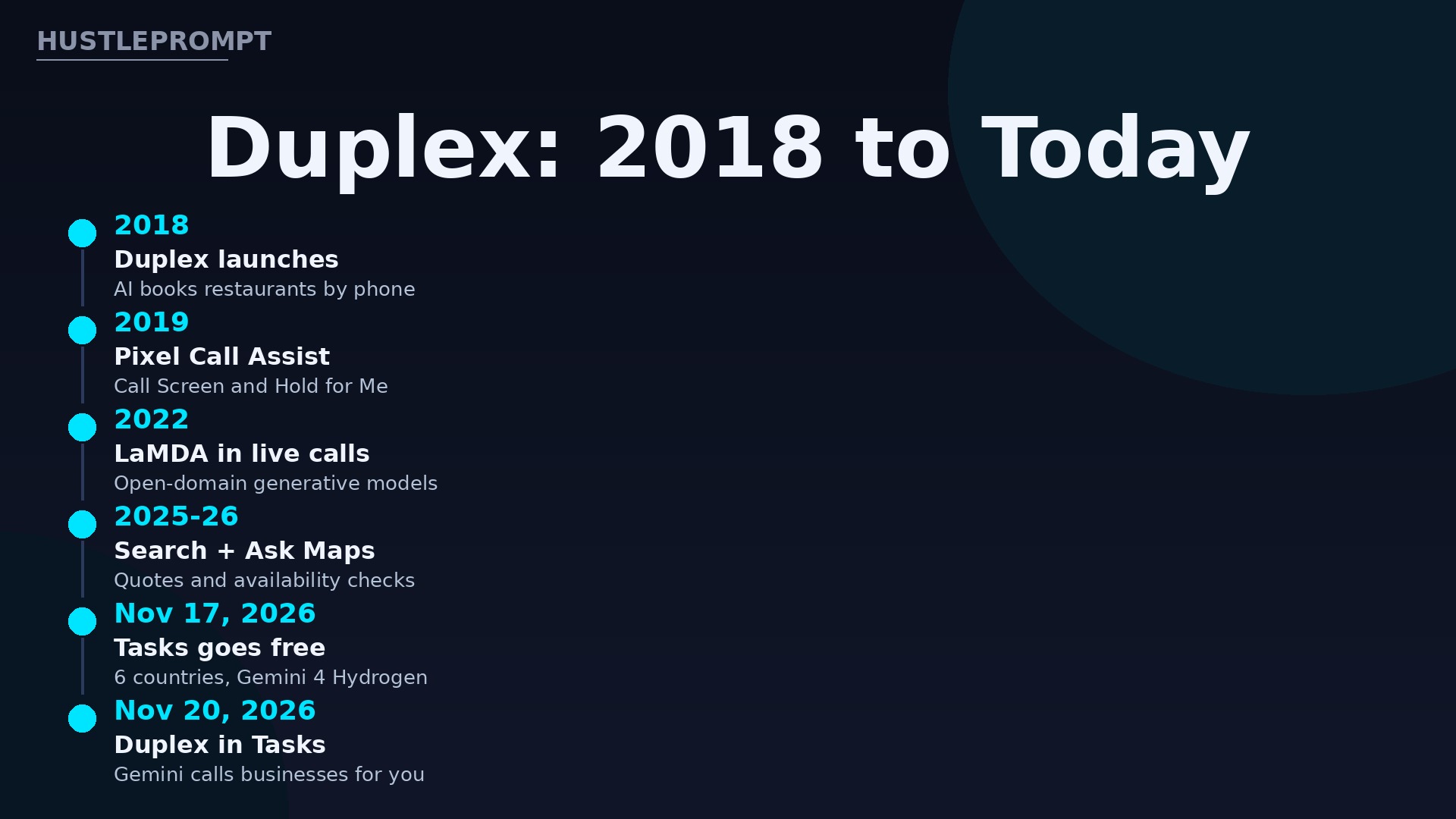
On November 20, 2026, Google Research published the engineering story behind the launch. Duplex no longer handles only restaurant bookings. It now takes free-text task descriptions and calls businesses when no online booking channel exists.
What Google actually launched
The launch pairs two announcements. On November 17, Google made Tasks in Gemini free in the United States, Japan, Korea, Canada, Australia, and India, running on its new Gemini 4 Hydrogen model. Three days later, Google Research explained the calling stack underneath it: Duplex, rebuilt as a unified system powered by Gemini.
That matters because the phone is where most local business still happens. A restaurant with no online reservations, a mechanic who only takes calls, a salon that books by phone: until now, those jobs forced you to pick up the phone yourself. Duplex closes that gap by treating a live phone call as just another channel Gemini can use.

Evidence: what Duplex in Gemini can do on a call
Every item below comes from Google’s own documentation. The support page lists the calling tasks; the Research post describes the stack behind them.
| Capability | What it means | Source |
|---|---|---|
| Book and manage appointments | Restaurant reservations, hair appointments, service bookings | Gemini Apps Help |
| Get hours, prices, availability | Service quotes, product availability, business hours | Gemini Apps Help |
| Navigate menus, wait on hold | Gemini sits through hold music and phone trees for you | Gemini Apps Help |
| Multi-constraint scheduling | Books car maintenance around your calendar conflicts | Google Research, Nov 20, 2026 |
| Free-text task descriptions | No fixed verticals; describe the job in your own words | Google Research, Nov 20, 2026 |
How a Duplex call actually works
A call starts with a plain-language instruction. You flip the Gemini home-screen toggle from Chat to Task and describe the job, for example asking Gemini to book a car service early on a Friday morning. Gemini finds the nearest businesses on Google Maps and checks your Google Calendar for a free slot.
Every call opens with a clear disclosure that it is an automated system calling from Google. The support page adds that Gemini states your name and that the call is on a recorded line. You review a summary first, including the number Gemini will call, and you tap Call for me to start it.
While the call runs, you can follow a live transcript or listen to the live audio, with your microphone muted by default. If the conversation goes somewhere Gemini cannot handle, you tap Take over, Gemini announces that you are joining, and then it leaves the call. Afterward you get a notification, a summary of the outcome, and the full transcript and recording in your Phone app.
Google’s own example shows why this is more than a parlor trick. Gemini app lead Josh Woodward asked Gemini to call the two nearest car dealerships about an overdue minivan service. Gemini called both at once, sat through the hold music, found a time free in his calendar, and added a Friday early-morning appointment in under five minutes.
From your request to a booked slot
The full loop, as Google describes it across the Research post, the Tasks announcement, and the support page.
What it can and cannot do
The calling feature is powerful, but it has firm edges. Gemini can get business hours, product availability, and service quotes. It can book, confirm, and manage appointments and reservations. It can navigate phone menus and wait on hold.
What it cannot do matters just as much. Gemini will not call emergency services such as 911. It will not complete financial transactions, share credit card numbers, or relay sensitive personal information like Social Security numbers, passwords, or health details over the phone. And it cannot be used for telemarketing.
There are also limits Google confirms but does not quantify. The support page says daily limits apply to the number of calls Gemini can make for you, but Google publishes no number for that limit. Calls go out over your device’s mobile network and your phone number, and standard carrier rates apply.
The money angle for freelancers
For a freelancer, the math is simple. A single booking call can eat half an hour once you count hold music, callbacks, and rescheduling. Three of those a week is hours a month spent on hold instead of client work. Duplex hands that time back.
The bigger win is timing. Duplex can call two businesses at once and compare, the way Woodward’s dealership example shows. A solo operator who needs a same-week slot from a plumber, a printer, or a venue can now shop two options in parallel without blocking their own afternoon.
Small service businesses can use the same trick in reverse. A one-person studio can hand Gemini the weekly admin calls: confirming a supplier pickup, checking a part price, or rebooking a client who cancelled.

Evidence: availability and limits, as Google states them
Read this table before you promise a client that Gemini will handle a call. The limits are real, and one key number is unpublished.
| Item | What Google says | Source |
|---|---|---|
| Tasks free | Free in the US, Japan, Korea, Canada, Australia, and India | The Keyword, Nov 17, 2026 |
| Business calling | Rolling out starting in the US; only US phone numbers for now | The Keyword / Gemini Apps Help |
| Models | Gemini 4 Hydrogen and Gemini 4 Neon power the calling stack | Google Research, Nov 20, 2026 |
| Daily call limit | Daily limits exist; Google publishes no number for them | Gemini Apps Help |
| Phone calls and payments | No payments or financial transactions over the phone; shopping checkout runs separately through Google Pay and the Agent Payments Protocol | Gemini Apps Help / Google Research |
| Per-minute pricing | None published in the Research post | Google Research, Nov 20, 2026 |
If you run a local business, the calls are coming to you
If you run a local business, the calls are coming to you, and Google built the experience for your side of the line too. There is no software to install, no booking system to maintain, and no staff to train. Whoever answers the phone handles the call the way they would with any customer.
You also stay in control. Merchants can opt out of automated calls in their Google Business Profile settings, or simply say Please stop calling my business during a call. Google says details gathered on one call can answer many later questions, so a business is not asked the same thing over and over.
That last point is a strategic signal. Business information sourced from Duplex phone calls has been shown in Search and Maps over one trillion times, according to Google’s 2023 disclosure in the same post. The calls shape what customers see before they ever dial your number.
How to profit from it this week
The smartest move this week is to set the system up before you need it, and to decide your policy if you receive the calls.
- Turn on Task mode. Open the Gemini app, flip the home-screen toggle from Chat to Task, and try one low-stakes job first, such as checking a supplier’s hours.
- Write the request like a brief. Include the business name, the date and time window, your backup options, and your name. Gemini shows a summary before it calls, so check the number and the details it will share.
- Batch your admin calls. List every phone errand for the week, then hand Gemini two or three at once. It can call businesses in parallel while you do paid work.
- Keep the transcript. After each call, review the summary and the recording in your Phone app. That record is your proof of what was agreed, and your feedback loop for better requests.
- If you own a business, decide your policy now. Check your Google Business Profile settings for automated calls, and brief whoever answers your phone: the caller will say it is an automated Google system, and your team should treat it like any other customer.
What Google did not announce
Two gaps are worth naming plainly. Google published no per-minute pricing for Duplex calls and no public Tasks telephony SDK in this post, so developers cannot yet build their own calling workflows on this stack.
Availability is also narrower than the headline suggests. Tasks is free in six countries, but the advanced features, including business calling, are rolling out starting in the United States, and the support page says Gemini can only call US phone numbers for now. The feature is rolling out gradually, so eligible users may not see it yet.
Watch: Tasks in Gemini in action
Google Gemini’s official launch video shows Tasks running longer projects in the background. Note that it covers Tasks in Gemini in general, not the Duplex phone-calling feature specifically.
Frequently asked questions
What is Duplex in Gemini?
Duplex in Gemini is Google’s phone-calling system, first introduced in 2018, now integrated into Tasks in Gemini. The Gemini app can call businesses on your behalf to book appointments, check availability, and handle service requests when no online booking channel exists.
Is Duplex in Gemini free?
Tasks in Gemini is free in the United States, Japan, Korea, Canada, Australia, and India, according to Google’s November 17, 2026 announcement. Business calling is rolling out starting in the United States. Google published no per-minute pricing for the calls.
How do I ask Gemini to call a business?
Open the Gemini app on a Pixel phone, flip the toggle from Chat to Task, and describe the job, or include @Call for me in your prompt. Review the summary Gemini shows you, then tap Call for me to start the call.
Will the business know it is talking to an AI?
Yes. Every call opens by disclosing that it is an automated system calling from Google, and the support page says Gemini states your name and that the call is on a recorded line.
Can a business stop these calls?
Yes. A merchant can opt out in Google Business Profile settings, or say “Please stop calling my business” during a call. Google also offers an opt-out page where businesses can opt back in later.
What can Gemini not do on a call?
It cannot call emergency services, complete payments or financial transactions over the phone, or share sensitive information such as Social Security numbers, passwords, or health details. It also cannot make telemarketing calls, and daily call limits apply.
Does Gemini charge for the calls?
Google has published no per-minute pricing for Duplex calls. Calls use your device’s mobile network and your phone number, and standard carrier rates apply.