
For roughly seven weeks, ChatGPT Plus subscribers watched OpenAI’s new shared workspace from the outside. On November 20, 2026, that wait ended. ChatGPT Space Plus access is now rolling out globally to users ages 18 and older, turning the $20-a-month plan into a workspace where documents, slides, and AI help live side by side.
Space debuted at OpenAI’s DevDay event on September 29-30, 2026, and until now it belonged only to Pro, Business, and Enterprise accounts. The November 20 update opens the door to the plan most individual power users actually pay for, and it brings mobile editing with it.
What changed on November 20
OpenAI announced the move in its ChatGPT release notes: Space is rolling out globally to Plus users ages 18 and older, starting November 20. The same entry confirms that Space replaces Library, the older section where ChatGPT kept saved material.
To find it, open Space in the left sidebar. It becomes the new home for pages, slides, images, and uploaded files. The rollout is gradual, so some Plus accounts will see it before others, but OpenAI’s help center already lists Plus alongside Pro, Business, and Enterprise as plans that can create and edit content in Space.
The numbers behind the rollout
- $20 / month — the price of ChatGPT Plus, the plan that now gets Space (Engadget)
- Nov 20, 2026 — the day the global rollout to Plus users began (OpenAI release notes)
- 18+ — the minimum age to use Space (OpenAI help center)
- 52 days — the gap between the DevDay debut on September 29 and the Plus rollout on November 20 (Crypto Briefing)
“In Space, you can create interactive pages and presentations with ChatGPT, then invite other people with Space access to build on them with you.” — OpenAI, ChatGPT release notes, November 20, 2026

OpenAI’s official artwork for ChatGPT Space. Source: OpenAI, via chatgpt.com/features/space.
What Space actually is
A Space is a shared home for a project or a team. Inside it, you keep Pages, files, slides, and sites in one place, and you invite other people to work on them with you. Each collaborator uses their own ChatGPT, and sharing a page never shares your private chats or your ChatGPT Memory.
Pages are the core building block. OpenAI calls them a new type of document built for work with agents, covering writing, visualizing, researching, and coding. You can start a Page from a conversation, from a template, or by writing directly in Space. Pages can hold text, images, charts, and files, and teammates can edit them together in real time.
Pages can also stay current on their own. OpenAI says you can set pages and slides to update automatically based on your connected apps and tools. Its examples: a to-do list that updates itself, a study guide with a 3D model you can explore, or a project plan that stays current with decisions from Slack.
Slides, Sheets, and the rest of the toolkit
Slides are the collaborative deck builder inside Space. They began rolling out on October 16, 2026, and OpenAI’s help center now confirms they are available to Plus accounts with Space access. You can build a deck from a conversation, files, or an outline, edit it with teammates in real time, and present directly from ChatGPT.
When a deck needs to leave ChatGPT, the web version exports to PowerPoint, PDF, or Google Slides. One limit to know: comment-only access is not available at launch, so collaborators get view or edit access. Sheets, the spreadsheet piece, is still listed as coming soon.
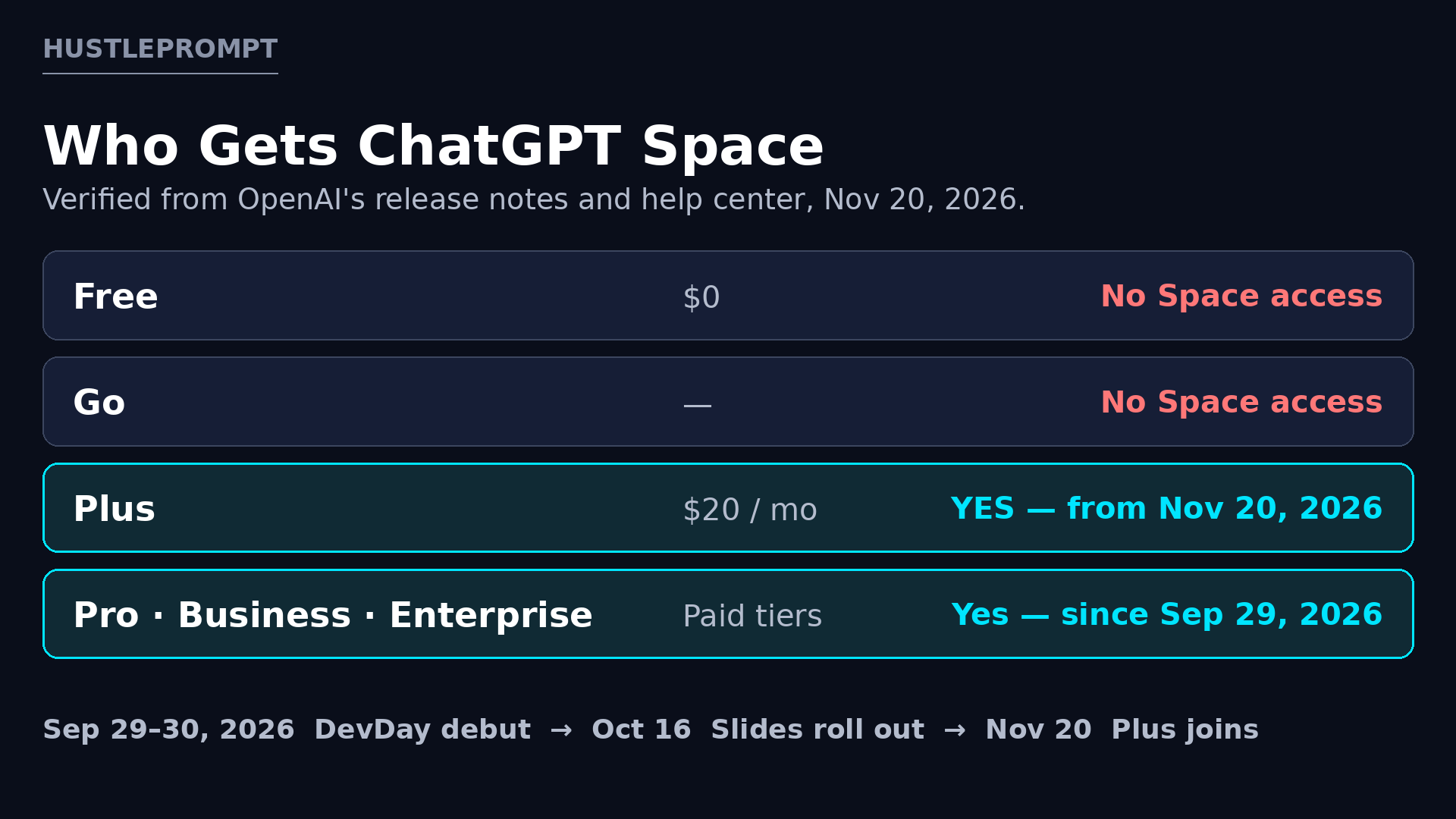
| ChatGPT plan | Price | Space access | Since |
|---|---|---|---|
| Free | $0 | No | — |
| Go | — | No | — |
| Plus | $20 / month | Yes | Nov 20, 2026 |
| Pro, Business, Enterprise | Paid tiers | Yes | Sep 29, 2026 |
Plan access verified against OpenAI’s release notes and help center, November 20, 2026. Plus pricing per Engadget.
How to open your first Space
Getting started takes minutes, and OpenAI’s own guide keeps it simple. The steps below follow the company’s Getting started with Space in ChatGPT help article.
- Open Space in the left sidebar of ChatGPT on the web, desktop app, or mobile. If you do not see it yet, the rollout may not have reached your account.
- Create a space by asking ChatGPT to make one and give it a name, such as “Website launch” or “Client onboarding.”
- Start a Page from a conversation, from a template, or by writing directly in Space. Ask ChatGPT to build it from your notes, files, or chat history.
- Invite collaborators with the Share button and pick view or edit access. People with edit access can change the page together in real time.
- Tag ChatGPT in a comment when you want a change, or ask it to revise a section, shorten an introduction, or add a summary.
Mobile editing finally arrives
This is the quiet upgrade inside the announcement. Until now, opening a Space page on a phone meant reading and sharing only. Changing anything required a trip back to a proper screen, as Crypto Briefing noted in its coverage of the rollout.
That changes today. OpenAI’s release notes confirm you can now create and edit pages on the web, the desktop app, and iOS and Android. On mobile you can also find, read, and share pages, and move between pages and subpages. For anyone who reviews client work from a phone, that closes a real gap.
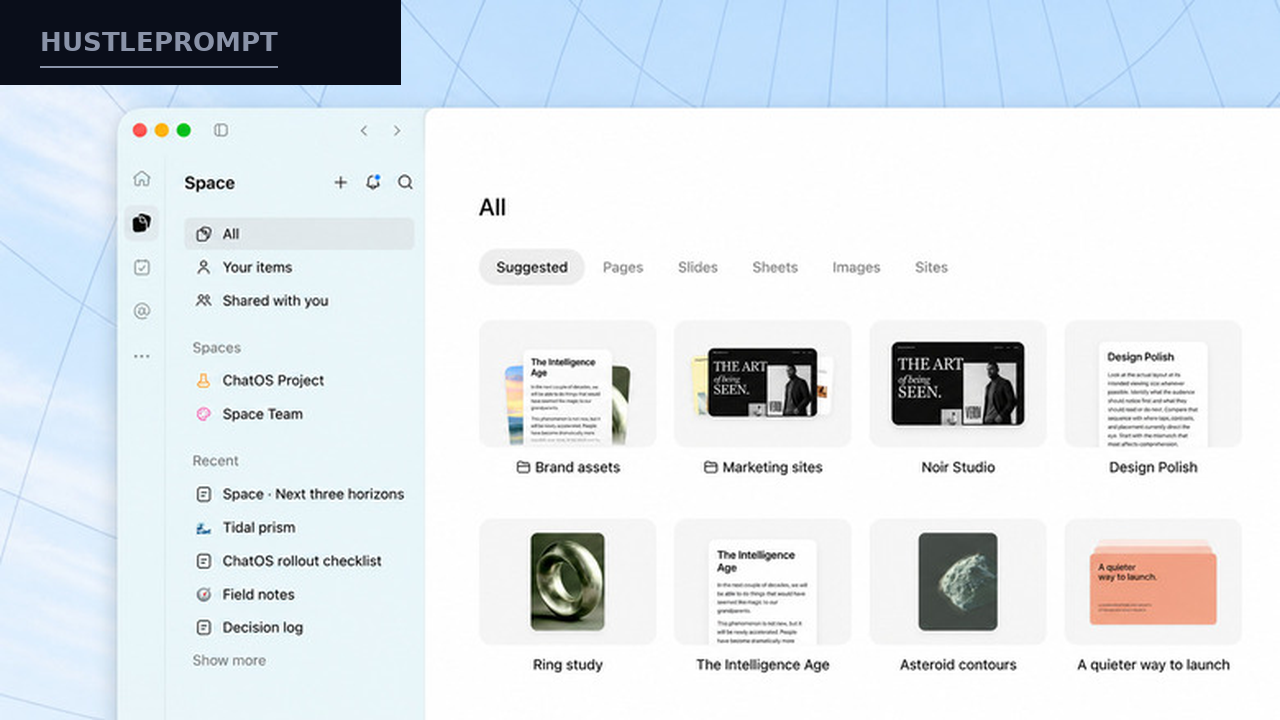
The ChatGPT Space interface, with Pages, Slides, Sheets, Images, and Sites in one home. Screenshot: OpenAI, via Engadget.
How a Space flows: from chat to shared deliverable
Ask ChatGPT in Work to research, draft, or plan. The conversation holds the raw material.
Turn the chat into a Page. Edit it yourself or ask ChatGPT to revise it, and add charts or files.
Invite teammates or clients with view or edit access. Everyone edits the same page in real time.
Build the deck in Slides, present from ChatGPT, or export to PowerPoint, PDF, or Google Slides.
The page stays live after delivery: set it to update from your connected tools, and the same link keeps showing the latest version.
How to profit from ChatGPT Space Plus
Space is a collaboration tool, but for freelancers and small teams it is also a delivery system. A shared Page can replace the PDF you email a client and never update again. Here is how to turn the $20 plan into billable work.
- Sell client workspaces, not files. Set up one Space per client with a project brief, a live status Page, and a shared Slides deck. Clients see progress in real time, and you stop chasing feedback across email threads.
- Package shared Pages as a service. Offer a setup sprint: research, a structured Page with charts and trackers, and a handover call. The Page keeps updating from connected tools, which gives the client a reason to keep paying monthly.
- Ship decks faster. Build client presentations in Slides from your notes, then export to PowerPoint or Google Slides when the client needs the file. Same deliverable, less formatting time.
- Run content operations in one place. A Space can hold the editorial calendar, the draft Pages, and the review comments. Writers, editors, and clients work on the same documents instead of passing versions around.
The math is simple: one small client workspace can cover the $20 monthly cost many times over. The risk is scope creep, so price the setup and the monthly upkeep as separate line items.
The catch: no Dots yet, and Free stays out
Two limits matter. First, Plus users cannot use a Dot with their Spaces yet. Dots are OpenAI’s personal agents, and they are currently available to Pro users. OpenAI started testing Dots with a small group of Plus subscribers on November 19, so wider access may follow, but it is not here today.
Second, the door is closed to free accounts. To open a shared page or presentation, you must be signed in to a Plus, Pro, Business, or Enterprise account with Space access. People on Free cannot open shared pages, and public links are not available, so a Space is not a public portfolio page. If a client is on Free, they will need a paid plan to open your shared work.
Watch the official video below from OpenAI to see Space in action, then check your own account. If Space has not appeared yet, the rollout is gradual, and OpenAI’s help center notes it may not be available for your account yet.
Video: “Create and Share a Report in ChatGPT Space” — OpenAI’s official YouTube channel.
Frequently asked questions
Is ChatGPT Space available on Plus now?
Yes. OpenAI’s release notes for November 20, 2026 say Space is rolling out globally to Plus users ages 18 and older. The rollout is gradual, so it may take time to appear in your account.
How much does ChatGPT Space cost on Plus?
Space is included in the Plus plan at $20 per month. There is no separate charge for Space, Pages, or Slides on Plus, according to OpenAI’s help center.
What is the difference between Space and Library?
Space replaces Library for accounts with access. Library was a place to keep saved material. Space is a shared workspace where you create and edit Pages, slides, and files with ChatGPT and collaborators.
Can I edit Space pages on my phone?
Yes. With this rollout, you can create and edit pages on the web, the desktop app, and iOS and Android. Before the update, mobile users could only find, read, and share pages.
Can free users open a shared Space page?
No. To open a shared page or presentation, you must be signed in to a Plus, Pro, Business, or Enterprise account with Space access. People on Free cannot open shared pages, and public links are not available.
Can Plus users export Slides to PowerPoint?
Yes. On the web, Slides exports to PowerPoint, PDF, or Google Slides. You can also present a deck directly from ChatGPT without exporting it.
Can Plus users use a Dot in Space?
Not yet. Plus users cannot use a Dot with Spaces, but OpenAI started testing Dots with a small group of Plus subscribers on November 19, 2026. Dots are currently available to Pro users.
Keep Reading
Sources: OpenAI ChatGPT release notes; OpenAI help center: Getting started with Space; OpenAI help center: Creating and collaborating on slides; Engadget; Crypto Briefing.