
A freelance video editor charges $50–$150 an hour for a rough cut. Descript does the rough cut in minutes — edit the transcript like a Word document, and the video re-edits itself. G2 rates it 4.6/5 across 837 reviews, but two meters decide your real bill: media minutes and AI credits. This review breaks down Descript’s verified 2026 pricing, what each plan buys, how it compares to Premiere Pro, Riverside, and CapCut, and who should — and shouldn’t — pay for it.
What Is Descript?
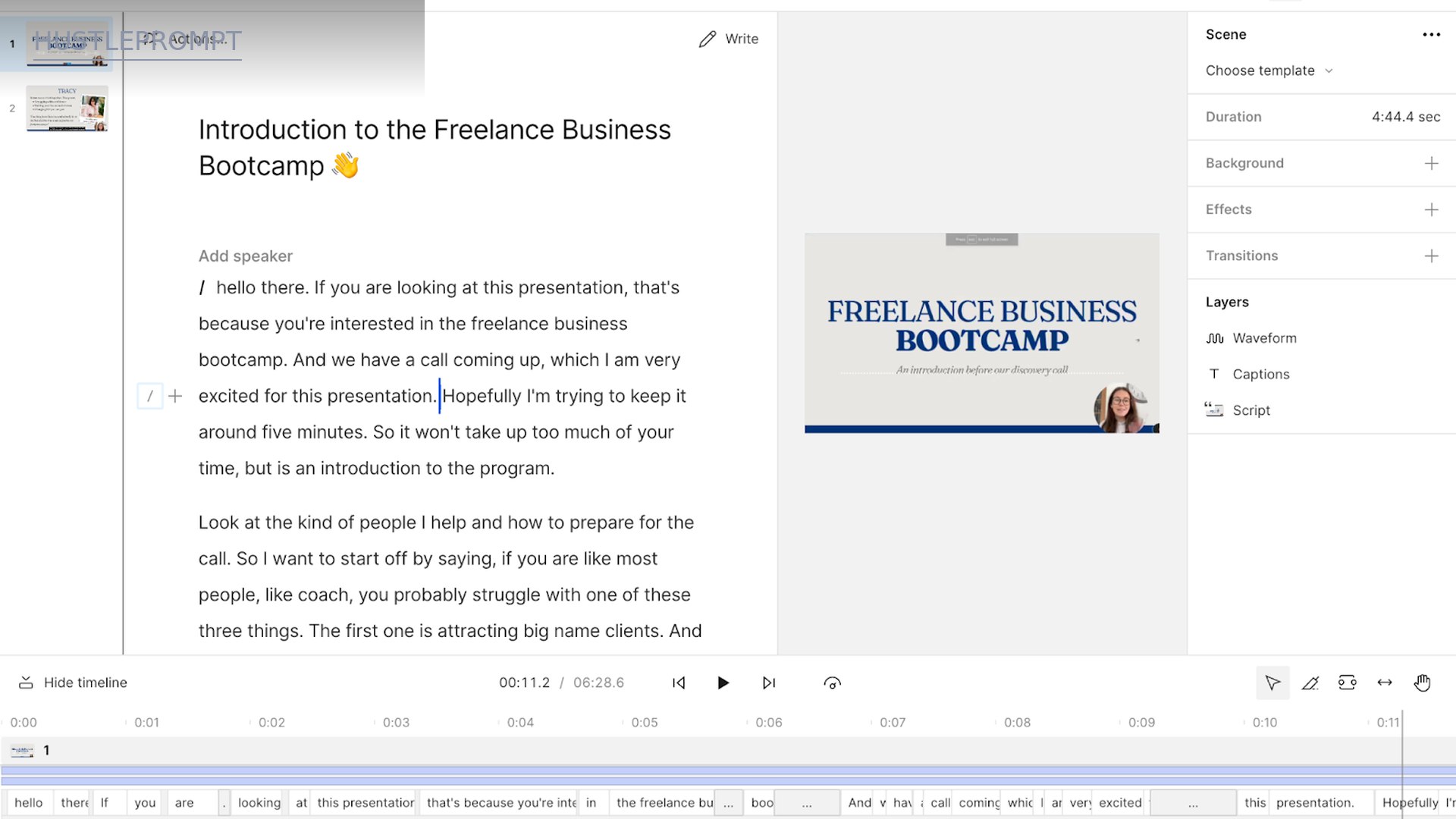
Descript is an AI video and audio editor with one radical idea: edit the transcript, and the timeline follows. Record or upload footage, get an instant AI transcript, then cut, rearrange, and rewrite by editing text. It is equally a podcast studio, a remote-recording tool (Rooms), and an AI co-editor (Underlord) that takes plain-language instructions.
Key Features
Text-Based Editing
Descript transcribes your media into 25 languages with speaker detection for 8+ speakers and multitrack transcription. Delete a word and that moment of video disappears; drag a paragraph and the footage moves with it.
Underlord: The AI Co-Editor
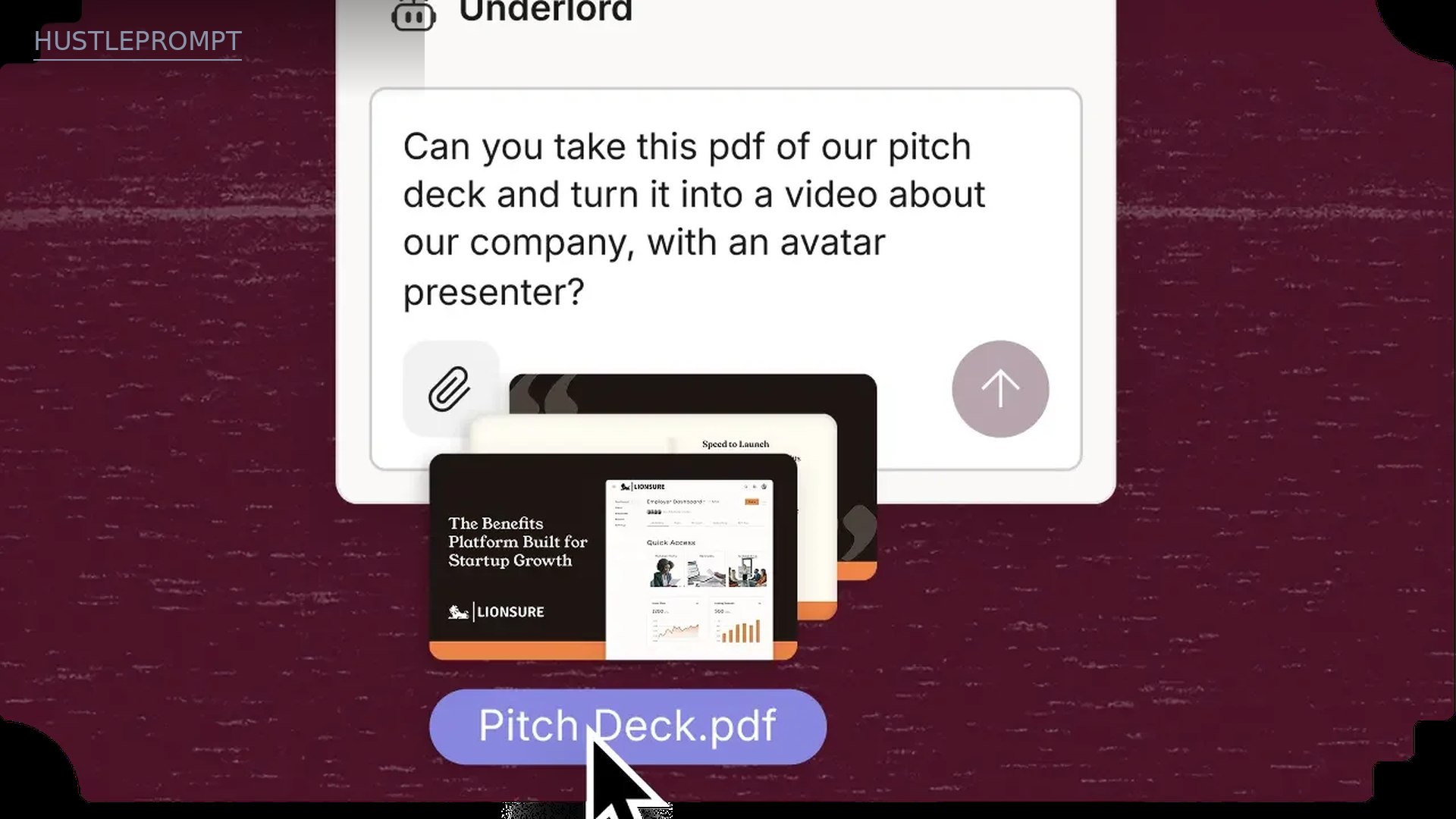
Underlord takes plain-language instructions — remove filler words, shorten gaps, pick viral clip moments, write the script — and executes them. It also generates images and video from text and drafts social posts and show notes.
Studio Sound
One-click audio enhancement: background-noise removal and voice enhancement that makes a closet-recorded podcast sound close to studio quality.
AI Cleanup: Fillers, Gaps, Gaze, Backgrounds
AI scans for “um,” “uh,” “like,” and dead air — then deletes them in one pass. Edit for Clarity cuts digressions; Remove Retakes keeps only your best takes. Eye Contact fixes your gaze while reading a script; Green Screen removes backgrounds without a physical setup.
AI Speech, Voice Cloning, and Avatars
Text-to-speech with realistic stock voices, plus custom voice clones — type a line and your AI voice says it. Regenerate repairs awkward cuts. 35+ stock avatars, text-prompt avatars, and image-upload custom avatars round out the presenter toolkit.
Rooms: Remote Recording
Record with guests in Rooms: up to 10 participants, separate cloud-backup tracks per speaker, and automatic transcription. Session hours run from 2 hours/month (Free) to 25 hours/month (Business).
Captions and Translation
Animated captions in 61 languages, audio dubbing in 30 languages, and (Business) translation proofread against the original script.
Descript Pricing (October 2026)
Descript charges per person per month, and your real budget is two meters: media minutes (every minute of uploaded or recorded media counts) and AI credits (Underlord, Studio Sound, Eye Contact, generated media). Unused minutes and credits do not roll over. Figures below are summarized from independent roundups that verified descript.com/pricing in Sep–Oct 2026 (the official page confirms the tiers, allowances, and up to 35% annual discount). Confirm current prices on the official page before purchasing.
| Plan | Monthly billing | Annual billing (per month) | Media hours / mo | AI credits / mo | Key unlocks |
|---|---|---|---|---|---|
| Free | $0 | $0 | 1 hour | 100 (one-time) | 720p export with watermark, 5 GB storage, limited AI tools, no card required |
| Hobbyist | $24 | $16 | 10 hours | 400 | 1080p watermark-free, 100 GB, full AI tools incl. Studio Sound |
| Creator | $35 | $24 | 30 hours | 800 | 4K export, 1 TB, up to 3 seats, unlimited stock media, AI video generation |
| Business | $65 | $50 | 40 hours | 1,500 | 4K, 2 TB, up to 5 seats, Brand Studio, 30+ language dubbing + proofread, custom avatars |
| Enterprise | Custom | Custom | Sized to team | Sized to team | SOC 2 Type II, SSO/SCIM, audit logs, dedicated CSM, custom MSA |
The annual discount is the single biggest lever: Creator drops from $35 to $24/month — a 31% saving — and Hobbyist drops from $24 to $16.
The Numbers: What Your Money Actually Buys
The headline number is not the subscription — it is cost per media hour, because raw footage is what the meter charges:
| Plan (annual) | Price / mo | Media hours | Cost per raw hour | AI credits |
|---|---|---|---|---|
| Free | $0 | 1 | $0.00 | 100 (one-time) |
| Hobbyist | $16 | 10 | $1.60 | 400/mo |
| Creator | $24 | 30 | $0.80 | 800/mo |
| Business | $50 | 40 | $1.25 | 1,500/mo |
Stack that against the alternatives. A freelance editor charges $50–$150 per hour; a 30-minute episode needs 2–4 hours of editing, so $100–$600 per episode. Transcription runs about $0.25 per audio minute. On Creator annual, 30 hours of raw footage plus 800 AI credits costs $24 — the rough cut that took an editor all afternoon happens while you answer emails.
Three catches before you subscribe:
- Media minutes burn raw footage, not finished video. Upload a 3-hour recording and you have spent 3 of your 10 Hobbyist hours — even if the final cut is 12 minutes.
- Nothing rolls over. Unused minutes and credits expire each cycle. Quiet month? You still paid full price.
- AI credits are a second budget. Studio Sound, filler removal, Eye Contact, and Underlord all draw from the pool. Hobbyist’s 400/mo runs out fast — Creator’s 800 is the floor for weekly publishers.
Should You Pay for Descript?
The 60-second decision
How It Works
First video edited in about twenty minutes:
- Sign up free. No credit card; Free includes 1 media hour and 100 one-time AI credits — enough for a real short video.
- Bring in media. Upload, record, record your screen, or invite guests to a Room. Transcription is automatic.
- Edit the transcript. Delete filler, cut tangents, rearrange sections. Apply Studio Sound and filler removal in one click.
- Polish and prompt. Add captions, layouts, and stock b-roll — or have Underlord “shorten gaps and find clip-worthy moments.”
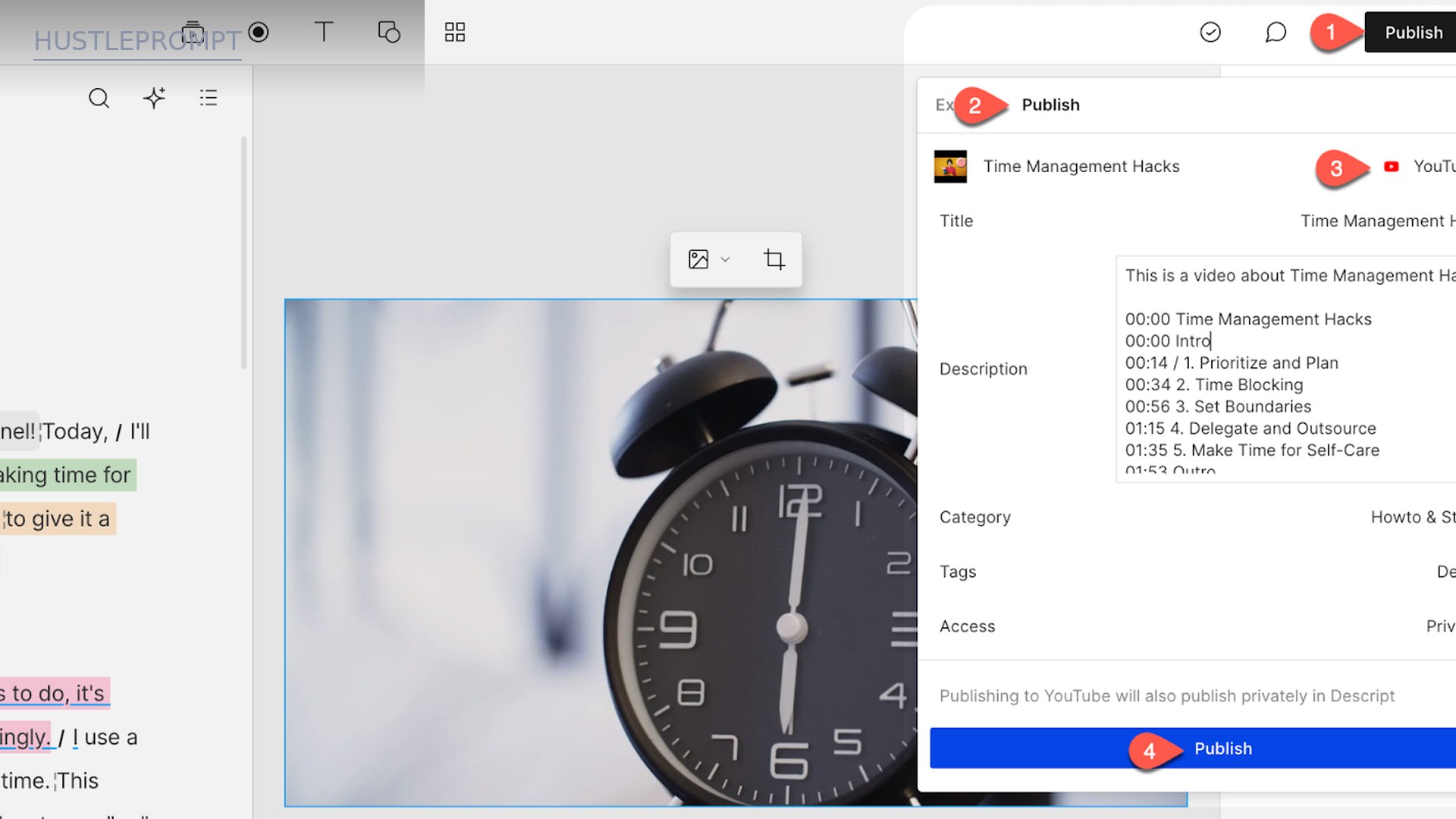
- Export or publish. Export up to 4K locally (Creator+), publish to YouTube with title and chapters, or share a web link.
Descript vs the Competition
| Descript | Adobe Premiere Pro | Riverside | CapCut | |
|---|---|---|---|---|
| Entry paid plan | $16–$24/mo (Hobbyist) | ~$23/mo (single app) | ~$19/mo (Standard) | Free / Pro ~$8/mo |
| Editing model | Transcript-first, AI-assisted | Pro timeline | Record-first, text editing | Timeline, template-heavy |
| AI cleanup | Studio Sound, filler/gap removal, Eye Contact | Enhance Speech, auto-reframe | Magic Audio, clips, show notes | Auto captions, background removal |
| Remote recording | Rooms: 10 guests, cloud backup | Not included | Core strength: studio-quality local tracks | Not included |
| Transcription | 25 languages, 8+ speakers, multitrack | Auto transcription, limited | 100+ languages | Auto captions |
| 4K export | Creator plan and up | Yes | Yes (Pro) | Yes (paid tiers) |
| Best for | Podcasters, YouTubers, course creators | Professional editors, film | Interview shows, remote podcasts | Short-form, TikTok/Reels |
Competitor figures summarized from third-party pricing roundups, October 2026; confirm on each vendor’s official pricing page before buying.
Adobe Premiere Pro
Premiere is the professional’s timeline: unmatched precision, plugins, and ecosystem. If you dread editing and want finished content fast, Descript’s transcript workflow saves more hours per week than any plugin.
Riverside
Riverside wins remote recording with studio-quality local tracks. But its editing is thinner — many users record in Riverside and export to Descript for the actual cut.
CapCut
CapCut is free and unbeatable for short-form: templates, effects, mobile-first speed. But it has no transcript-based editing or podcast workflow. Shorts on CapCut, everything long-form in Descript.
How Freelancers Actually Profit With It
Descript is not just a cost-saver — it is a margin machine. Four playbooks:
1. Podcast editing services
Charge $150–$400 per episode for cleanup, chapters, and show notes. A 45-minute episode takes under 90 minutes with Studio Sound and filler removal — and one Hobbyist plan ($16/mo annual) covers roughly 10 episodes a month.
2. Repurposing retainers
Clients pay $500–$1,500/month for clip packages. Underlord finds the viral moments and formats them for TikTok, Reels, and Shorts — one long video becomes 10 clips in an afternoon.
3. Course and coaching content
Record once, edit the transcript, translate captions into Spanish and Portuguese — each language is a new audience for the same course.
4. Done-for-you YouTube channels
Script → record in Rooms → transcript edit → 4K export on Creator ($24/mo annual). One subscription covers a channel posting 8 videos a month — against a $2,000/month retainer, the margin is enormous.
Pros and Cons
| Pros | Cons |
|---|---|
| Transcript editing is genuinely faster — rough cuts in minutes, not hours | Media minutes meter raw footage — 3 hours of b-roll costs 3 hours of quota |
| Best-in-class AI cleanup — Studio Sound, filler removal, one-click | AI credits are a second budget — heavy AI use drains Hobbyist’s 400/mo fast |
| Remote recording built in — Rooms replaces a separate Riverside/Zencastr bill | Not a pro timeline — color, plugins, and VFX stay in Premiere/DaVinci |
| Free plan is genuinely useful — no card, real editing, 1 hour of media | Can be resource-heavy — large projects want a decent machine |
Who Should Buy It (and Who Shouldn’t)
Buy it if you publish video or podcasts regularly — weekly shows, YouTube, courses, client content. Past a few finished hours a month, Creator’s $24/month (annual) beats every alternative on time saved per dollar.
Skip it if you edit occasionally (Free or CapCut covers you), if you need pro-grade color and effects (Premiere or DaVinci), or if your raw footage is huge and unpredictable — the media-minute meter will punish you.
Verdict: Is Descript Worth the Money?
Yes — for regular publishers. Transcript editing collapses the most boring hours of post-production into a document edit, and the AI cleanup stack replaces gear and plugins. Creator at $24/month (annual) is the sweet spot: 4K, 30 media hours, 800 AI credits. Start on Hobbyist at $16/month annual for weekly 1080p publishing.
Rating: 4.5/5 for podcasters and creators; 3.5/5 for occasional editors (who should stay on Free). If editing is part of your income, this is the highest-ROI $24 in your stack.
Pricing summarized from independent roundups that verified descript.com/pricing in September–October 2026 (USD, taxes excluded). The official page confirms the tiers and allowances. Prices and plans change — confirm current details before purchasing.
Frequently Asked Questions
Is Descript free?
Yes — the free plan needs no credit card and includes 1 hour of media per month, 100 one-time AI credits, and 720p exports with a watermark. You can record, edit, and publish a real short video before paying anything.
How does text-based editing work?
Descript’s AI transcribes your recording into text. Deleting a word deletes that moment of video; moving a sentence moves the footage. A full multitrack timeline sits underneath for frame-level control.
Is Descript good for podcasts?
One of the best tools for it: record, transcribe, remove filler and gaps, apply Studio Sound, add chapters, then export or publish.
Can Descript clone my voice?
Yes — type text and your AI voice clone speaks it. Regenerate repairs awkward cuts, and stock AI voices are included too.
What are media minutes and AI credits?
Media minutes track every minute of uploaded or recorded media: 1 hour on Free, 10 on Hobbyist, 30 on Creator, 40 on Business. AI credits track features like Underlord and Studio Sound: 100 one-time on Free, then 400/800/1,500 monthly. Neither rolls over.
Does Descript offer discounts?
Annual billing cuts up to 35%: Hobbyist $24→$16, Creator $35→$24, Business $65→$50 per month. Students, educators, and non-profits get special rates via an application form.