
Your coding agent just rewrote a client’s checkout flow at 2 a.m. It worked. It also touched files it was never supposed to see and called an API with a live key. No record of either. That is the week Docker is trying to end.
On November 19, 2026, Docker relaunched itself around one word: trust. The announcement, Meet the New Docker: Built to Run on Trust, argues containers were built for workloads, not for agents that decide what to run, what to access, and what to change. Docker AI Governance turns that argument into rules.
For freelancers and small agencies, the pitch is practical: let an AI coding agent run wild inside a client project and still prove what it touched, what it could not touch, and why. That proof is the product.
What Docker actually launched
Three dates tell the story. On November 16, Docker shipped Sandboxes v0.54.0. On November 18, Karan Verma published The Trust Layer. On November 19, Docker wrapped both into a brand relaunch built on a trusted supply chain, a trusted runtime, and a trusted ecosystem.
| Date | What shipped | Why it matters |
|---|---|---|
| November 16, 2026 | Docker Sandboxes v0.54.0 | Dedicated port management, TLS compatibility setting, hardened SSH configuration, and clearer policy checks in the sbx CLI. |
| November 18, 2026 | The Trust Layer: Securing Agentic AI with Docker AI Governance | Karan Verma’s explainer of the three governance layers: Sandbox Policies, MCP Tool Governance, and Audit + Visibility. |
| November 19, 2026 | Meet the New Docker: Built to Run on Trust | Brand relaunch around trust for AI agents, built on a trusted supply chain, a trusted runtime, and a trusted ecosystem. |
Docker first introduced AI Governance in May 2026. The November posts complete the story: isolation you can run, policies you can enforce, and records you can show a client.
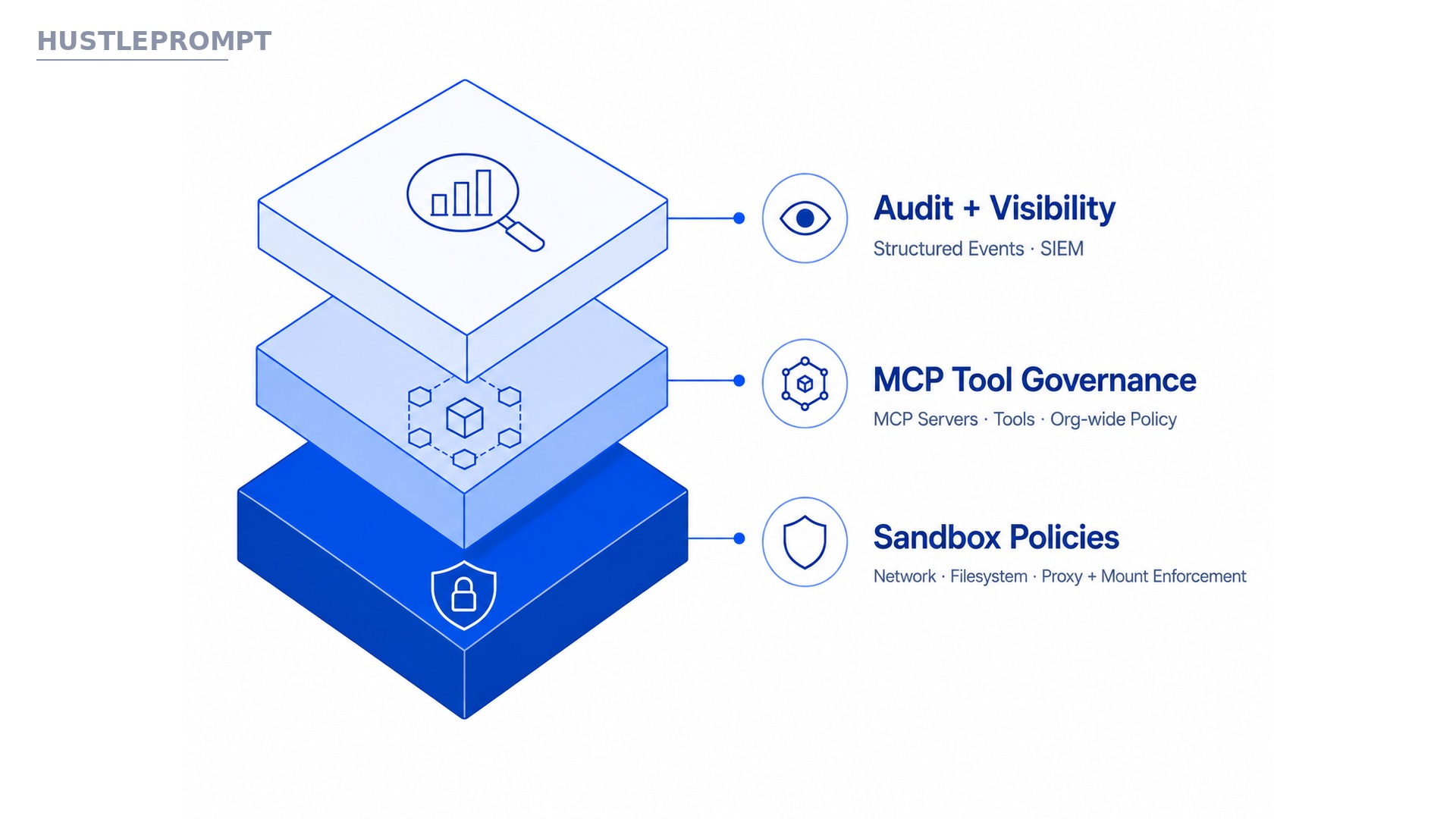
The three layers of Docker AI Governance
Docker AI Governance answers three questions: where can the agent operate, what can it do, and can we see what happened? Each question gets its own layer.
Sandbox Policies: where can the agent operate?
A coding agent needs real access: installing packages, building containers, editing files, connecting to services. Sandbox Policies draw the boundary first. Network policies allow or block domains, IP ranges, and ports. Filesystem policies control which host paths can be mounted and whether access is read-only or read-write.
The rules are enforced at the network proxy and the filesystem mount layers, not by asking the model to behave. An agent cannot talk its way past a boundary it cannot see. You can check the boundary before starting the agent: sbx policy check network api.anthropic.com returns Allowed; a blocked domain returns Denied.
MCP Tool Governance: what can the agent do?
MCP, the Model Context Protocol, gives agents a standard way to reach external tools. That is powerful, and the widest hole in most agent setups. MCP Tool Governance puts policy around MCP activity handled through Docker’s MCP Gateway: which servers may be registered, what agents can do through them, and which calls need approval.
The policies are written in Cedar, a policy language for authorization rules. When enforcement is active, requests are denied unless a matching policy permits them. A policy can allow read-only tool calls for one server and block the rest. Sensitive calls can require human confirmation.
Audit + Visibility: can we see what happened?
Setting a policy is only half the job. Audit + Visibility records sandbox policy decisions and session events as structured audit records. Each one captures the principal, the action, the target, the decision, and the time. The records hold governance metadata, not prompt contents.
Audit records can be kept locally or delivered to the cloud, where teams can search them, export them, or forward events into SIEM workflows. Denied actions are the most useful entries: they show a governance rule blocked the action, and why.
How a governed agent request flows
1. Agent acts
The coding agent decides to run code, call a tool, or reach a service.
2. Sandbox Policy
Network and filesystem rules are enforced at the proxy and mount layers.
3. MCP Gateway
Cedar policies allow, deny, or require confirmation for each tool call.
4. Audit log
Every decision is recorded and can feed SIEM workflows.
The model still decides how to do the work. The policy decides what it is allowed to do.
What a sandbox really is
A Docker Sandbox is not a container with extra rules. It is a lightweight microVM with its own Linux kernel and its own private Docker Engine: a hardware boundary between the agent and your machine. That is what matters when an agent runs code you have not reviewed.
| Standard container | Docker Sandbox | |
|---|---|---|
| Isolation | Shared host kernel | Own microVM with its own Linux kernel |
| Docker Engine | Shared host daemon | Private Docker Engine inside the sandbox |
| Agent risk | A breakout can reach the host | Hardware boundary between agent and host |
| Network | Configured per container | Host-enforced proxy with org-wide policy |
| Secrets | Often passed into the container | Stay on the host in the sbx secret store |
| Best for | Running known workloads | Running agents that decide what to do |
Docker documents five isolation layers: hypervisor, network, Docker Engine, workspace, and credential proxy. The credential layer matters most for client work. The real secret stays on your host, in the sbx secret store. The agent gets the tools it needs without ever holding the key.

What it costs
Local sandboxes are free for individual developers, and the sbx CLI installs on macOS, Windows, and Linux without Docker Desktop. When a job outgrows your machine, the same sandbox runs on Docker-managed cloud compute, metered by the second, and sbx move carries it between the two.
| Cloud sandbox size | vCPUs | Memory | Price per hour |
|---|---|---|---|
| Micro | 1 | 2 GB | $0.07 |
| Small | 2 | 4 GB | $0.14 |
| Medium | 4 | 8 GB | $0.28 |
| Large | 8 | 16 GB | $0.56 |
| XL | 16 | 32 GB | $1.12 |
Local sandboxes are free. Cloud compute is metered by the second. Docker AI Governance is a separate plan priced per license through a Docker sales representative, with no published dollar price.
Docker AI Governance is the paid layer on top: a separate plan priced on the number of licenses purchased. You work with a Docker sales representative to set the license count. Docker publishes no dollar price, so treat any number you see elsewhere as unverified.
How to use it on client work
Here is a setup that works for a typical freelance engagement. It takes an afternoon to build once, and then it repeats for every client.
- Install the
sbxCLI and start the agent inside a sandbox, never directly on your host machine. - Mount only the client project folder, read-write. Keep your other clients, your SSH keys, and your personal files outside the sandbox entirely.
- Set a default-deny network policy. Allow only the package registries and APIs the job actually needs, such as the model provider and the client’s repository host.
- Register MCP servers through the gateway, one sandbox at a time. Require human confirmation for destructive tools such as anything that deploys, deletes, or spends money.
- Check the effective policy before the agent starts with
sbx policy check network. If a domain the job needs comes back denied, fix the policy, not the prompt. - Export the audit log with the delivery. It shows the client what the agent did, what it was blocked from doing, and which rules applied. That record is why a client can say yes to agent-assisted work.
What to watch out for
There are limits worth knowing before you promise a client anything. MCP policies apply only to activity handled by Docker’s MCP Gateway. If an agent connects directly to a remote MCP server from inside a sandbox, that connection falls under the sandbox’s network policy instead.
Current audit coverage includes sandbox policy decisions and session events, with the same schema able to support more Docker AI sources later. The read-only flag in a Cedar policy relies on annotations supplied by the MCP server, which are advisory. The gateway is the control point traffic must actually pass through.
The core offer stands: the agent keeps its autonomy inside boundaries you defined, and everything outside stays a policy decision. For a freelancer, that is the difference between telling a client to trust the AI and showing them the walls around it.
Docker’s official launch video for the rebrand, Meet the New Docker: Built to Run on Trust, from the Docker YouTube channel.
Frequently asked questions
What is Docker AI Governance?
It is Docker’s trust layer for AI agents, launched in May 2026 and explained in full on November 18, 2026. It adds three controls on top of Docker Sandboxes: Sandbox Policies for network and filesystem access, MCP Tool Governance for which tools agents can call, and Audit + Visibility for a record of every policy decision.
Is Docker Sandboxes free?
Local sandboxes are free, including for commercial work. You install the sbx CLI and run agents in microVMs on your own machine at no cost. Cloud sandboxes on Docker-managed infrastructure are metered by the second, starting at $0.07 per hour for the Micro size.
How is a Docker Sandbox different from a container?
A container shares the host kernel. A sandbox is a lightweight microVM with its own Linux kernel and its own private Docker Engine, so there is a hardware boundary between the agent and your machine. Docker documents five isolation layers: hypervisor, network, Docker Engine, workspace, and credential proxy.
What does Docker AI Governance cost?
Docker publishes no dollar price. It is a separate plan priced on the number of licenses purchased, and you work with a Docker sales representative to determine how many licenses you need. Licenses can be assigned to a team or to an individual organization member.
Which coding agents work with Docker Sandboxes?
Docker lists Claude Code, Codex, Gemini, Kiro, Cursor, GitHub Copilot, Warp, NanoClaw, and more. Any of them can be launched with sbx run, and agents run unattended inside the sandbox with –dangerously-skip-permissions as the default.
Does the audit log record what my agent typed?
No. Audit records capture governance metadata such as the principal, action, target, decision, and time. They do not contain the contents of prompts or agent responses. Records can be kept locally or delivered to the cloud and forwarded into SIEM workflows.
Keep Reading
- AI Agent Security Is the New Gold Rush
- Perplexity Open-Sources SPACE, Its AI Agent Sandbox
- Cline SDK v0.2.1: Ship Client Apps Faster With AI Agents
Sources
- Meet the New Docker: Built to Run on Trust — Docker Blog, November 19, 2026
- The Trust Layer: Securing Agentic AI with Docker AI Governance — Docker Blog, November 18, 2026
- Docker Sandboxes release notes (v0.54.0, November 16, 2026) — Docker Docs
- Docker Sandboxes — Docker
- AI Governance plan — Docker Docs
- Isolation layers — Docker Docs