
Your inbox is still broken, and now Microsoft admits its first fixes did not work. The Microsoft 365 outage that began on Thursday, November 12, 2026 rolled into a second day on Friday, with Outlook, Teams calendars, and Microsoft 365 Copilot still degraded — and Microsoft’s early-Friday update saying the changes it applied were “not taking as expected.” For any business that runs on Microsoft 365, this is now a two-day email outage with no restoration time in sight.
The disruption began at 16:17 UTC on Thursday, November 12, when Exchange Online users in the Americas started losing access to their mailboxes. Within about two hours, Microsoft opened a wider incident, MO1550821, warning that users in any region could be affected. The Exchange issue is tracked separately as EX1550543. By Friday morning, Microsoft’s service health page still listed Microsoft 365 (Business or Enterprise) as “Service degradation,” while consumer products — Outlook.com, OneDrive, and the consumer Copilot app — stayed operational.
The Microsoft 365 outage, at a glance
| Started | 16:17 UTC, Thursday, November 12, 2026 (Exchange Online, EX1550543) |
| Incidents | EX1550543 (Exchange Online) and MO1550821 (multiple Microsoft 365 services) |
| Status Friday | Still “Service degradation” on Friday morning, November 13 — no restoration time given |
| Latest fix attempt | Microsoft said early Friday the changes were “not taking as expected”; now evaluating traffic throttling, protocol adjustments, and failover routing |
| Peak reports | 120,000+ Outlook problem reports at peak, from 74 countries (Downdetector) |
| Still reporting | 18,000+ US users still reporting Outlook problems late Thursday night |
| What Microsoft says caused it | A process on affected servers that establishes secure connections was becoming overwhelmed; no confirmed root cause yet; no malicious activity found |
| Not affected | Outlook.com personal accounts, OneDrive, and the consumer Copilot app |
Source: Microsoft service health status (status.cloud.microsoft); Storyboard18 — Microsoft Outage: Outlook, Teams and Copilot Remain Down as Latest Fixes Fall Short; Epifive — Microsoft Outage Today: Outlook, Teams Down.
What is actually down
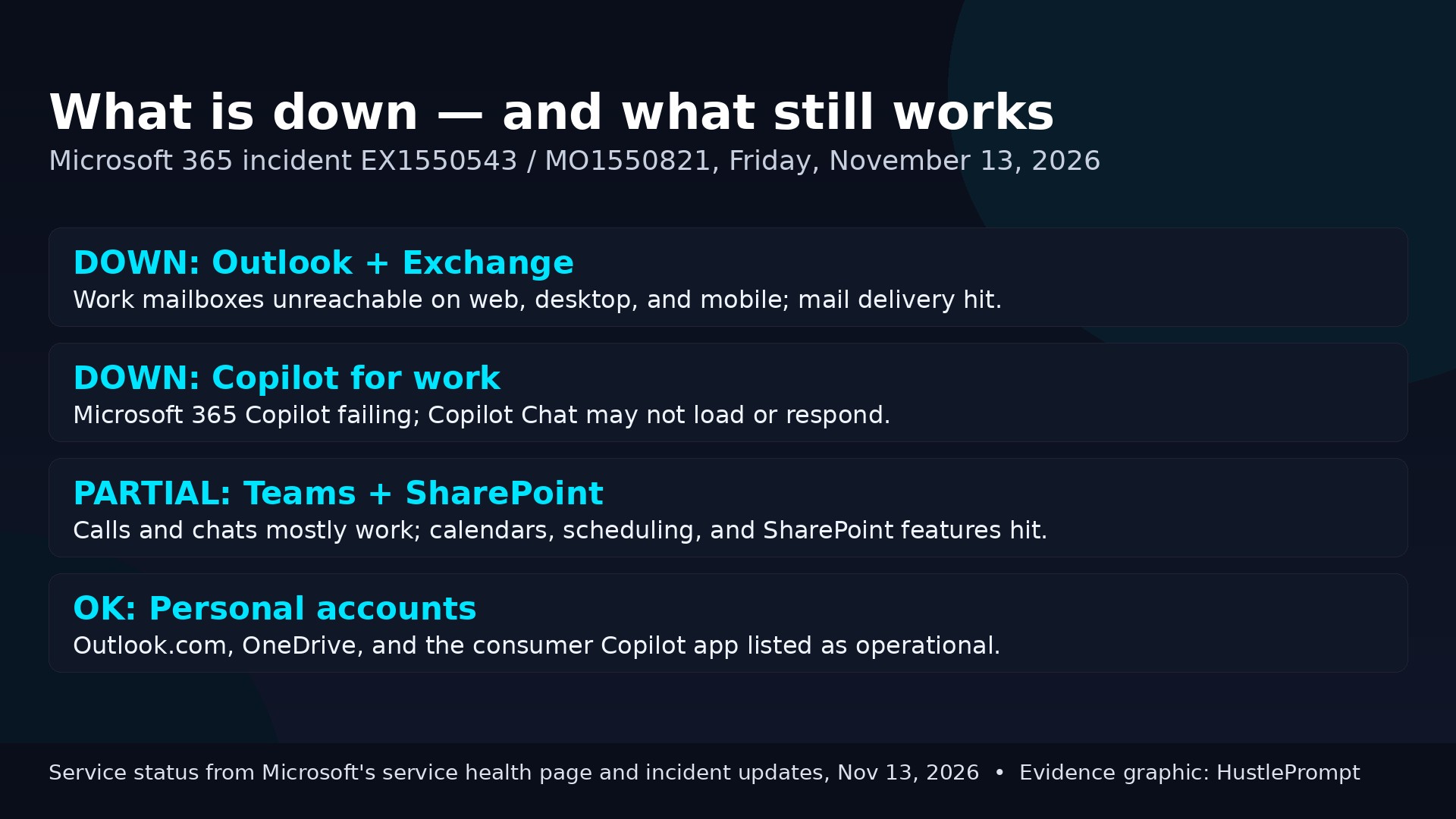
This is not one app failing. It is the shared plumbing underneath Microsoft 365. The affected list Microsoft published covers Outlook on every client — web, desktop, and mobile — plus mail delivery, Teams calendars and scheduling, SharePoint features that rely on Exchange, Microsoft 365 Copilot, Microsoft Graph, Planner, To Do, Intune, Purview, and Power BI. Defender for Office 365 and Defender XDR are also listed.
Teams is the exception that proves the rule. Microsoft says Teams calls, meetings, group chats, and channel messages stayed largely usable — because those do not depend on Exchange. The moment a Teams feature touches email — scheduling a meeting, checking a calendar — it breaks. That split is how you can tell this is an Exchange capacity problem, not a Teams problem.
The AI angle matters here too. Microsoft 365 Copilot is down with the rest of it: Copilot Chat may not load or may not respond for work accounts. The same outage also knocked out Claude for Outlook — Anthropic’s status page says its Microsoft 365 connector is failing because of this Microsoft incident, and Claude for Outlook mail and calendar actions may fail. One Microsoft outage, two AI assistants down. (Anthropic had a separate login outage of its own this morning — read Claude Down: Login Outage Hits Claude.ai and Code.)
Why the fixes are failing
Microsoft’s own updates tell the story of a fix that is not landing. In an update posted on X early Friday, Microsoft 365 Status wrote: “We’ve monitored the status of the changes applied to improve serviceability and confirmed they’re not taking as expected. We’re identifying alternate workstreams that can be applied to increase capacity in the face of sustained traffic management imbalances.”
Translated: the servers that came back could not stay back. Microsoft says it applied changes to restore affected servers, then watched some of them go down again after being brought back. Recovery has been uneven, and the company is now evaluating traffic throttling, protocol adjustments, and failover routing to increase capacity and stability. As of its 06:17 UTC update on Friday, the incident was still listed as “Service degradation,” with no root cause and no post-incident review published yet.
What Microsoft has said about the cause so far is narrow but specific: its investigation found that a process on affected servers responsible for establishing secure connections was becoming overwhelmed, causing the servers to stop processing requests. Microsoft has said it is not aware of any malicious activity, and a senior Microsoft executive confirmed no security breach was involved. The company has stressed that the overwhelmed-connection process is not yet a confirmed root cause.
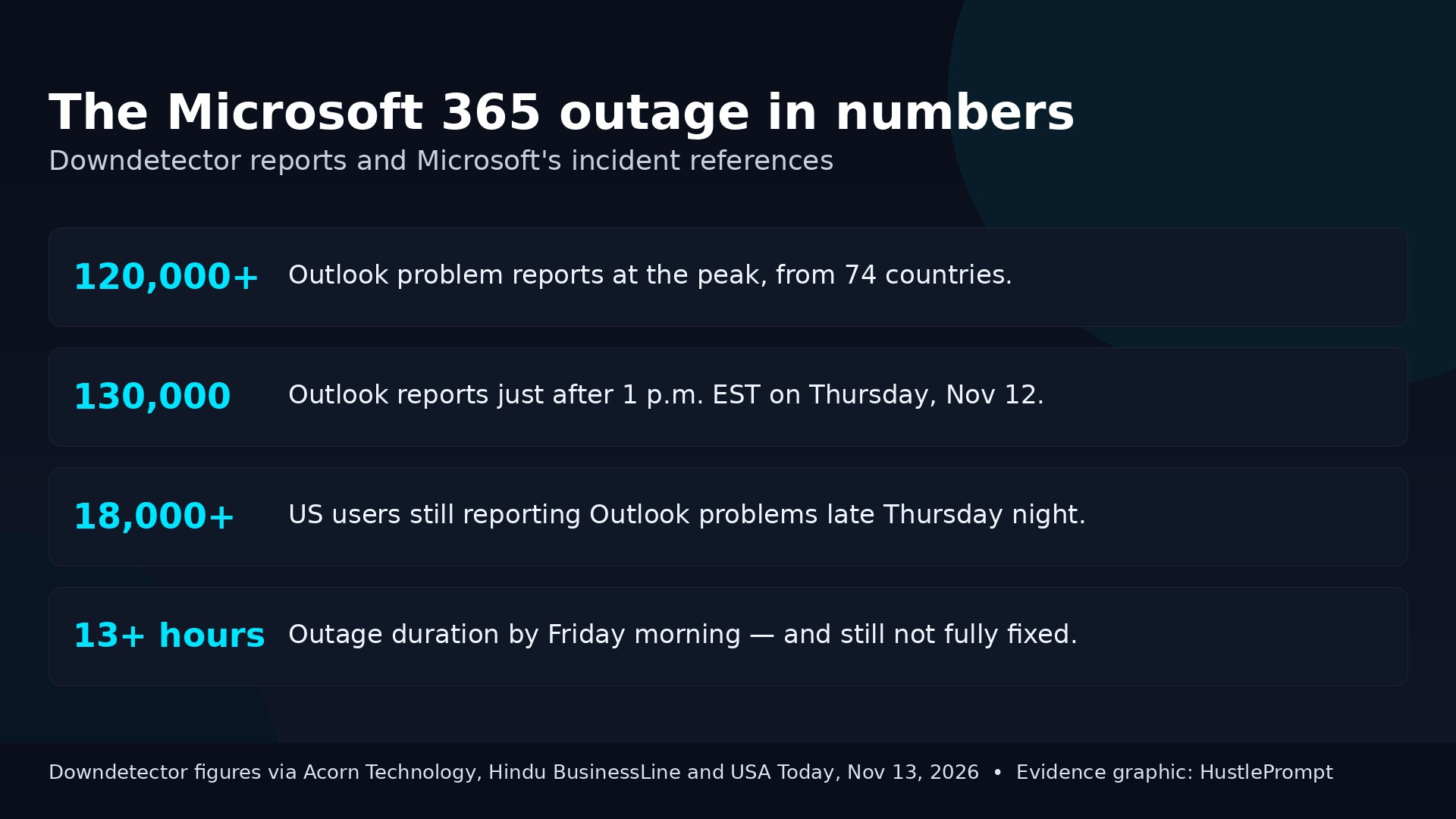
The outage reached beyond businesses. Government systems in Australia and Japan reported disruptions, and companies across the United States and other countries were affected through Thursday night. Downdetector logged more than 120,000 Outlook problem reports at the peak from 74 countries, and nearly 130,000 users reported Outlook problems just after 1 p.m. EST on Thursday. More than 18,000 US users were still reporting Outlook problems around 11:30 p.m. Thursday, with more than 5,000 also reporting Microsoft 365 problems.
What this costs a business
Email is not a side tool for most companies — it is the front door. A full day without work email means missed client replies, stalled invoices, meetings nobody can schedule, and support tickets nobody can answer. For a small business, one lost day of email can cost more than a month of the Microsoft 365 subscription itself. And because Copilot is down too, the AI that was supposed to summarize threads and draft replies is gone at the exact moment the backlog is biggest.
There is also a recovery cost nobody budgets for. When the mailboxes come back, the flood arrives all at once: a day of delayed mail, duplicate meeting invites, and calendar chaos. The businesses that recover fastest will be the ones that told their clients early, moved conversations to channels that work, and kept a record of what was missed.
One thing worth doing today: check your SLA credits. Microsoft’s service level agreement includes service credits for sustained downtime, and administrators can claim them through the admin center. The terms depend on your plan — check Microsoft’s November 2026 SLA terms for your tier rather than assuming a number. It will not cover a lost client, but it is money you are owed.
The numbers that matter
| Metric | Figure |
|---|---|
| Outlook reports at peak | 120,000+ (Downdetector), from 74 countries |
| Reports after 1 p.m. EST Thu | Nearly 130,000 Outlook reports |
| Still reporting late Thu | 18,000+ US Outlook reports; 5,000+ Microsoft 365 reports |
| Duration by Friday morning | 13+ hours, still not fully fixed |
| Services affected | 10+ — Outlook, Exchange, Teams calendars, SharePoint, Copilot, Graph, Planner, To Do, Intune, Purview, Power BI, Defender |
| Root cause confirmed | No — Microsoft has not confirmed one; no malicious activity found |
“We’ve monitored the status of the changes applied to improve serviceability and confirmed they’re not taking as expected.” — Microsoft 365 Status (@MSFT365Status), November 13, 2026. Downdetector figures via Acorn Technology, Hindu BusinessLine, and USA Today.
How to keep your business running today
Do not wait for the all-clear to communicate. Here is the practical sequence:
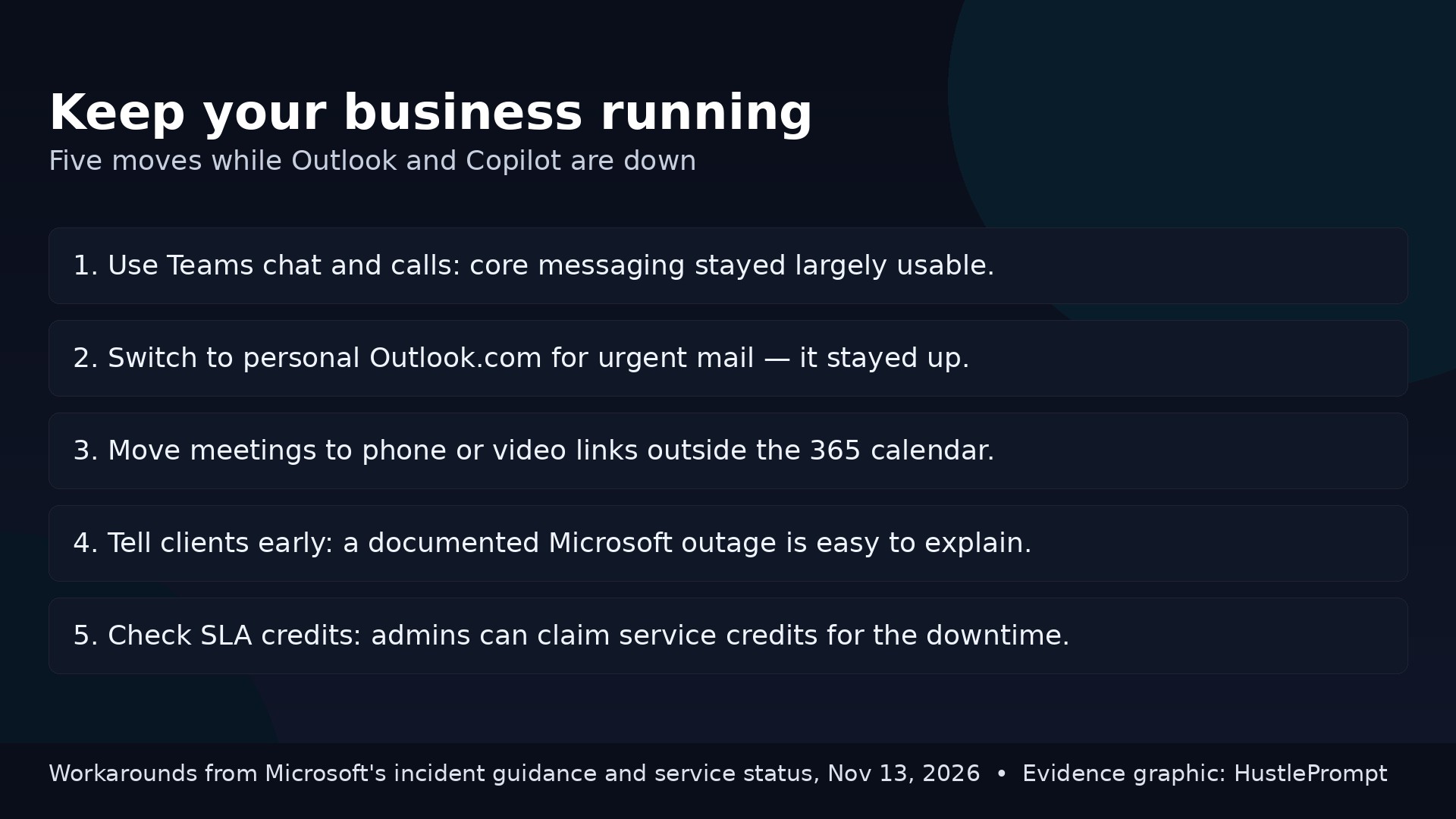
- Move conversations to Teams chat and calls. Core Teams messaging stayed largely usable through the outage. If your team can talk, it can work — even without email.
- Use personal Outlook.com for urgent mail. Personal accounts were listed as operational. It is not a long-term fix, but it gets an urgent message out today. Do not forward sensitive work mail to a personal account without checking your company policy first.
- Take meetings off the 365 calendar. Send direct video links or phone numbers instead of calendar invites. A meeting that happens beats a meeting that was perfectly scheduled and never occurred.
- Tell clients before they notice. A two-line message — “Microsoft 365 is down globally, we are reachable on Teams and by phone” — protects trust. Silence makes clients assume you are ignoring them.
- Document everything for the SLA claim. Note when your mailboxes went down and when they came back. Admins claim service credits through the Microsoft 365 admin center under incidents EX1550543 and MO1550821.
- After recovery, triage before you reply. Sort the backlog by sender and deadline, not by arrival time. Answer clients and money first, newsletters last.
Keep your business running
Your 5-step outage checklist
1. Switch to Teams
Calls, meetings, and chats stayed largely usable. Move the conversation there now.
2. Use personal Outlook
Outlook.com stayed operational. Use it for urgent mail — within company policy.
3. Go direct on meetings
Send video links and phone numbers instead of calendar invites that cannot be delivered.
4. Tell clients early
A documented Microsoft outage is easy to explain. A silent delay is not.
5. Claim SLA credits
Admins can claim service credits for the downtime under EX1550543 and MO1550821.
The outage is Microsoft’s problem to fix. The communication is yours — and it is what clients will remember.
Watch it in action
Copilot is one of the services this outage took down — and it is the one most businesses will miss first, because it sits inside the same Outlook and Word windows that stopped working. Microsoft Mechanics, Microsoft’s official video series for IT, shows what Copilot does inside Word, Excel, PowerPoint, Outlook, and OneNote when it is running:
Watch: Microsoft Mechanics walks through Copilot Chat running free inside the Microsoft 365 apps — the same apps this outage disrupted. Video: Microsoft Mechanics (Microsoft’s official video series).
Frequently asked questions
Is Microsoft Outlook down right now?
For many work and school accounts, yes. The outage began at 16:17 UTC on Thursday, November 12, 2026, and Microsoft still listed Microsoft 365 as “Service degradation” on Friday morning, November 13. Personal Outlook.com accounts were listed as operational — this outage mainly hits Microsoft 365 business accounts. Check status.cloud.microsoft for the current status.
What caused the Microsoft 365 outage?
Microsoft has not confirmed a root cause. Its investigation found that a process on affected servers responsible for establishing secure connections was becoming overwhelmed, causing servers to stop processing requests. Microsoft says it is not aware of any malicious activity, and a senior executive confirmed no security breach was involved.
Which Microsoft services are affected?
Outlook and Exchange Online email, Teams calendars and scheduling, SharePoint features that rely on Exchange, Microsoft 365 Copilot, Microsoft Graph, Planner, To Do, Intune, Purview, Power BI, and Defender. Teams calls, meetings, and chats stayed largely functional. Microsoft tracks the incident as EX1550543 and MO1550821.
Is Microsoft Copilot down too?
Microsoft 365 Copilot for work accounts is affected — Copilot Chat may not load or may not respond. The consumer Copilot app was listed as operational on Microsoft’s status page. The outage also knocked out Claude for Outlook, because Anthropic’s Microsoft 365 connector depends on the same Microsoft services.
Why are Microsoft’s fixes not working?
Microsoft said early Friday that the changes it applied to restore affected servers were “not taking as expected” — some servers went down again after being brought back. The company is now evaluating traffic throttling, protocol adjustments, and failover routing to increase capacity. It has not given a restoration time.
Can I claim compensation for the outage?
Possibly, through service credits. Microsoft’s service level agreement includes credits for sustained downtime; administrators claim them through the Microsoft 365 admin center under incidents EX1550543 and MO1550821. The exact terms depend on your plan — check Microsoft’s November 2026 SLA terms for your tier.
How can I keep working while Outlook is down?
Use Teams chat and calls, which stayed largely usable. Send urgent mail from a personal Outlook.com account if company policy allows it. Share direct video links or phone numbers instead of calendar invites, tell clients early that Microsoft 365 is down, and document your downtime for the SLA claim.
Keep Reading
- Microsoft Copilot Credits Start Dec 1: $0.01 Each — Copilot is moving to a credits model on December 1. Here is what each credit costs and what it buys.
- Office in Copilot: Word, Excel, PowerPoint Go Live — The same Copilot that is down today just went live inside Office. What the launch changed.
- AI Subscriptions in November 2026: What $20 Actually Buys — When one AI goes down, the backup matters. A price snapshot of every major AI subscription.
Sources: Microsoft service health status (status.cloud.microsoft); Storyboard18 — Microsoft Outage: Outlook, Teams and Copilot Remain Down as Latest Fixes Fall Short; Epifive — Microsoft Outage Today: Outlook, Teams Down; Democrat & Chronicle — Microsoft Outage: Outlook, Teams Still Having Problems; The Hindu BusinessLine — Widespread Outage Hits Microsoft Email, Other Apps; Acorn Technology — Microsoft 365 Outage: Why It Happened & What to Do Now. Incident times, references, and service lists are from Microsoft’s status updates; Downdetector figures are as reported. Microsoft has not confirmed a root cause.