
Most AI website builders stop at the fun part. You type a sentence, a site appears, and then the real work starts: hosting, a domain, HTTPS, search setup, and the awkward day a developer has to rebuild the whole thing from scratch. NOVA, a new AI agent from Bridgeye that launched on Product Hunt on November 27, 2026, is built around that gap. NOVA AI deployment covers the trip, from a plain prompt to a live site that Google and AI assistants can find.
One account and one plan take a project from development to deployment, with 160+ AI models included. The free plan starts with 40 credits a day, and Product Hunt lists the launch price as $0.
What NOVA is, and what it is not
NOVA is an AI agent that builds websites, apps, and documents from plain words. Describe a site, an app, a PDF, a slide deck, or a spreadsheet, and NOVA builds it, checks it in a browser, and puts it online. It also works on your files: trimming video for Reels and Shorts, merging PDFs, and turning data into dashboards.
It is not a code editor, and it is not a hosting company with an AI feature bolted on. The product has two faces: a browser app for people who never want to read code, and NOVA CLI, a terminal agent for developers. Both share the same project and the same memory, so work moves between them without a rebuild.
NOVA is made by Bridgeye Private Limited, registered in Ponda, Goa, India, and run by four co-founders.
The expensive part starts after the build
Ask any freelancer what eats their margin. The answer is rarely the build. It is the handoff. A client gets a pretty demo, then asks for a domain, hosting, Google visibility, and changes from a teammate. Each step means another account, another bill, or another rebuild.
NOVA’s launch post names the same list: someone to host it, someone for the domain, an agency so Google finds you, someone so AI assistants find you, and a rebuild the day a developer joins. That is the problem NOVA sells against. The build is cheap now. The after-build is where small businesses bleed time.
After the build: the old route vs NOVA
| After-build task | The usual route | What NOVA does |
|---|---|---|
| Hosting | Separate host, separate bill, separate setup | One-click hosting, including Node.js, Next.js, Python, Flask, FastAPI, and Django apps |
| Domain and HTTPS | Buy a domain, wire up DNS, set up HTTPS | Free address with HTTPS, or buy or connect your own domain |
| Search setup | Learn SEO or hire help | Search health score with fixes, plus the files search engines read |
| AI search visibility | No standard answer | Checks whether AI assistants mention you |
| Version history | Manual backups or Git | Every change saved; roll back in one click |
| Team editing | Share logins or rebuild | Invite editors; publishing, domains, and billing stay with you |
| Developer handover | Often a rebuild from scratch | nova pull brings files and chat history into the terminal; nova push puts it live again |
Source: NOVA launch post on Product Hunt and runnova.ai.

None of this removes the need for judgment. A search health score is not a search strategy, and an AI mention check is not a brand. But one plan changes the math: fewer accounts, fewer handoffs, fewer unbilled hours.
How NOVA AI deployment works
The flow is short. You describe what you want in your own words, attach photos, a PDF, or a spreadsheet, and NOVA asks one question when something is unclear instead of guessing. For bigger builds, it shows its plan first.
- Describe it. Say what you want in plain words.
- Review the plan. For bigger builds, NOVA shows its plan first.
- Watch it build. NOVA writes the code, runs it, and checks it.
- Go live in one click. A free address with HTTPS, or your own domain.
- Get found. Search files, a health score, and AI mention checks.
- Hand it over. nova pull and nova push move it to a developer.
From a sentence to a live site
- Describe — Say what you want in plain words.
- Plan — NOVA shows its plan for bigger builds.
- Build — Code, tests, and browser checks run by NOVA.
- Go live — One click, free address or your own domain.
- Get found — Search health score, fixes, and AI mention checks.
- Hand over — nova pull and nova push to a developer.
NOVA also plugs into tools freelancers already use: Stripe, Shopify, Gmail, Google Sheets, Mailchimp, WordPress, WooCommerce, Calendly, GitHub. Through NOVA MCP, Claude Code, Cursor, and ChatGPT can build and deploy apps on NOVA too.
What it costs
NOVA plans at launch
| Plan | Price | What is included |
|---|---|---|
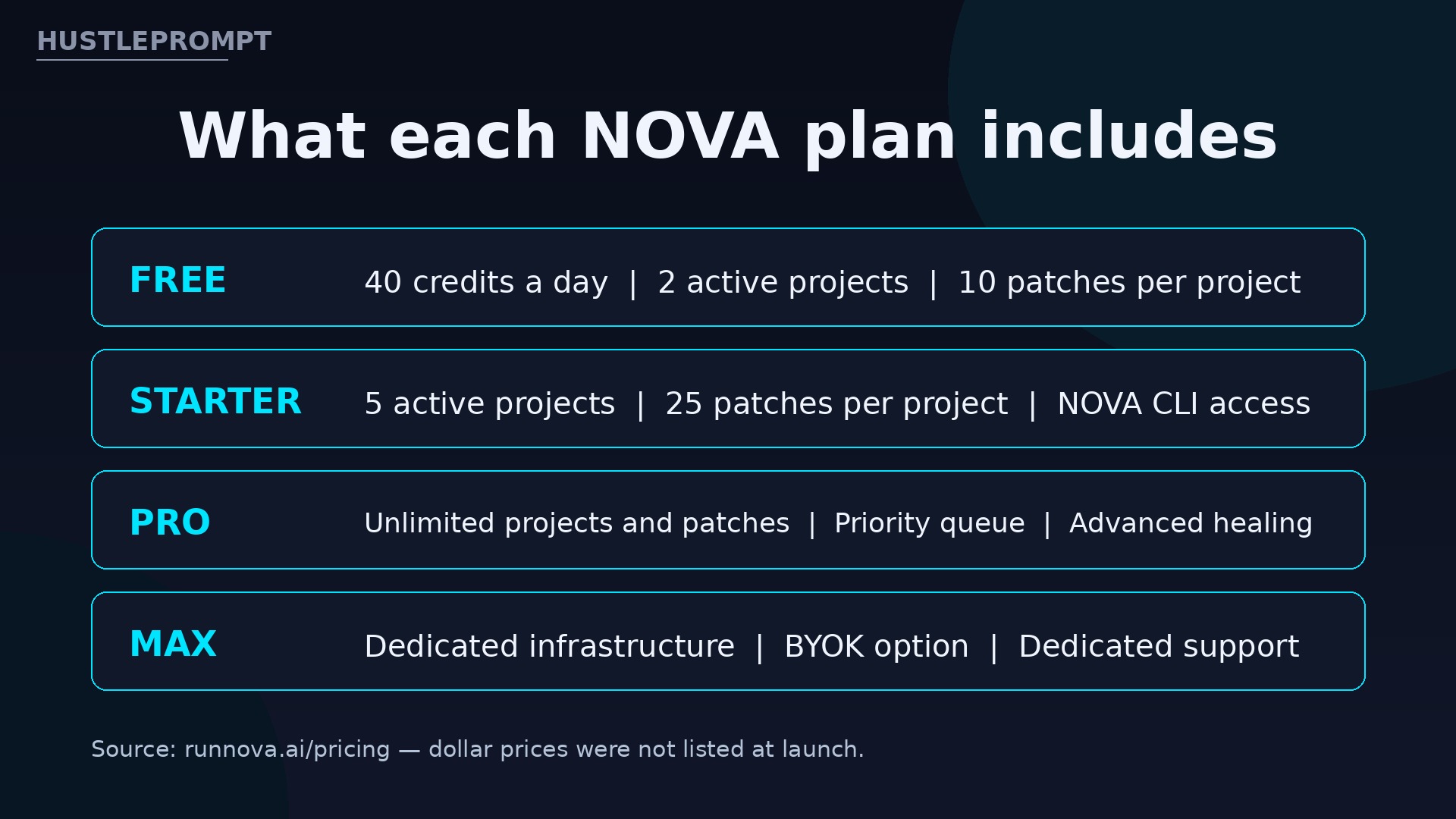
| Free | $0 | 40 credits a day; 2 active projects; 10 patches per project; custom domains; PDF, DOCX, and PPT generation |
| Starter | Not published | 5 active projects; 25 patches per project; NOVA CLI access; Healer debugger |
| Pro | Not published | Unlimited active projects and patches; fast priority queue; advanced healing; zero-latency streaming diffs |
| Max | Not published | Everything in Pro, plus dedicated infrastructure, BYOK option, and dedicated engineer support on Discord |
Source: NOVA pricing page. Dollar prices for paid plans were not listed on November 28, 2026.
The free plan is the honest starting point: 40 credits a day, 2 active projects, and 10 patches per project, with custom domains included. Credits reset every 24 hours and are spent per command, healing iteration, or multi-file build.
Here is the gap to watch: the pricing page lists no dollar price for Starter, Pro, or Max. It shows a dash where the monthly price should be. Product Hunt lists the launch price as $0, which covers the free plan. Do not budget a paid plan until Bridgeye publishes real prices. The pricing page also says app hosting is paid for first, then the app runs, so hosting is a separate cost.
How freelancers can profit from NOVA
The money angle is not the tool. It is the service wrapped around it. NOVA removes the chores that eat a fixed-price project, so you keep more of the fee.
- Prototype on free credits. Build the client demo on the free plan before anyone pays.
- Sell a launch-ready package. Site, domain, HTTPS, and a search health check, in one price.
- Offer a monthly care plan. Recheck the search health score, fix issues, update content.
- Charge for the handover, not the rebuild. Use nova pull and nova push to pass finished work to a developer cleanly.
- Keep the client in one place. Team editing lets the client change words while billing stays with you.
The 40 free daily credits are enough to test ideas and build small client demos. The limit that bites first is the 2 active projects on the free plan, so rotate finished work out or move to a paid plan when the pipeline grows.
Where a human developer still matters
Frequently asked questions
What is NOVA by Bridgeye?
NOVA is an AI agent from Bridgeye that builds websites, apps, and documents from plain words, then hosts them, connects a domain, and checks search health. It launched on Product Hunt on November 27, 2026.
How much does NOVA cost?
The free plan costs $0 and gives 40 credits a day, 2 active projects, and 10 patches per project. Starter, Pro, and Max add more projects, unlimited edits, and GitHub, but their dollar prices were not published on the pricing page at launch.
Can I use my own domain with NOVA?
Yes. Every site can go live on a free address with HTTPS, or you can buy or connect your own domain. Apps that need a server, such as Node.js, Next.js, Python, Flask, FastAPI, and Django, are hosted too.
Does NOVA work with developers?
Yes. NOVA CLI is the same agent in the terminal. A developer runs nova pull to bring the whole project down with every file and the chat history that built it, then nova push to put changes live again. Nothing gets rebuilt.
What can NOVA build besides websites?
Web apps, servers, APIs, and bots, plus designed PDFs, Word documents, PowerPoint decks, Excel sheets with working formulas, dashboards, and video, audio, and image jobs such as trims, captions, and reframes for Reels and Shorts.
Is NOVA really free to try?
Yes, the free plan starts with 40 credits a day and resets every 24 hours. That is enough for small builds and client demos, while the 2-project limit is the first wall most freelancers will hit.
Keep Reading
- Cursor Live Apps: Agents Now Ship Your Software — another AI coding agent that takes projects all the way to a live app.
- Webflow Review 2026: Worth $25/Month? — how a classic website builder prices the same launch-ready job.
- AI Coding Tools Double Output, or Cut It — what AI coding tools really do to a freelancer’s output.