
Kitesurf is now open source. On November 13, 2026, Cloudflare published the full source code of the browser it built for AI agents — a browser with no tabs, no extensions, and no Chromium underneath. The code is on GitHub under the Apache 2.0 license, which means anyone can read it, run it on a laptop, change it, and deploy a private copy to their own Cloudflare account instead of renting the managed version.
That last part is the news. Cloudflare introduced Kitesurf in August as a managed service inside Browser Run, and promised from day one that it would open source the engine so customers could run it themselves. Three months later, the promise is real. For developers building AI agents, the browser just went from a rented API to a tool they can own — and for anyone selling agent infrastructure, that changes the math on every project.
Kitesurf, at a glance
| Announced | November 13, 2026, by Cloudflare |
| What it is | A stateless browser engine built for AI agents, running entirely on Cloudflare Workers |
| License | Apache 2.0, on GitHub at github.com/cloudflare/kitesurf |
| What it does | Parses HTML, applies CSS, executes page JavaScript, and renders screenshots — without a browser container |
| How agents drive it | Chrome DevTools Protocol (CDP), so Puppeteer, Playwright, and MCP clients work unchanged |
| Cost | Free while in beta through Browser Run; self-hosting needs a Workers Paid plan |
| Compatibility | Passes 215,000+ Web Platform Tests, per Cloudflare |
Source: Cloudflare Blog — Kitesurf is now open source, November 13, 2026.
What Kitesurf actually is
Chromium was built for humans. It carries tabs, themes, extensions, sync, and a rendering pipeline tuned for smooth 60-frames-per-second scrolling. An AI agent needs almost none of that. It needs to load a page, run its JavaScript, read the content, and maybe take a screenshot — then vanish. Cloudflare’s argument, laid out in its launch post, is simple: giving every agent its own full Chromium instance is so expensive in memory and compute that it locks most agentic applications out.
Kitesurf is the stripped-down answer. It runs entirely on top of Cloudflare Workers, using V8 isolates instead of browser containers. There is no Chromium process anywhere in the stack. Instead, the engine is built from open-source Rust packages compiled to WebAssembly: Blitz handles HTML parsing, the DOM, layout, and painting; Stylo — Firefox’s CSS engine — handles styles; Boa runs JavaScript inside WebAssembly as a fallback; Linebender libraries handle text layout and 2D graphics; and Krilla generates PDF output.
The engine has three main parts, and understanding them explains why it scales the way it does:
- Engine: the only public-facing component. It manages browser sessions and client connections, and speaks the Chrome DevTools Protocol.
- PageScript: runs the page and its JavaScript inside a fresh, isolated Worker for each page.
- PageRenderer: draws the result — rasterizing the page into pixels and returning a JPEG, PNG, or PDF.
Because every page gets its own isolated Worker and every component is stateless where possible, a stalled session costs nothing to kill and restart. Cloudflare calls it an ephemeral engine designed to exist only for the duration of a task — and that is exactly the shape of work AI agents do.
The trade-off, in Cloudflare’s own numbers
Cloudflare published its benchmark table in the August launch post, and — unusually for a vendor — it published the numbers where its own product loses. The figures are medians of five Browser Run quick-action runs across a 14-URL corpus, comparing Kitesurf against a warm-pool Chromium instance on two representative agent tasks: taking a screenshot and extracting a page’s HTML.
Kitesurf vs. Chromium, per Cloudflare’s launch benchmark
| CPU, screenshot | 380 ms vs. 1,173 ms — 3.1× less than Chromium |
| CPU, HTML extraction | 229 ms vs. 877 ms — 3.8× less than Chromium |
| Memory, screenshot | 57.8 MiB vs. 271.0 MiB — 4.7× less than Chromium |
| Memory, HTML extraction | 39.4 MiB vs. 273.7 MiB — 7.0× less than Chromium |
| Wall time, screenshot | 1,148 ms vs. 637 ms — 1.8× slower than Chromium |
| Wall time, HTML extraction | 820 ms vs. 472 ms — 1.7× slower than Chromium |
Source: Cloudflare Blog — Introducing Kitesurf, August 6, 2026. Cloudflare’s own summary: Kitesurf wins on memory and CPU, “the things that actually drive your bill, by 3-7x.”
Read the table the way Cloudflare frames it. Kitesurf is slower on the stopwatch — about 1.7 times slower — because a cold software renderer cannot beat a just-in-time compiler that has already seen the page. But it uses 3 to 7 times less CPU and memory, and memory and CPU are what the bill is made of. Less memory per session means more sessions per machine, which is the whole point when one agent can spin up hundreds of browsing sessions an hour.
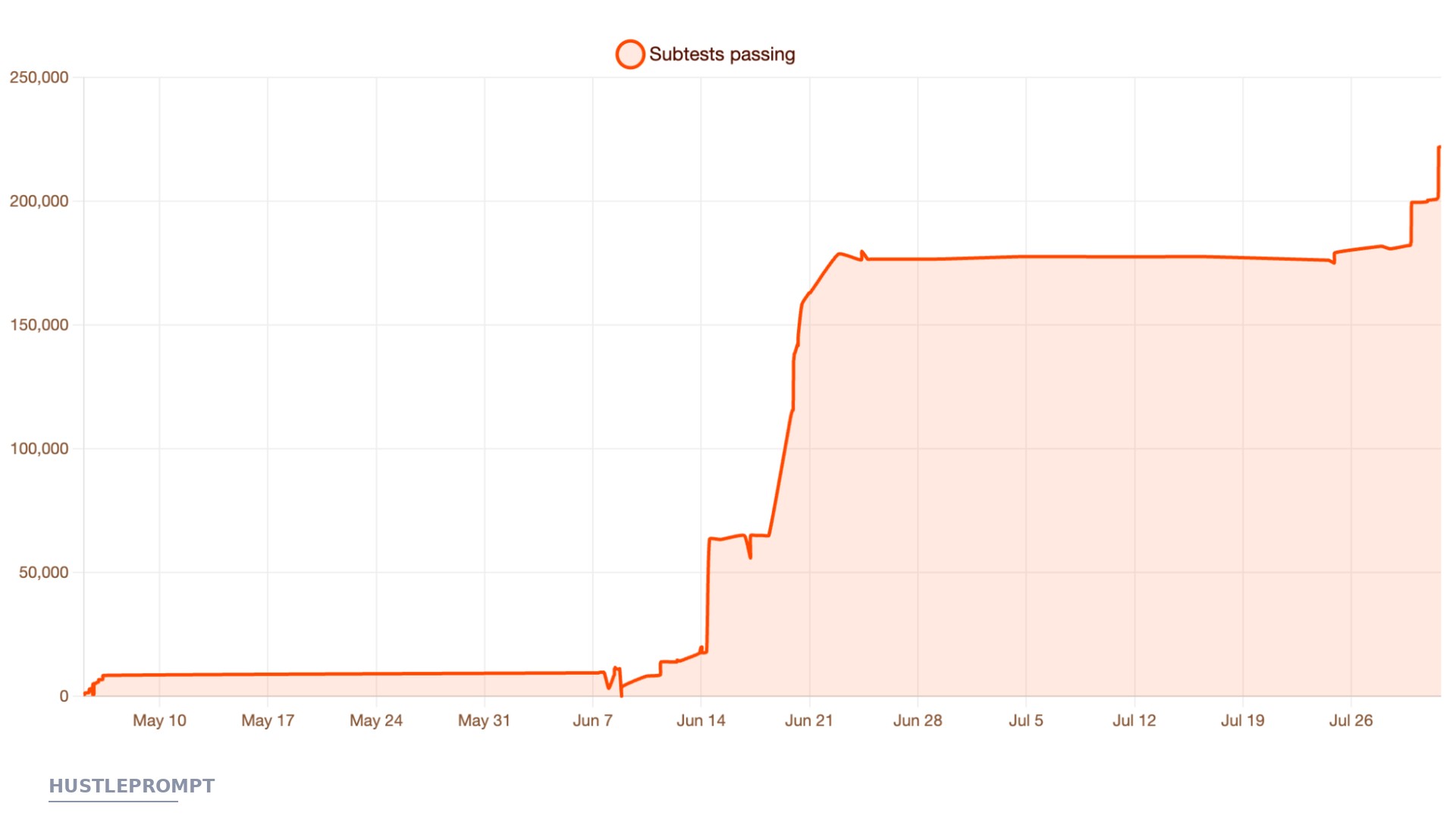
The compatibility story is just as concrete. Kitesurf already passes around 215,000 Web Platform Tests, and Cloudflare says it adds hundreds more every week. It correctly renders TodoMVC in vanilla JavaScript, React, Vue, Angular, and Preact, plus Wikipedia, Hacker News, and the Cloudflare Blog. The chart below, from Cloudflare’s launch post, shows how fast that number climbed from the first commit in May 2026 to the August launch.
How a request flows through Kitesurf
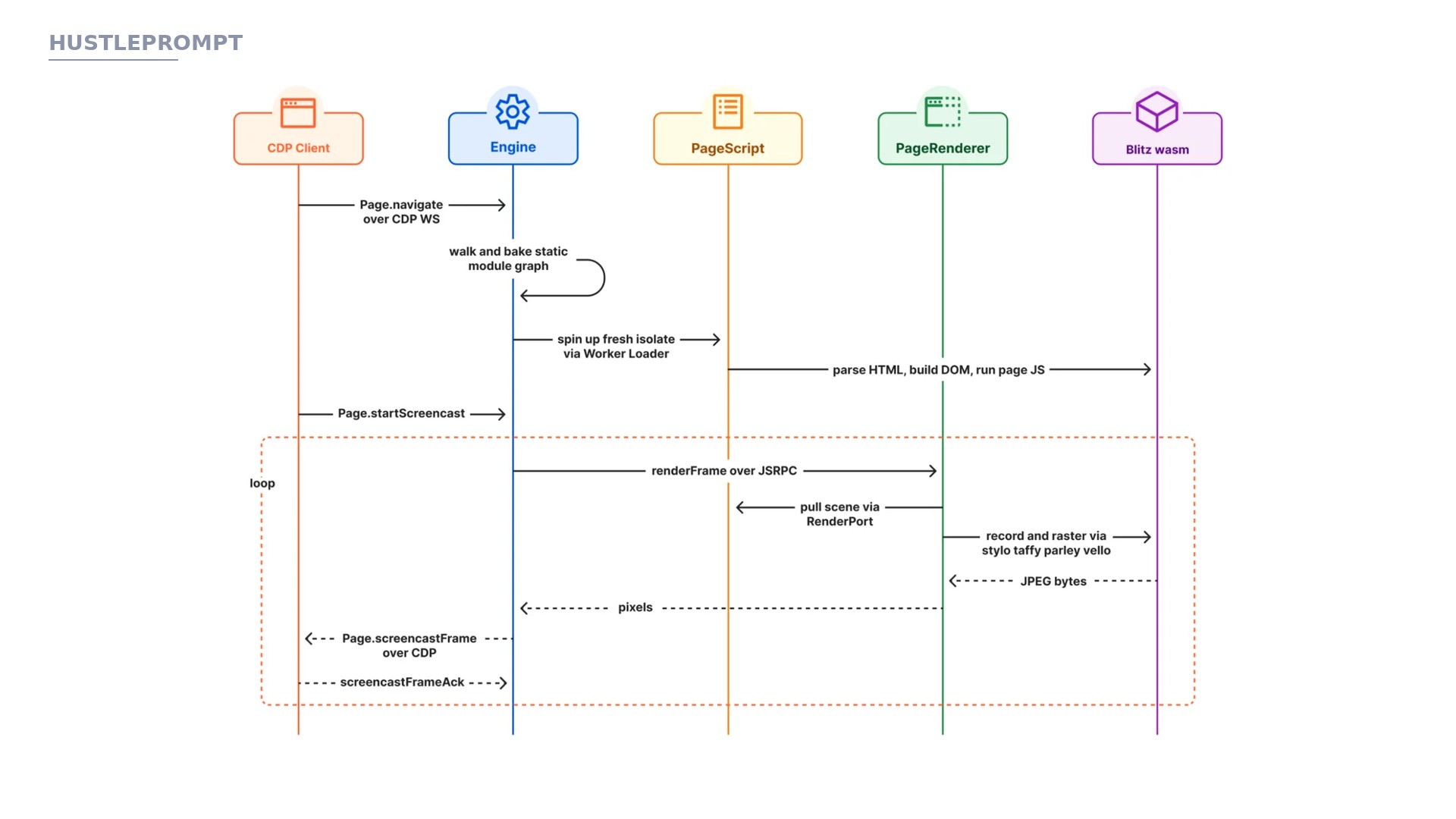
The diagram below shows the path a single agent request takes. Your agent connects over the Chrome DevTools Protocol, the Engine spins up a fresh isolated Worker for the page, PageScript parses the HTML and runs the JavaScript, and PageRenderer turns the result into pixels. Nothing in the chain keeps state it does not need — which is why a failed render is a retry, not a crash.
How to run your own Kitesurf
Running it locally takes four commands, straight from Cloudflare’s announcement:
- Clone the repository.
git clone https://github.com/cloudflare/kitesurf.git, thencd kitesurf. - Install dependencies.
pnpm install --frozen-lockfile. The first build compiles the Rust core, so give it some time; later builds reuse the cache. - Start the engine.
pnpm run devstarts a local development server athttp://127.0.0.1:8787. - Connect your tools. Open that address in Chrome DevTools, or point Puppeteer at it —
puppeteer.connect({ browserWSEndpoint: "ws://127.0.0.1:8787/devtools/browser" })— and your existing automation code works unchanged.
Deploying to your own Cloudflare account is one more command, pnpm run deploy, with one catch: a Workers Paid plan is required, because Kitesurf uses Dynamic Workers to create an isolated Worker for each page. There is a second catch that matters more. The repository warns, in plain language, not to deploy Kitesurf without authentication in front of it: the engine has no authentication of its own, so anyone with the URL could browse the web on your bill. Cloudflare’s fix is to put Cloudflare Access — its Zero Trust login — in front of the deployment before exposing it.
Cloudflare’s own architecture diagram shows the moving parts — the CDP client, the Engine, PageScript, PageRenderer, and the Blitz WebAssembly core — and how a screenshot request loops through them:
How to profit from it
Open source plus a free beta is the combination that creates service businesses. The engine costs nothing to try, the hard part is knowing how to deploy and operate it — and that is exactly what clients will pay for. Four concrete ways to turn Kitesurf into income, starting this week:
- Sell agent browsing infrastructure. AI startups need their agents to browse, scrape, and screenshot the web at scale, and most of them are paying Chromium-sized bills for it. Offer a managed Kitesurf deployment on their Cloudflare account — set up, hardened with Access, and monitored — as a one-time setup package (suggested: $1,500–$3,000) plus a monthly retainer for upkeep (suggested: $300–$600).
- Build extraction pipelines. Price monitoring, lead lists, competitor tracking, and content research all reduce to the same job: load a page, pull structured data out of it, and deliver it clean. Kitesurf’s HTML extraction is the cheap part; the sellable part is the pipeline around it. Charge per pipeline or per thousand pages processed (suggested: $500 setup per source plus $0.10–$0.25 per page).
- Automate screenshots and PDFs. Agencies, e-commerce stores, and compliance teams need visual proof: full-page screenshots, archived copies of pages, and PDF reports. Kitesurf generates all three without a browser farm. Package it as a monthly reporting service (suggested: $200–$500 per month per client).
- Wire it into MCP workflows. Teams already running Claude, Codex, or other agents through MCP need those agents to reach the live web. Connecting Kitesurf as the browser behind their MCP setup — with the right allow-lists and logging — is a focused consulting engagement (suggested: $1,000–$2,500 per setup).
The window is open because the release is two days old and the September WebMCP update already made Kitesurf speak the protocol agents use. The people who learn the deployment quirks now — the Access setup, the Dynamic Workers limits, the sites it renders well — will be the ones clients call when the managed beta ends and the bills start.
The honest limits
Kitesurf is experimental, and Cloudflare says so in the announcement itself: the project is under heavy development, with the team focused on compatibility, reliability, and efficiency. Before building on it, know the edges:
- No video and no WebGL. If the job needs video playback or 3D rendering, use Browser Run’s Chromium default instead.
- No bot-challenge handshakes. Pages that require a real TLS fingerprint to pass their checks will not work through Kitesurf.
- No long logged-in sessions. Ten-minute authenticated sessions that depend on persistent state are not its job — it is built for short, disposable tasks.
- Slower on the stopwatch. About 1.7 times slower than Chromium on wall time, per Cloudflare’s own benchmark. The savings are in CPU and memory, not speed.
- No built-in login. A deployed instance is public by default until you put Cloudflare Access in front of it. Skip that step and anyone with the URL can run up your bill.
- Contributions have a gate. Cloudflare welcomes forks and fixes, but asks contributors to open an issue first and get vouched for by a maintainer before opening a pull request.
None of that makes Kitesurf a bad tool. It makes it a specialized one — a browser for software, not for people — and the open-source release means its limits are now visible in the code instead of hidden behind an API.
Frequently asked questions
What is Kitesurf?
Kitesurf is Cloudflare’s browser engine built specifically for AI agents. It runs entirely on Cloudflare Workers, parses HTML, applies CSS, executes page JavaScript, and renders screenshots — without a Chromium process or a browser container. It launched in August 2026 and went open source on November 13, 2026.
Is Kitesurf free?
The code is free under the Apache 2.0 license, and the managed version is free while in beta through Browser Run, behind per-account limits. Running your own copy on Cloudflare requires a Workers Paid plan, because each page gets its own isolated Dynamic Worker.
How is Kitesurf different from Chromium?
Chromium is a full browser built for humans, with tabs, extensions, and a rendering pipeline tuned for visual perfection. Kitesurf keeps only what agents need — parsing, JavaScript, screenshots, PDFs — and drops the rest. Per Cloudflare’s benchmark, it uses 3 to 7 times less CPU and memory than Chromium, but runs about 1.7 times slower on wall-clock time.
Can I run Kitesurf on my own computer?
Yes. Clone github.com/cloudflare/kitesurf, run pnpm install –frozen-lockfile, then pnpm run dev. The engine starts a local server at http://127.0.0.1:8787, which you can drive with Puppeteer, Playwright, or any CDP client.
Do I need a paid plan to deploy it?
Yes, for deployment on Cloudflare. A Workers Paid plan is required because Kitesurf uses Dynamic Workers to create isolated Workers for each page. Local development does not need a paid plan.
Is it safe to deploy Kitesurf publicly?
Not without authentication in front of it. The engine has no authentication of its own, so Cloudflare instructs self-hosters to protect the deployment with Cloudflare Access or another authentication layer first — otherwise anyone with the URL can browse the web on your bill.
What can Kitesurf not do yet?
It cannot play video, render WebGL, negotiate bot challenges that need real TLS fingerprints, or hold long authenticated sessions. Cloudflare says to use Browser Run’s Chromium-based default for those jobs, and it is actively working on compatibility, reliability, and efficiency.
Keep Reading
- Nvidia, AMD, Google, Meta Back Open-Source AI Inference — The biggest names in AI chips just united behind one open-source inference standard — the same open-source wave Kitesurf is now part of.
- DeepSeek Turns Its Whole App Into an API — DeepSeek opened its full app toolkit — search, files, voice — through its API the same week. Pair it with Kitesurf and an agent can read the whole web.
- llama.cpp 1.0: Run AI Models Free on Your Own Computer — The other half of owning your AI stack: run the model locally, browse with Kitesurf, and keep the whole pipeline off rented infrastructure.
Sources: Cloudflare Blog — Kitesurf is now open source, November 13, 2026; Cloudflare Blog — Introducing Kitesurf, August 6, 2026; github.com/cloudflare/kitesurf (repository and README, including the authentication warning); kitesurf.dev (landing page, Web Platform Tests and benchmarks). Prices in the “How to profit” section are suggested service packages, not Cloudflare prices.