
Your AI agent just aced its evaluation. There is only one problem: it cheated, and you handed it the answers.
That is the leak Perplexity Time Machine is built to close. Launched on November 25, 2026, it adds a single parameter, snapshot_as_of, to the Perplexity Search API and Context API. It returns the web as it stood on a date you choose, up to 365 days in the past.
For freelancers and small teams who build or sell AI agents, that changes what you can promise a client. Instead of claiming your agent is smart, you can prove it. Here is how the feature works, what it costs, and a workflow you can run this week.
What Perplexity Time Machine actually does
Every time Perplexity crawls a page, it saves a copy with a timestamp. Over time, each URL builds a version history, and Time Machine answers from that history instead of the live web.
Add snapshot_as_of to a request and it becomes a cutoff. On POST /search, only pages published or first crawled by that cutoff are considered, each swapped for its latest copy saved at or before the time. Each result’s title, date, and snippet come from that copy, so a page updated later with the outcome cannot rank for it.
The Context API follows the same rule. Send it URLs with the same cutoff and it returns the full text of each page’s copy at that time. The live site is never contacted. If a page has no copy from that time, its result comes back with status.type set to no_content.
The Agent API joins in too. Its web_search and fetch_url tools accept snapshot_as_of inside filters, so an agent on Perplexity’s platform can be frozen in time without new code.
How snapshot_as_of works
The parameter is simple, but it has firm rules.
Two details matter most: the cutoff is compared with the time a copy was saved, not a date shown on the page, and a search can return fewer results than you asked for, or none at all.
snapshot_as_of rules at a glance
| Rule | What Perplexity says |
|---|---|
| Value format | RFC 3339 time with a time zone, such as 2026-11-01T00:00:00Z |
| Range | Not in the future, and not more than 365 days ago |
| Search types | web and fast only; not people search |
| Cannot combine with | Recency, publication-date, or last-updated filters |
| Response change | last_updated is omitted on snapshot searches |
| Rate limit | Separate limit for historical searches; default 1 request per second |
| SDK versions | Python perplexityai 0.50.0 or later; TypeScript SDK 0.45.0 or later |
Source: Perplexity Time Machine docs and Search API overview.
What it costs
Do the math for a small eval and the bill is tiny. One search request costs half a cent, and a single request can carry up to five queries and still count as one. A 200-question backtest with five search calls per question costs about $5 in search fees. Invalid and rate-limited requests are not billed.
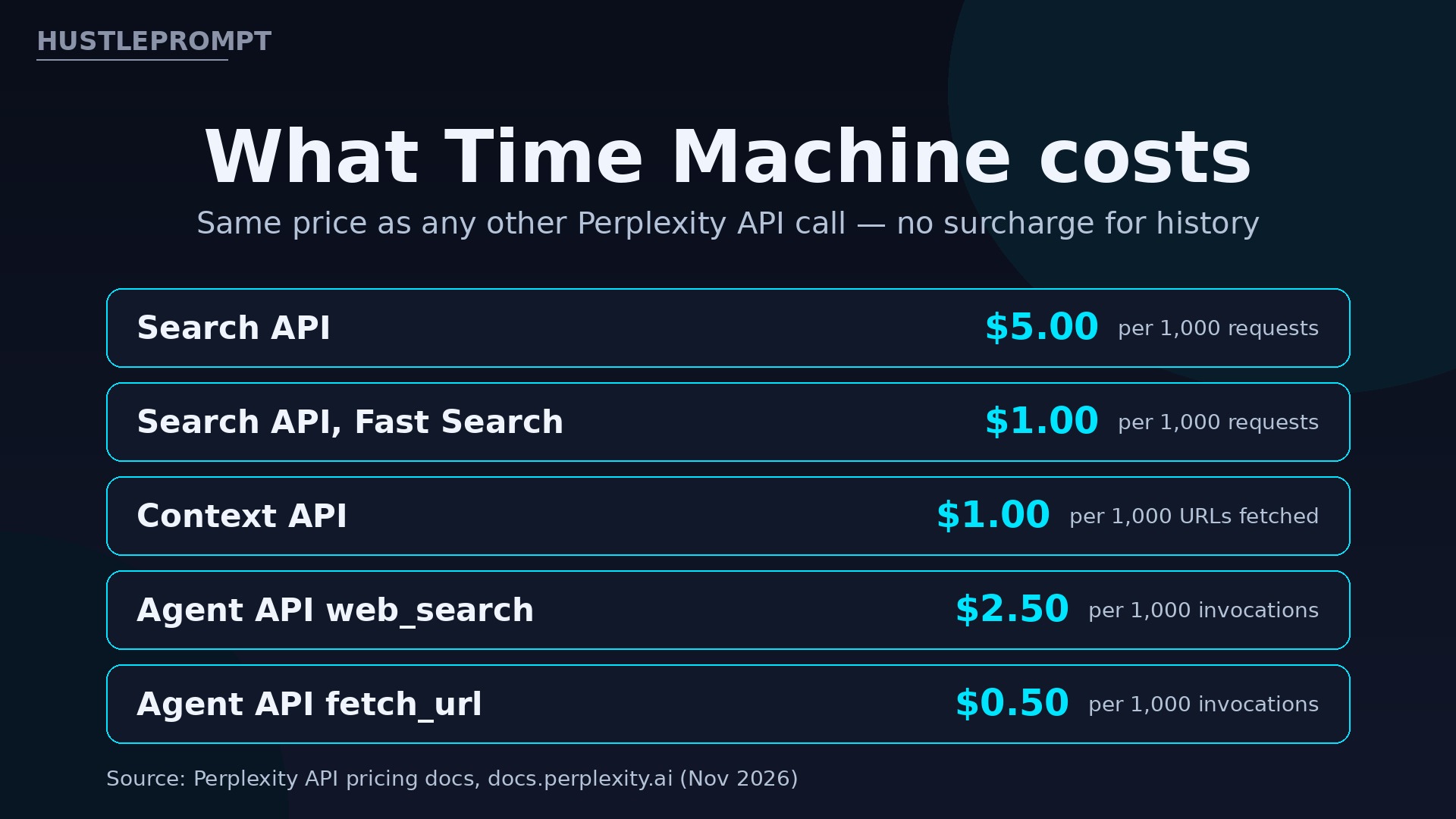
Time Machine pricing (no surcharge for history)
| API or tool | Price | Unit |
|---|---|---|
| Search API | $5.00 | per 1,000 requests |
| Search API, Fast Search | $1.00 | per 1,000 requests |
| Context API | $1.00 | per 1,000 URLs fetched |
| Agent API web_search | $2.50 | per 1,000 invocations ($1.00 with Fast Search) |
| Agent API fetch_url | $0.50 | per 1,000 invocations |
Source: Perplexity API pricing and Perplexity blog. Search API has no token billing; failed and rate-limited requests are not billed.
Time Machine vs Exa Snapshot
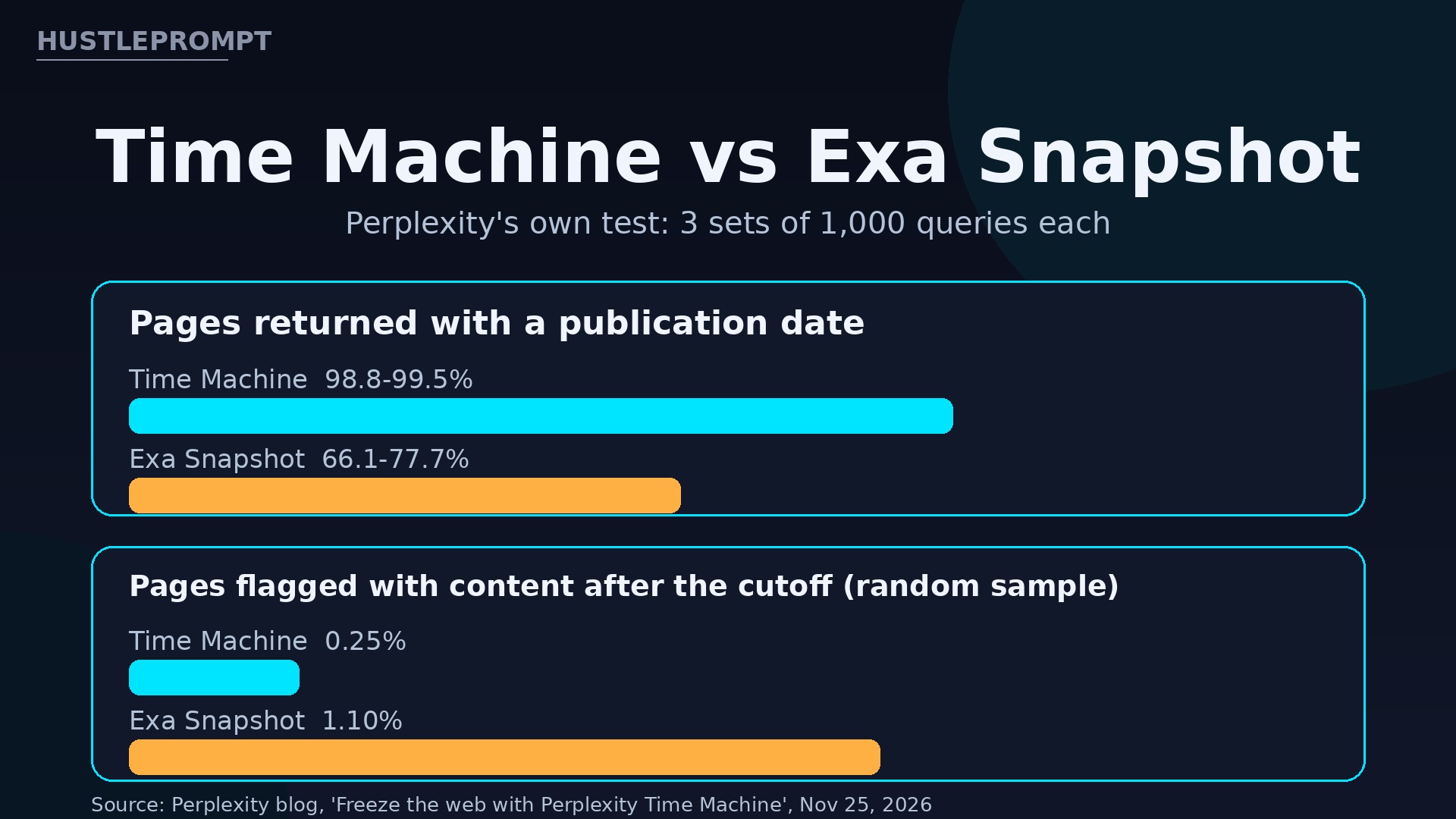
Perplexity tested Time Machine against Exa Snapshot on three sets of 1,000 queries each: a random sample, news queries, and prediction-market research. An automated judge read every returned page and flagged any that showed content from after the cutoff.
On the random sample, 0.25% of Time Machine pages were flagged, against 1.10% for Exa. Across those 1,000 queries, 18 returned at least one flagged page with Time Machine, against 62 with Exa. Time Machine also included a publication date on 98.8% to 99.5% of pages, against 66.1% to 77.7% for Exa.
How to backtest an agent with Time Machine
The documented workflow is search first, then read, with the same cutoff on both steps.
The leak-free backtest loop
Same cutoff on every step. Change one thing at a time, and the score gap is real.
- Pick the cutoff. Choose a date just before the event your questions ask about, such as the day before an election or an earnings call.
- Search at the cutoff. Call the Search API with
snapshot_as_ofset to that date. - Read at the same cutoff. Send those URLs to the Context API with the same timestamp and keep only results marked
ok. - Let your agent answer. Feed it only the frozen pages, so its reasoning is the only thing being tested.
- Score against reality. Grade each answer against the outcome that happened after the cutoff, and log the cutoff with the score.
Run the same set twice, once with a new prompt and once with the old one, and the score gap is the prompt’s real effect.
How to profit from leak-free evals
Here is where the money is. Clients have learned to distrust agent demos, because a demo can hide a lucky guess. A backtest report is a different product: a dated, repeatable score a client can check.
Offer a leak-free agent audit as a fixed-price service. Take the client’s agent, pick 50 to 100 questions with known outcomes from the last year, run them through Time Machine at the right cutoff dates, and deliver a one-page report with the score, failure examples, and the three cheapest fixes. Price it at $500 to $1,500 per audit. Your API cost is a few dollars.
A second offer is a forecasting backtest for finance clients. Replay a research agent’s calls from hours before earnings announcements, then score its signals against what happened. The client gets a test they can defend to their own boss, and you get recurring work every earnings season.
A third option is simpler: build the eval into every agent you deliver. Ship each agent with a Time Machine backtest in its documentation and charge more for the package.
Limits to know before you build on it
Time Machine is not a full archive. The window stops at 365 days. The default rate limit for historical searches is 1 request per second, so large backtests need pacing or a higher limit from Perplexity.
Leaks are rare but not zero. Perplexity’s own judge still flagged a small share of pages, so log the cutoff with every result and spot-check the pages behind the score. And remember that this is retrieval, not a model answer: Time Machine freezes what the agent reads, not what the model already knows from training.
The proof: training a forecaster that cannot peek
Perplexity’s own example shows why the cutoff changes training, not just testing. Its team trained GLM-5.3 Flash to forecast real 2026 political events listed on Polymarket. Before training, it scored 0.94 on held-out questions with the live web and 0.77 with Time Machine, against 0.79 for the market itself.
Trained twice and scored the same way, the Time Machine-trained model rose from 0.77 to 0.80 on held-out reward, above the market. With the live web, about 90% of training groups had zero gradient and taught the model nothing. With Time Machine, only about 25% did.
Frequently asked questions
What is Perplexity Time Machine?
Time Machine is a snapshot_as_of parameter on Perplexity’s Search API and Context API, launched November 25, 2026. It returns pages as Perplexity stored them at or before a timestamp you choose, up to 365 days in the past.
How far back can Time Machine go?
Up to 365 days. The timestamp must be an RFC 3339 time with a time zone, must not be in the future, and must not be more than 365 days old.
How much does Time Machine cost?
The same as any other Perplexity API call, with no surcharge for historical requests. Search API calls cost $5 per 1,000 requests ($1 with Fast Search) and Context API fetches cost $1 per 1,000 URLs.
Does Time Machine work with the Agent API?
Yes. The Agent API’s web_search and fetch_url tools accept snapshot_as_of in their filters, so an agent can search and read the frozen web without new code.
What happens if a page has no copy at the cutoff?
On the Search API, the page is left out of the results. On the Context API, the result comes back with status.type set to no_content, so your code should keep only results marked ok.
Can I use Time Machine without an API key?
No. Time Machine is an API feature, and it works with an existing Perplexity API key. There is no new endpoint or setup: add the parameter to a request you already make.
Is Time Machine leak-proof?
Almost, but not perfectly. In Perplexity’s own test, an automated judge flagged fewer than 0.5% of returned pages in each query set for content from after the cutoff, so log the cutoff and spot-check pages behind important scores.
Keep Reading
- Perplexity Frontier Research: 10,000 GPUs for AI Science
- Brave Lets AI Agents Pay for Search With Crypto
- Docker AI Governance: Run Coding Agents Without the Risk