
Invoca analyzed 70 million business calls for its 2026 benchmark: only 56% of callers ever reach a person. In home services, 48% go unanswered. This tutorial shows you how to sell local businesses the fix: a done-for-you AI receptionist setup that answers every call, books the job, and texts the owner a summary. This is the hands-on phone-answering service — not the voice-AI market trend (posts 9109, 10871, 9552), not website chat (post 8527), not booking alone (post 9323).
Disclaimer: general business information, not legal advice. Use written agreements and the client’s own tools. Prices are illustrative, never promises of income.
What the service is
You set up an AI voice agent that answers the client’s business phone 24/7. It greets callers by the business name, answers the ten questions every caller asks, books appointments, and texts a summary after every call. Call forwarding makes it work: the client’s real number stays the same, and unanswered or after-hours calls roll to the AI number.
- The greeting script: the exact words the AI says first, in the business’s voice.
- The knowledge base: hours, services, prices, service area, cancellation policy.
- The booking wiring: the AI writes appointments onto Google Calendar or Outlook.
- The transfer rules: who gets emergencies, who gets sales calls, what happens when nobody picks up.
- The test calls: ten scripted calls you run before a real caller reaches the AI.
- The weekly review: read transcripts, fix wrong answers, report the bookings.
Unanswered call forwards to the AI.
Business name, AI disclosure, greeting.
Name, callback number, service, urgency.
Appointment booked, or warm transfer.
Text with transcript, next step.
The evidence: the phone leaks money
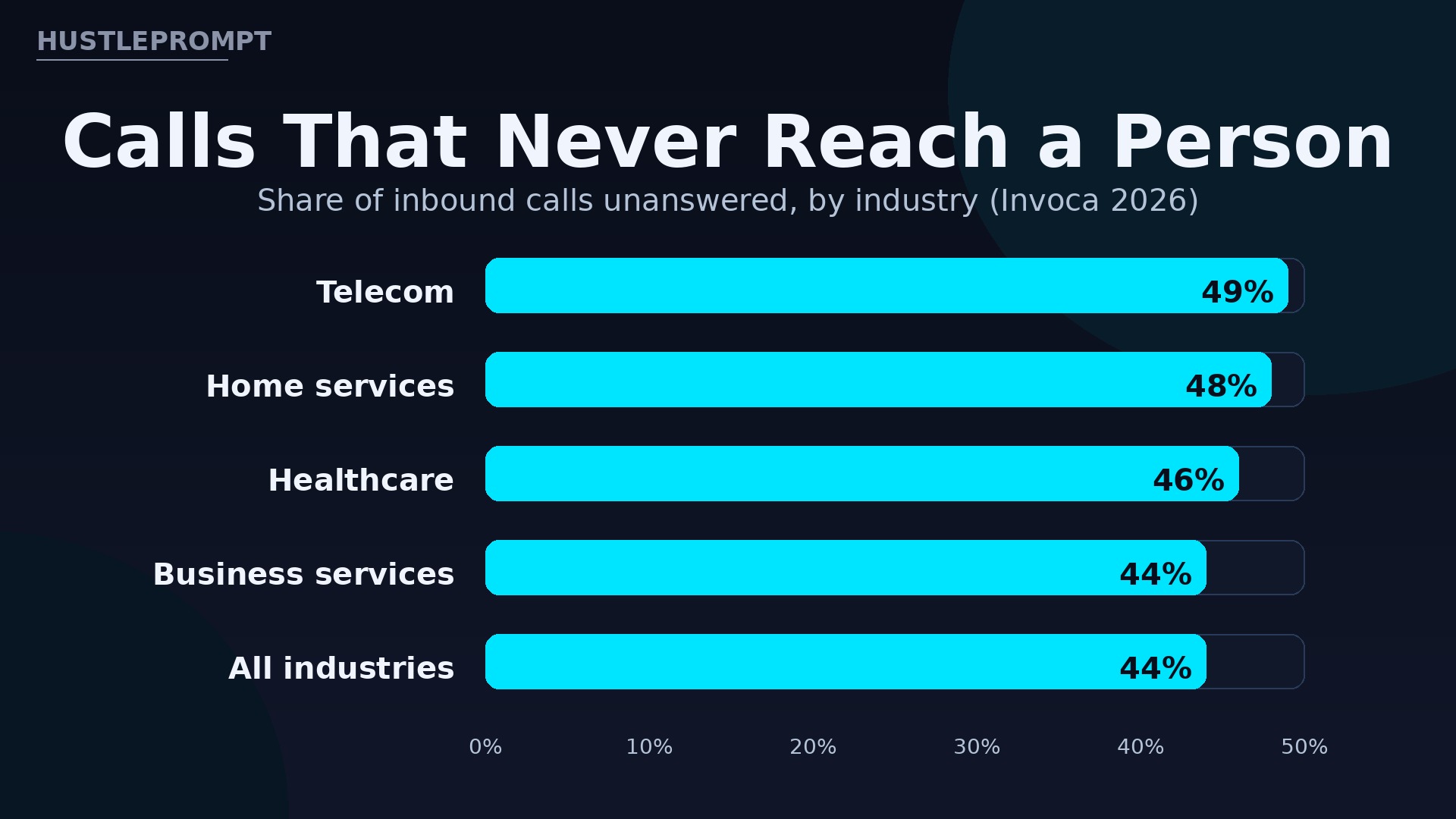
Most owners underestimate the missed-call problem: a caller who gets no answer usually says nothing and books elsewhere. Invoca’s 2026 benchmark of 70 million-plus calls found only 56% of callers reach a person. For calls over 30 seconds — real callers, not misdials — the answer rate is 71%.
| Industry | Never reach a person | Answered |
|---|---|---|
| Telecom | 49% | 51% |
| Home services | 48% | 52% |
| Healthcare | 46% | 54% |
| Business services | 44% | 56% |
| All industries | 44% | 56% |
What callers do next is the sales pitch. CallRail surveyed 1,000 U.S. consumers in September 2025: 78% have abandoned a business after an unanswered call, 82% say they would call a competitor, and 21% call another business immediately. Only 42% leave a voicemail.
The calls that do connect are worth real money. Invoca found 38% of answered calls from digital marketing are genuine leads, and 42% of those leads convert to an appointment or sale on the call. Every call your AI answers is a lead the owner already paid to generate.
What the platforms charge
| Platform | Entry plan | What it includes | Booking + transfers |
|---|---|---|---|
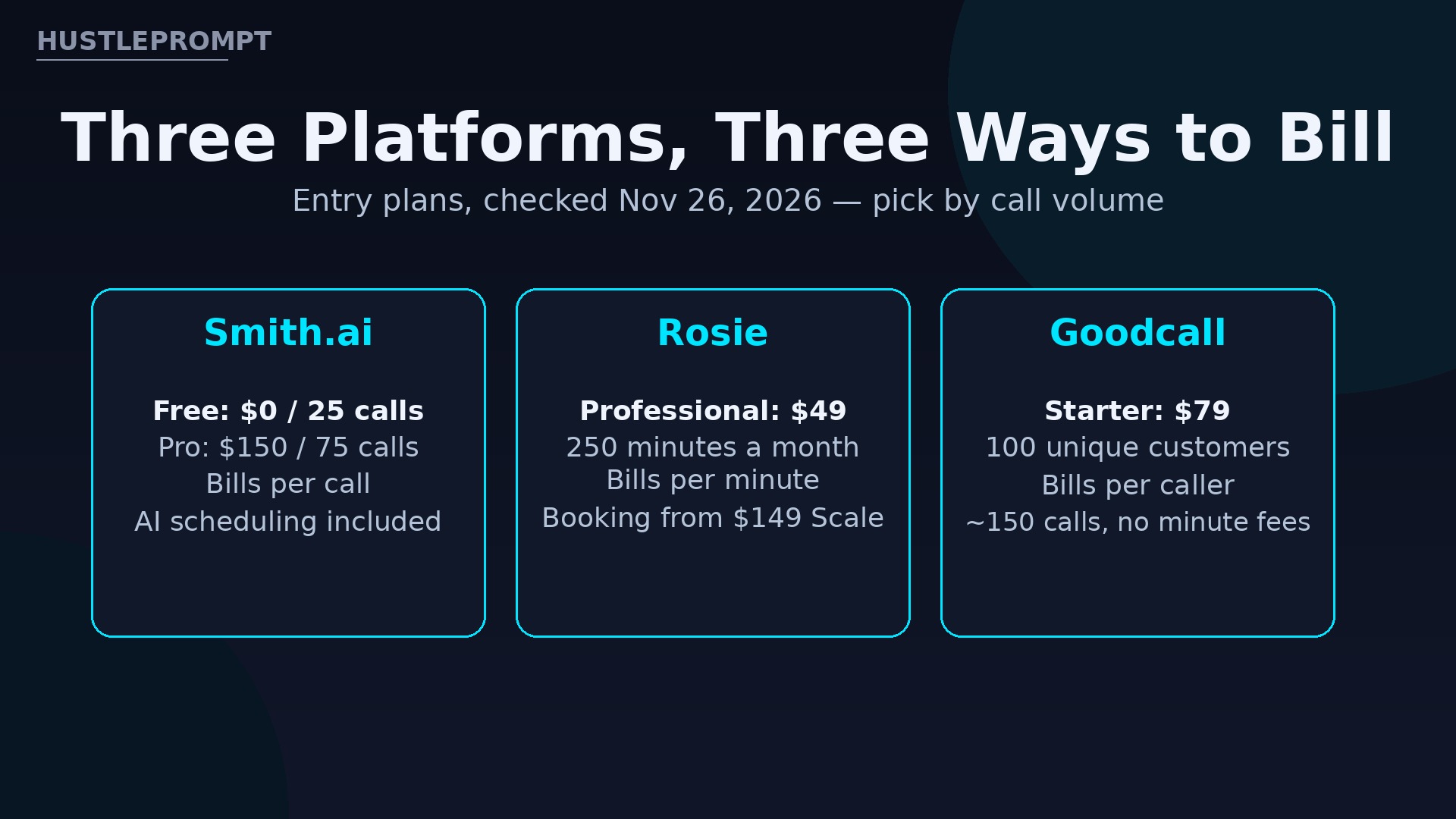
| Smith.ai AI Receptionist | Free: $0/mo, 25 calls; Pro: $150/mo, 75 calls | 24/7 answering, recordings, transcripts | AI scheduling, warm transfers |
| Rosie | Professional: $49/mo, 250 minutes | 24/7 answering, spam filter, text summaries, 7-day trial | Booking + transfers from $149/mo Scale |
| Goodcall | Starter: $79/mo, ~150 calls | No per-minute charges, local number, demo agent | Booking and transfers on every plan |
Start on the free or cheapest tier for every pilot. Smith.ai Free covers 25 real calls a month at $0, and Rosie’s 7-day trial unlocks every feature. The client pays for their own plan.
How it works
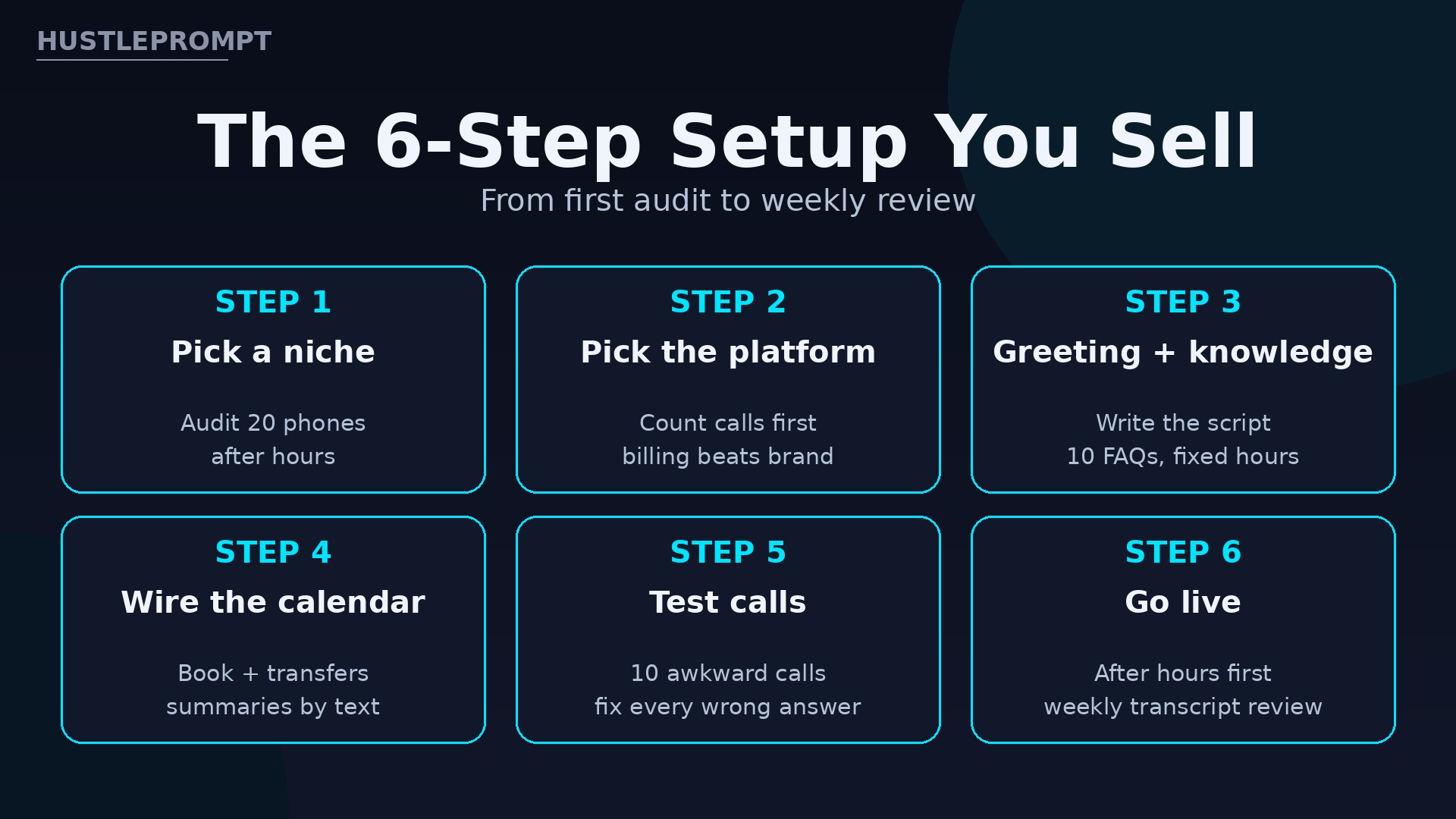
Step 1: pick a niche, audit phones
Pick one pair: plumbers in one city, or dental practices in one county. Audit 20 targets the way a caller would: ring them at 7 p.m. on a Tuesday, and again at 10 a.m. on a Saturday. A plumber whose phone rings out twice is a warm lead — with the evidence for your pitch.
Step 2: pick the platform
Count the client’s calls first: last month’s inbound calls and average length, from the phone bill. Under 25 calls a month, Smith.ai Free costs $0. A salon at 100 to 150 calls fits Rosie Professional at $49 or Goodcall Starter at $79. A dental practice at 300 fits Smith.ai Pro at $500 or Rosie Scale at $149. Billing model beats brand: per call, per minute, or per unique caller.
Step 3: greeting and knowledge base
Write the greeting before you touch any settings. Thirty seconds, in the business’s own voice: “Thanks for calling Bright Smile Dental, this is Alex, your AI assistant. How can I help?” Then build the knowledge base from the ten questions callers ask every week — hours, location, prices, service area, cancellation policy. If the website lists last year’s hours, the AI will quote them — fix the site first.
Step 4: wire calendar and transfers
Connect the calendar the business lives on — Google Calendar or Outlook — and test a booking end to end first. Then set the transfer rules: emergencies to the owner’s mobile, sales calls to the front desk, everything else a message with a callback number. Point summaries at the owner’s phone by text. On Rosie, direct booking and warm transfers start on the $149 Scale plan; on Smith.ai, scheduling is on every plan, including Free.
Step 5: run ten test calls
Call the number yourself with the questions nobody planned for: a price the AI was never given, an angry warranty complaint, a mumbling caller, and a spam caller selling SEO. Smith.ai’s Quality Studio runs simulated calls for this, and Goodcall’s demo agent lets you hear it before you pay. Fix every wrong answer, then call again. A receptionist that invents prices is worse than no receptionist at all.
Step 6: go live, review weekly
Forward unanswered and after-hours calls first — the calls already being lost. Once the owner trusts the summaries, move to full daytime coverage. Then read the transcripts weekly: fix wrong answers, add the questions callers keep asking, and send a one-page report. The weekly review is the whole retainer.
What to charge
No official price list exists — illustrative ranges.
| Package | Illustrative price | What it includes |
|---|---|---|
| Setup only | $600 to $1,200 one-time | Greeting, knowledge base, calendar, 10 test calls |
| Setup + first month | $1,200 to $2,500 one-time | Above + 4 weeks of review |
| Monthly management | $300 to $600 a month | Weekly review, updates, monthly report |
Scale it: 4 setups a month at $900 is $3,600, and 2 clients on a $400-a-month plan add $9,600 a year.
Mistakes that kill this business
- Going live on all calls day one. Start after hours, earn trust, expand.
- Letting the AI quote prices it was never given. No price on file? Take a message.
- No escalation path. Angry callers and emergencies need a human, fast.
- Skipping the test calls. Ten awkward calls beat one furious owner.
- Never reading the transcripts. The weekly review is the retainer.
- Working in your own account. The client must own the platform and the number.
Frequently Asked Questions
What is an AI receptionist setup service?
A done-for-you service that configures an AI voice agent to answer a local business’s phone 24/7: greeting script, knowledge base, calendar booking, transfer rules, test calls.
How is a phone AI receptionist different from a website chatbot?
A chatbot answers typed questions on a website (post 8527). An AI receptionist answers live voice calls: it greets the caller, holds a spoken conversation, books the appointment, and transfers urgent calls.
Which AI receptionist platform should I start with?
Count the client’s calls first. Under 25 a month, Smith.ai Free costs $0. For 100 to 150 calls, Rosie Professional at $49 or Goodcall Starter at $79. For 300 calls, Smith.ai Pro at $500 or Rosie Scale at $149.
How long does an AI receptionist setup take?
Smith.ai says its AI Receptionist can be set up in about 15 minutes, but production setup takes a few hours: greeting, knowledge base, calendar wiring, ten test calls. Budget half a day for the first client.
How much can I charge for AI receptionist setup?
Illustrative: $600 to $1,200 for setup only, $1,200 to $2,500 for setup plus the first month, and $300 to $600 a month for ongoing review. The client pays the platform separately.
Do callers accept talking to an AI on the phone?
Better than most owners expect. In CallRail’s September 2025 survey of 1,000 U.S. consumers, 52% said businesses using AI assistants after hours provide superior service, and 50% would use AI to book.
Keep Reading
- Sell AI Appointment Booking to Local Service Businesses.
- Sell AI Chatbot Setup Services to Local Businesses.
- How to Start an AI Automation Agency (From Zero to First Client).
Sources: Invoca Benchmarks Report 2026 — invoca.com; CallRail consumer survey, September 2025 — callrail.com; Smith.ai AI Receptionist pricing — smith.ai; Rosie pricing — heyrosie.com; Goodcall pricing — goodcall.com.