
Your video is finished. The hard part starts now: the thumbnail, the title, and the long stare at YouTube Analytics, trying to work out why one video took off and the next flopped. That second job is what Onset AI YouTube wants to take off your plate.
Onset launched on Product Hunt on November 26, 2026, and landed at No. 9 in Product Hunt’s best-of list for November 27. It is a web app that reads your YouTube Analytics, reviews each upload 48 hours after it goes live, and drafts titles and thumbnails from what worked on your channel.
For creators, that timing matters. A title and a thumbnail decide whether anyone clicks. A better click-through rate means more views from the same impressions, more ad revenue, more watch time, more leverage with sponsors. Onset attacks that lever with your numbers, not generic advice.
What Onset actually does
Onset connects to your channel with a Google sign-in and read-only access. Your recent uploads load right away. At launch, it does three things.
- It reviews every upload. Forty-eight hours after you publish, it compares click-through rate and retention with your channel average and marks where viewers left.
- It drafts titles in your voice, from what worked on your channel, not a template. The site says it handles Hinglish too.
- It drafts thumbnails in your style. You add a photo and up to three real frames from your video, and drafts are built around them.
It also hands you a brief for your next video — angle, hook, title, thumbnail direction — ready before you film. The maker, Nirav, puts it plainly: filming is not the hard part, the second job is. Onset does that second job with your numbers.
How the 48-hour review works
The 48-hour wait is the smartest choice. Onset does not guess on day one. It waits for real data, then measures your video against your average, not a generic benchmark. A 4 percent click-through rate means nothing alone — until your average is 6 percent, or 2 percent.
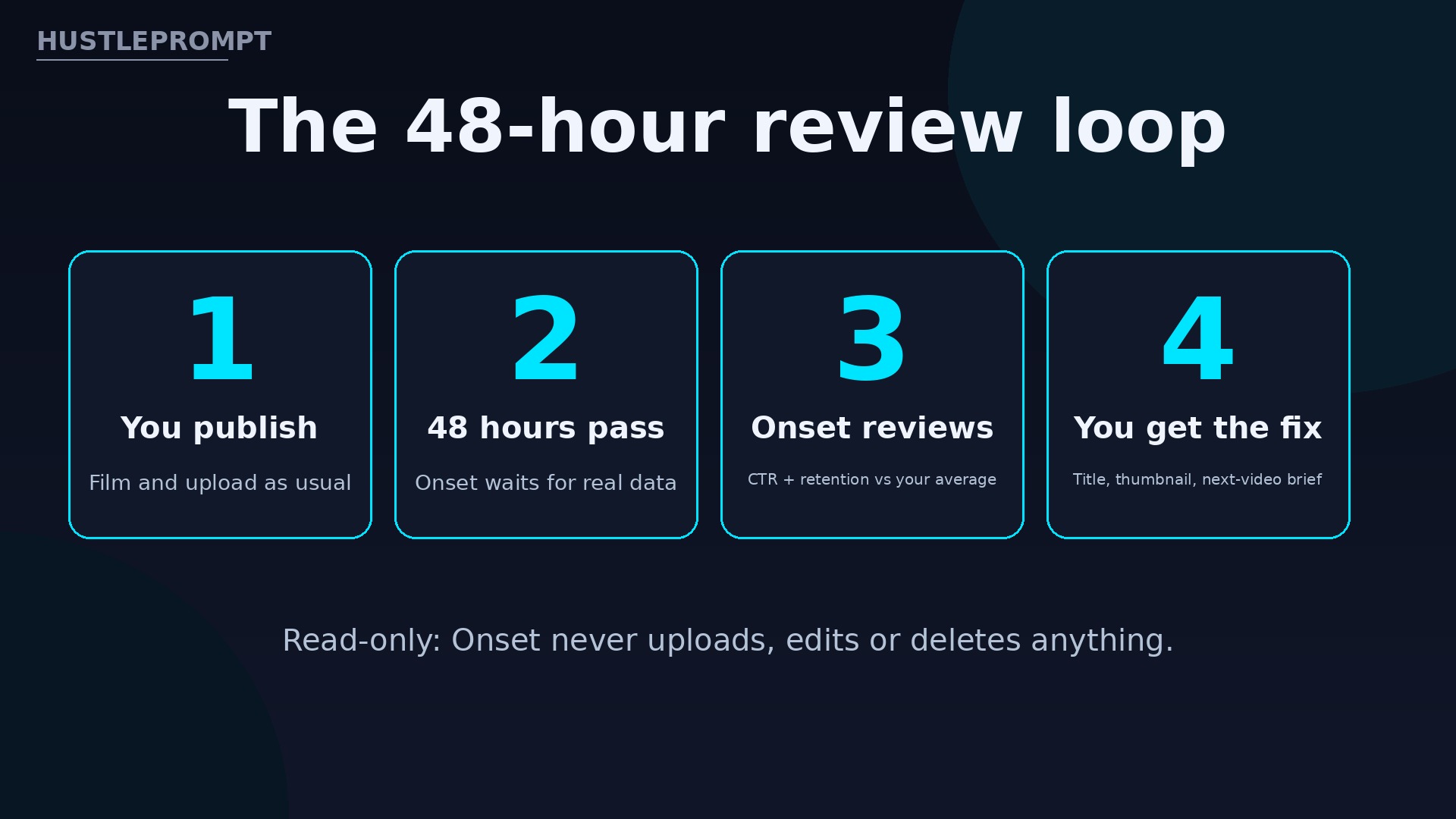
The review shows what happened, then drafts the fix. Publish, wait 48 hours, read the review, and swap in a sharper title or thumbnail. YouTube lets you change both after a video is live, so a late review can rescue a weak video.
Onset’s site shows an example review screen. The numbers are illustrative, not a real channel — the site says so. It still shows the format: a measured result, a comparison with your average, a suggested fix.
Onset’s example review screen (illustrative numbers from onsetapp.in)
| Metric | This video | Channel average | What it means |
|---|---|---|---|
| Click-through rate | 3.1% | 5.4% | Below average — Onset drafts a new thumbnail |
| Average view duration | 6:42 | 5:10 | Above average, the video itself holds up |
| Biggest drop-off | 0:42 | — | Intro ran long, cut it next time |
Source: onsetapp.in — the site labels this screen as an example with illustrative numbers. Two title drafts appear beside it, including a shorter alternative to the original.
What it costs versus hiring help
The honest money math: Product Hunt lists Onset at $0, and access runs through a waitlist, a few creators at a time. No paid plan has been announced, so it is free to try — if you get a spot.
Compare that with hiring a human. A freelance editor or thumbnail designer charges per video or on a retainer, and rates vary widely. Onset does not replace that person. It replaces the guessing before you hire anyone.

Onset vs. hiring a human editor or designer
| Factor | Onset | Human editor / designer |
|---|---|---|
| Cost | $0 listed price; waitlist access, no paid plan announced | Per-video fee or monthly retainer; rates vary widely |
| Turnaround | Review 48 hours after each upload | Depends on availability and workload |
| What you get | Review, title drafts, thumbnail drafts, next-video brief | Full edit, custom design, creative judgment |
| Data used | Your own YouTube Analytics vs. your channel average | Experience, taste, and your direction |
| Limits | No video editing yet; read-only, never posts | Costs money on every video, even the flops |
Sources: Product Hunt listing and onsetapp.in. Freelance rates are not quoted because they vary too much to state as a fact.
The smart play is not either-or. Use Onset to learn what your audience clicks, then pay a human only where the data says it pays: a better edit for videos that earn, or a designer for thumbnails that need a human eye.
How to profit from Onset
Onset only pays off if you close the loop. The review is free information; the profit comes from acting on it, every upload.
- Join the waitlist. Go to onsetapp.in and tell them about your channel. Product Hunt users get in first.
- Connect your channel. Sign in with Google and grant read-only access to your views, watch time, retention, and click-through rate. It never uploads, edits, or deletes anything.
- Publish, then wait 48 hours. Do not judge a video on day one.
- Read the review and apply the fix. If click-through rate trails your average, swap in a drafted thumbnail or title. YouTube allows both changes after publishing.
- Use the brief before you film the next one. Take the angle, the hook, and the thumbnail direction into your next video.
- Track your average over 4 to 6 uploads. One review is a hint. A rising average is proof the loop works.
Second way to profit: sell this workflow to other creators. Title and thumbnail packages built from their analytics are a real freelance offer.
Where human judgment still matters
Onset is a packaging tool, not a taste machine. It can tell you viewers left at 42 seconds, but not whether the joke there was worth keeping. It can draft ten titles, but not know which one feels honest and which one feels like clickbait.
Three things stay human. First, the idea: no analytics tool invents a video worth watching. Second, taste: a thumbnail that wins clicks but misleads viewers costs trust later. Third, the edit: AI rough-cuts are on the roadmap, not in the product today.
One privacy point: Onset asks for read-only access through Google sign-in, never sells your data, and lets you disconnect or delete your account at any time in Settings. Read-only is the right design.
Who should join the waitlist
Onset fits creators who publish regularly with enough uploads for a meaningful channel average. Post once a month and a 48-hour review teaches little. Post weekly and the loop compounds fast.
It also fits solo creators who cannot yet justify a full-time editor. The price is $0, access is a waitlist, and the risk is an hour to connect a channel and read the first review.
Onset is early: its biggest features — AI rough-cuts, a rate card from real numbers, brand deals in one place — are still on the roadmap. But the core loop is live now, and the cheapest time to learn what your audience clicks is before everyone else does.
Frequently asked questions
What is Onset?
Onset is a web app for YouTube creators. It connects to your channel, reviews each upload 48 hours after it goes live using your own YouTube Analytics, and drafts titles and thumbnails in your channel’s style. It launched on Product Hunt on November 26, 2026.
How much does Onset cost?
Product Hunt lists Onset’s price as $0, and access is through a waitlist at onsetapp.in. No paid plan has been announced. Creators are let in a few at a time, with Product Hunt users first.
Does Onset post to my YouTube channel?
No. Onset is read-only. It never uploads, edits, or deletes anything on YouTube. It reads your channel data through the YouTube Data API and YouTube Analytics, and you can disconnect it or delete your account at any time.
How does the 48-hour review work?
Forty-eight hours after you publish, Onset compares your video’s click-through rate and retention with your channel’s own average, marks where viewers left, and drafts a fix: a new thumbnail, a sharper title, and a brief for your next video.
Can Onset write titles in my voice?
That is the idea. The titles are built from what worked on your channel, not from generic templates. The site says it handles Hinglish as well as English.
Can I use Onset to sell services to other creators?
Yes. The review loop, analytics-based titles, and thumbnail drafts are a service you can offer to other YouTubers. Package it as a title and thumbnail service, and use Onset’s reviews as the evidence you show clients.
What is coming next for Onset?
According to the launch post and the official site, AI rough-cuts from raw footage are next, followed by a rate card built from your real numbers and a place to manage brand deals, invoices, and payments.
Keep Reading
- Sell AI YouTube Thumbnail and Title Services to Creators
- Best AI Tools for Freelancers (by Task) in 2026
- Riverside Review 2026: Worth $29/Month?