
What if the cheapest H100 on the internet was not on a cloud dashboard at all, but one command away? That is the pitch behind gpyou GPU compute, a new command-line tool that launched on Product Hunt on November 27, 2026. It pools four GPU clouds into one market, lists every GPU with 24 GB or more in stock, and rents the cheapest one first.
For freelancers and small teams, GPU rental is often the biggest line item. A fine-tune that runs overnight or a coding agent that burns tokens all day can turn into a four-figure bill. gpyou attacks that bill simply: never pay the first price you see.
What gpyou actually does
gpyou is a command-line interface, not a dashboard. Install it with pipx install gpyou (Python 3.12 or newer) or the one-line installer on its site, then sign in with an email code, a passkey, or an authenticator app. No API key; the session lives in your operating system keychain.
The core command is gpyou gpus. It shows every GPU with 24 GB or more in stock across the pool, cheapest first. Pick one to run a container, start a QLoRA fine-tune, or serve a model with vLLM. The price shows before anything is rented.
Behind the scenes, gpyou pools four providers, all on demand: Runpod Secure Cloud, Vast.ai verified hosts, Verda, and Shadeform. You get every GPU model with at least 24 GB in stock, such as the RTX 4090, L40S, A100, H100, and H200.
The money math: what the cheapest GPU costs right now
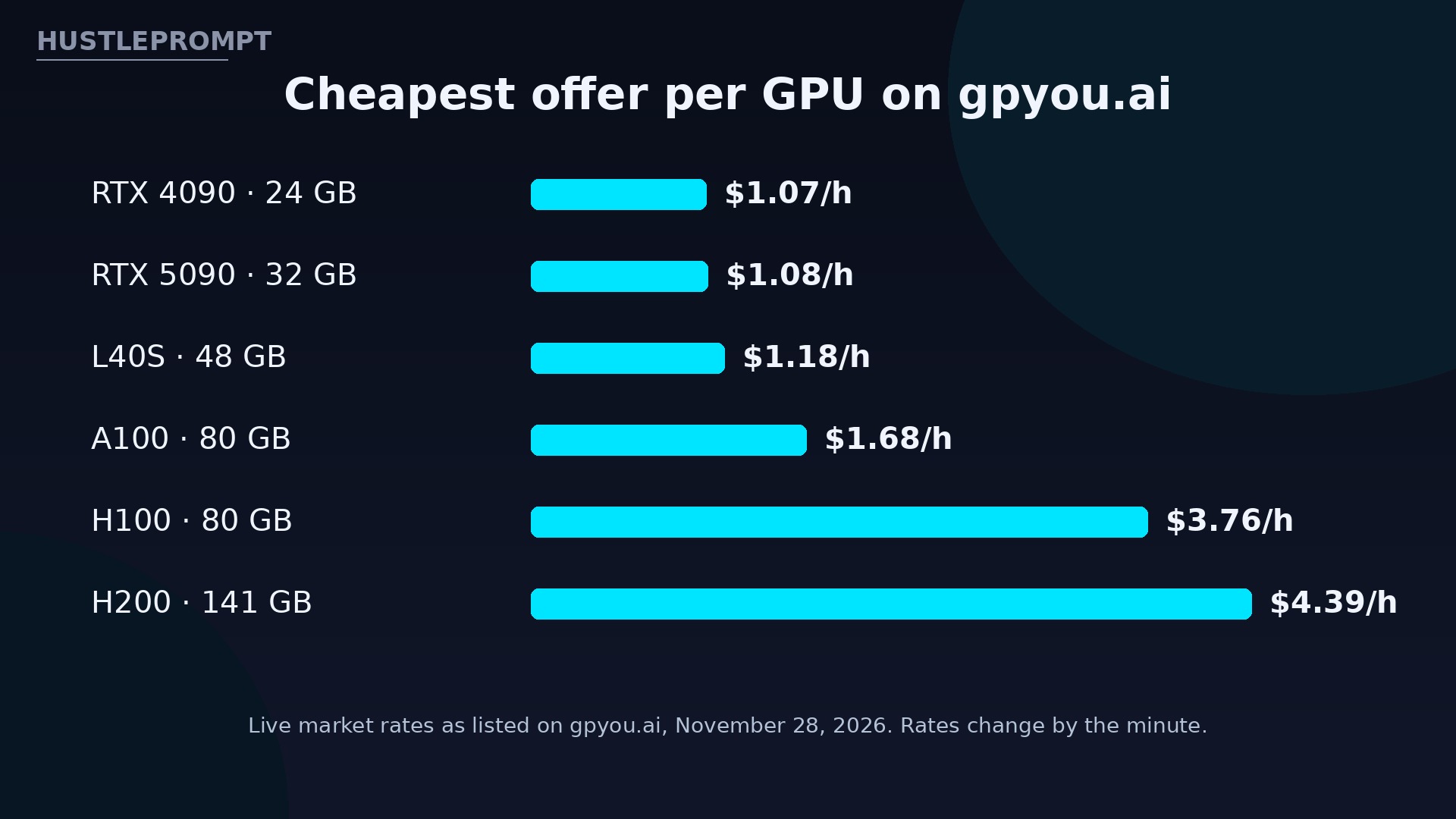
Here is the live list from gpyou’s homepage, November 28, 2026. Rates move by the minute.
| GPU | VRAM | Cheapest offer |
|---|---|---|
| RTX 4090 | 24 GB | $1.07 per hour |
| RTX 5090 | 32 GB | $1.08 per hour |
| L40S | 48 GB | $1.18 per hour |
| A100 | 80 GB | $1.68 per hour |
| H100 | 80 GB | $3.76 per hour |
| H200 | 141 GB | $4.39 per hour |
At those rates, the math gets concrete fast. Ten hours of fine-tuning on an RTX 4090 costs about $10.70; the same ten hours on an H100 costs about $37.60. An eight-hour coding day on your own RTX 5090 costs about $8.64. Those are one day’s list rates.
The demo on gpyou’s homepage makes the same point in miniature. Asking for an RTX 4090 under a $2.50 per hour cap returned 9 offers from 4 providers, cheapest $0.46 per hour on Vast.ai, next $0.52 on Runpod.
What “cheapest in stock” actually means in practice
Stock is the hard part of GPU rental. The newest cards, like the B200 and B300, are hard to get at all, and a listed price means nothing if the card is gone when you click rent. So gpyou ranks by confirmed stock, not advertised price, weighing stock, launch history, and price, with region and country limits applied first.
It also falls back automatically: if the cheapest offer is sold out or refused, it tries the next offer, and a running job is never moved. And it refunds fast. No machine in 15 minutes and your reserved credit comes back, while fine-tunes checkpoint every 100 steps.
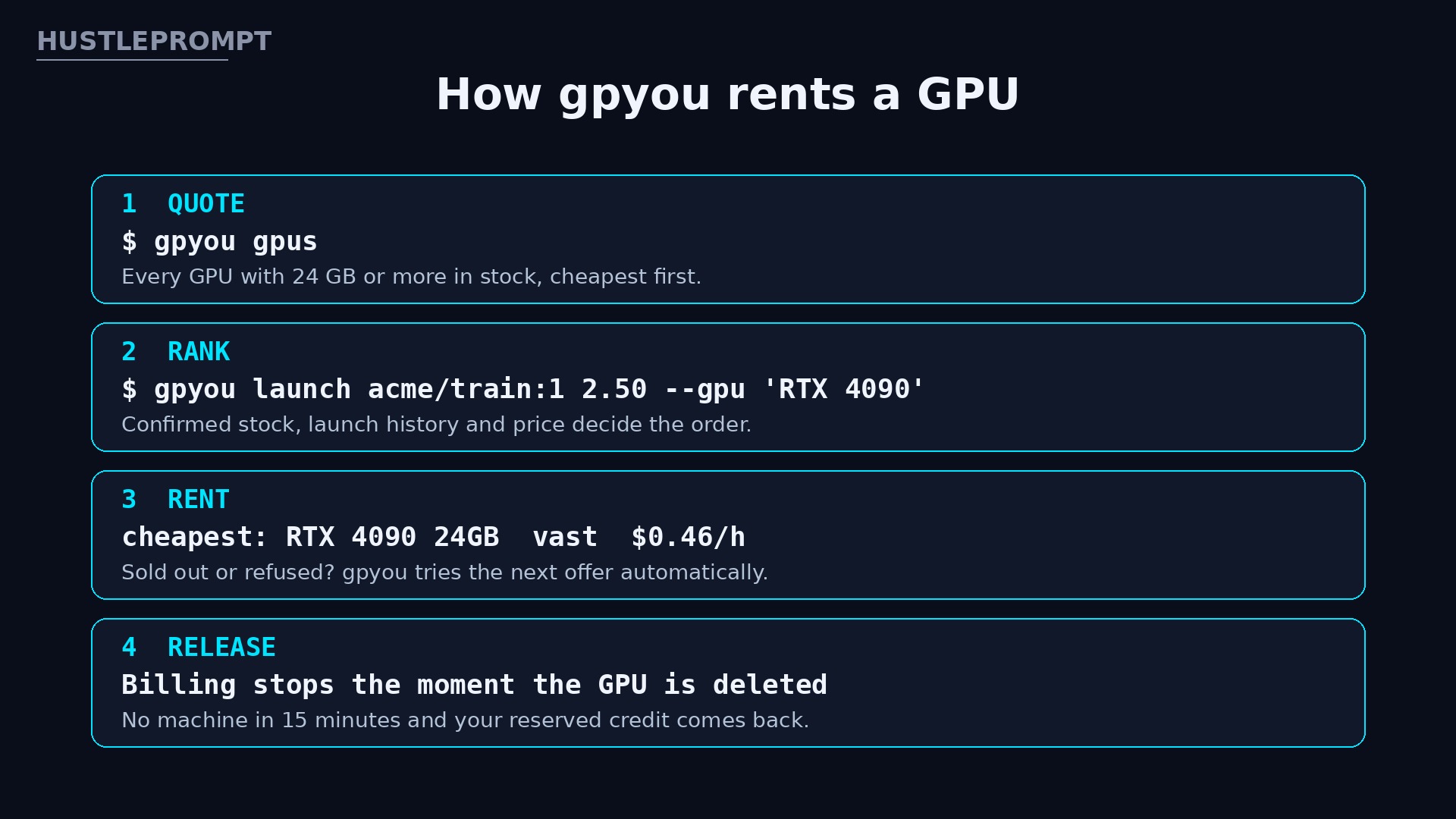
How it works: quote, rank, rent, release
1. Quote
You ask for a GPU. gpyou reads every provider and the clouds behind them, and shows the price first.
2. Rank
Confirmed stock, launch history, and price decide the order. Region and country limits apply first.
3. Rent
Sold out or refused? The next offer is tried. No machine in 15 minutes and your credit returns.
4. Release
Billing stops the moment gpyou asks the provider to delete the GPU. Nothing runs when you are not using it.
gpyou runs on prepaid credit, bought in top-ups of $10 to $1,000 through Stripe, with an optional auto top-up and monthly limit. GPUs are charged per second at the quoted rate. No subscription, no seat fee.
| Item | Price | Detail |
|---|---|---|
| GPU compute | Live market rate | Per second, at the rate you were quoted |
| Coding models | Same GPU rate | Nothing while paused; optional monthly cap |
| Endpoints | Same GPU rate | Only while awake; released after 15 idle minutes |
| Storage and images | $0.018 per GB per month | 1 TiB per account |
| Transfer | Quoted per GB | Capped per job with a max-transfer flag |
| Watches and GPU list | Free | Reserving bills your own provider account |
| Credit | $10 to $1,000 per top-up | Optional auto top-up; USD, VAT where it applies |
That per-second billing is where the savings hide. A container that crashes releases on exit, so it stops billing. An endpoint releases the GPU after 15 idle minutes. A coding model pauses itself after 15 or 60 idle minutes, releasing the GPU.
Six ways to use a GPU
| Use | What it does | Command |
|---|---|---|
| Coding models | Qwen3.8-27B on your own GPU, behind an OpenAI-compatible address for aider, OpenCode, Cline, Continue, and Codex CLI | gpyou code start |
| Containers | Run any image on 1 to 8 GPUs, up to 7 days; release on exit | gpyou launch |
| Fine-tuning | QLoRA on any public model that fits, with dataset validation, a quote, and a hard spend cap per job | gpyou finetune |
| Endpoints | Serve a model on 1, 2, 4, or 8 GPUs with vLLM and tensor parallelism | gpyou serve |
| Watches | Email when a GPU appears under your price, or reserve it at once on your own provider account | gpyou watches add |
| GPU list + MCP | Public list of what is in stock, plus a find_gpus tool for AI assistants; no account needed | gpyou gpus |
The coding model is the most interesting for freelancers. gpyou code start puts Qwen3.8-27B on a GPU of your own, on an RTX 5090, H100, or RTX PRO 6000, behind an OpenAI-compatible address. Point your coding agent at it and pay for GPU hours, not tokens.
The watch feature solves the other classic GPU problem: the card you need is never in stock. gpyou reads stock once a minute, and a watch emails you once when a B200 or B300 appears under your price.
The free tier is free. The live GPU list and the MCP tool need no account. Any assistant can call find_gpus and answer “which 80 GB GPUs are in stock in the EU under $3?”
How to profit from cheaper GPU compute
- Price the job before you run it. Check
gpyou gpusand read the quote first. A 24 GB card is enough for many fine-tunes and small endpoints. - Fine-tune small, sell the result. A QLoRA fine-tune with a hard spend cap is a fixed-cost project. Quote a flat fee covering GPU hours plus your margin.
- Replace token bills with GPU hours. If your coding agent burns tokens all day, run Qwen3.8-27B on your own GPU and pay the hourly rate. Pause it when you stop.
- Serve demos, not servers. Spin up a vLLM endpoint for a client demo. It releases after 15 idle minutes, so you pay for the demo, not a month of server.
- Watch the cards you cannot buy. Set a watch on the B200 or B300 at your max price. The reserve option can grab the card the minute it appears.
- Keep the job in the right region. If client data must stay in the EU, pass the Verda provider flag. Verda is in the EU; Runpod, Vast.ai, and Shadeform machines can sit outside it.
The honest limits
gpyou is a public beta, and the site says so plainly. Accounts are approved by hand, there is no SLA, and commands may still change. Endpoints are for development, with no autoscaling, so it rules out production traffic today but fits experiments, fine-tunes, and demos.
Two more limits matter. Everything is prepaid credit only, so you top up before you rent, with no free trial of the paid features. Your data lives in Cloudflare R2 under EU jurisdiction, but jobs run at the provider you land on.
None of that is a reason to skip it. Start with the free list and run one small fine-tune with a spend cap.
The maker’s one-minute walkthrough from the Product Hunt launch.
Frequently asked questions
What is gpyou?
gpyou is a command-line tool that pools GPU clouds into one market. It lists every GPU with 24 GB or more that is in stock, cheapest first, and rents the cheapest offer, billed per second from prepaid credit.
Which GPU clouds does gpyou use?
Runpod Secure Cloud, Vast.ai verified hosts, Verda, and Shadeform, all on demand. More providers are on the way, according to the gpyou site.
How much does gpyou cost?
There is no subscription. You buy prepaid credit in top-ups of $10 to $1,000 through Stripe, and GPUs are charged per second at the rate you were quoted. Storage costs $0.018 per GB per month, and the GPU list and watches are free.
What happens if the cheapest GPU sells out?
gpyou tries the next offer automatically. If no machine appears within 15 minutes, your reserved credit comes back. A running job is never moved.
Can I run my own coding model with gpyou?
Yes. The command gpyou code start puts Qwen3.8-27B on a GPU of your own, on an RTX 5090, H100, or RTX PRO 6000, behind an OpenAI-compatible address for aider, OpenCode, Cline, Continue, and Codex CLI. You pay for GPU hours, not tokens.
Is gpyou ready for production work?
Not yet. It is a public beta with hand-approved accounts, no SLA, and endpoints built for development with no autoscaling. It fits experiments, fine-tunes, demos, and personal coding models today.
Keep Reading
Anthropic Pays xAI $3.1 Billion a Month for Compute
Nvidia Nemotron Image Model Fine Print