
Every freelancer knows the drill. You brief Claude on a client’s brand voice on Monday, then spend Tuesday re-typing the same brief into ChatGPT, and Wednesday pasting it into Cursor. AI Context Flow 2.0, which finished #2 on Product Hunt on November 21, 2026, attacks exactly that waste: one shared memory that every AI tool you use can read.
The pitch is simple. Save your context once — a client brief, your rates, your writing style, a project’s rules — and every connected assistant pulls it in automatically.
What AI Context Flow 2.0 actually does
AI Context Flow is a shared memory layer made by Plurality Network. It stores your context outside any single assistant, in memory buckets, and serves it to your tools through a Chrome extension and an MCP server.
The extension works inside ChatGPT, Claude, Gemini, Grok, and Perplexity: press Ctrl+I and your saved context drops into the prompt.
The MCP server is the bigger deal for working freelancers. MCP, the Model Context Protocol, is the open standard AI tools use to connect to outside data. Connect AI Context Flow’s server once, and Cursor, Claude Code, Claude Desktop, Windsurf, and GitHub Copilot can search your memory, read the right bucket, and save decisions back to it. The vendor says the MCP server is free on every plan.

What is new in version 2.0
Version 2.0 launched on Product Hunt on November 21, 2026, and it adds four things that matter for client work:
- Buckets. Sort memory by project, client, or brand, and choose who can access each one.
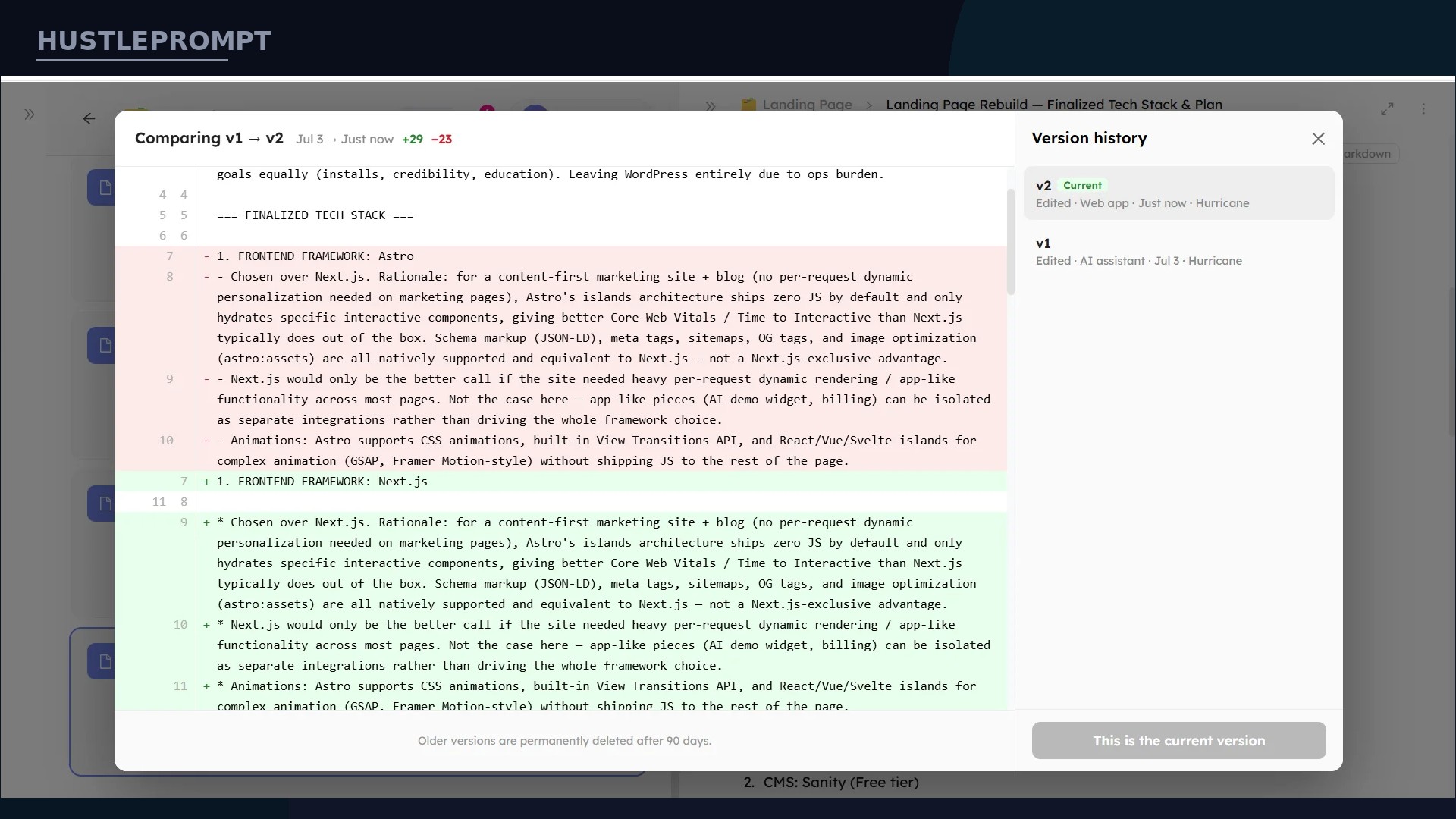
- Version history. Every edit is versioned, including edits made by AI tools. Roll back when an agent overwrites something. Older versions are kept for 90 days.
- Memory Studio. One web hub where you view, edit, sort, and filter all your context, with a built-in editor.
- The MCP server as a first-class feature. Connect once from Claude, ChatGPT, Cursor, or any other MCP client, and the same memory follows you everywhere.
How it works
Setup is short. The vendor says it takes about two minutes per tool:
- Create a free account and save your first bucket. Start with one bucket per client, plus an “About me” bucket.
- Copy your MCP URL. It is a single address,
https://app.plurality.network/mcp, and it works for every MCP client. - Add it as a connector in your AI tool and sign in. Add a custom MCP connector, paste the URL, and sign in with OAuth. Connections are permission-scoped and revocable.
- Use the extension for web chats. Where a tool has no MCP support yet, the Chrome extension inserts the same buckets with Ctrl+I.
Once connected, the flow runs both ways. Your assistant searches your memory by meaning, reads only what it needs, and writes decisions back so the next tool starts from them.
What it costs
Three plans, and the MCP server is included on all of them. The free plan covers the whole idea — buckets, extension, MCP server — while paid plans add daily credits, memory, and Personal Access Tokens.
| Plan | Price | Credits per day | Memory | Extras |
|---|---|---|---|---|
| Free | $0 | 200* | 50 MB | MCP server, context sharing |
| Plus | $10/mo or $99/yr | 1,500 | 500 MB | Premium models, Personal Access Tokens |
| Pro | $20/mo or $199/yr | 5,000 | 5 GB | Premium models, Personal Access Tokens |
*One honest flag: the vendor’s own pages disagree on the free plan’s daily credits. Its pricing table and guide list 200 a day, while the FAQ on the same product page lists 100 a day. This article uses 200 because that is the figure in the pricing table. Annual billing saves roughly 20%, according to the vendor. Every signup gets a 7-day free trial, and code AICFHUNT20 gives 20% off an annual plan until November 30, 2026.

How freelancers can profit from it
The money case is time. The vendor claims users typically save 10 or more minutes per AI conversation by cutting repetitive context-setting, and that marketers save an average of 12 or more hours a week. Those are the vendor’s numbers, not independent measurements.
Here is a setup that pays off fast if you run client work across several tools:
- One bucket per client. Brief, audience, tone rules, banned terms, and past decisions live there. Nothing crosses over.
- One “About me” bucket. Your services, rates, and writing style.
- Share by link when a client joins. Give a client or teammate viewer or editor access to one bucket instead of forwarding a chain of documents.
- Let agents write back. When Cursor or Claude Code finishes work, the decisions land in the bucket, so the next session starts where the last one stopped.
At $10 a month, Plus pays for itself if it saves you roughly one billable hour a month. Start free, though. If you only use one assistant, the vendor itself says you probably do not need this at all.
AI Context Flow vs built-in memory
ChatGPT, Claude, and Gemini all have their own memory now: Projects, project knowledge, and Gems. They work well — inside their own walls. A Claude Project does nothing in ChatGPT, and a ChatGPT Project does nothing in Gemini. Use three assistants and you maintain three copies that drift apart.
| Feature | ChatGPT Projects | Claude Projects | Gemini Gems | AI Context Flow |
|---|---|---|---|---|
| Works across assistants | No | No | No | Yes |
| AI fetches context on its own | Yes, inside ChatGPT | Yes, inside Claude | Yes, inside Gemini | Yes, via MCP |
| AI can save back to it | No | No | No | Yes, via MCP |
| Version history | Limited | Limited | Limited | Yes, 90 days |
| Share with others | Limited, same assistant | Limited, same assistant | Limited, same assistant | Yes, by link |
| Cost | Included in assistant | Included in assistant | Included in assistant | Free plan; paid from $99/yr |
The honest answer is that built-in memory is enough if you live in one assistant. AI Context Flow earns its place when you use two or more, share context with other people, or run agents that need the same memory between runs.
The catches to know before you pay
No tool is perfect. There is no mobile app yet — the extension runs in Chrome. MCP needs a one-time setup of a few minutes per tool, and not every assistant supports MCP on every plan. In browser chats without MCP, you insert context by hand with the extension.
Privacy is the other question to ask. The vendor says your context is end-to-end encrypted, that nothing is mined or shared, and that you own every byte of your data. That is the vendor’s claim; no independent audit is cited on the product page. Read the privacy policy before storing sensitive client data.
Video: Plurality Network’s official demo of the extension and Memory Studio — not the 2.0 launch specifically.
Frequently asked questions
What is AI Context Flow?
AI Context Flow is a shared memory layer from Plurality Network. It stores your context — briefs, brand voice, notes, files — in memory buckets and serves it to ChatGPT, Claude, Gemini, Grok, Perplexity, and any MCP-compatible tool, so you save it once and reuse it everywhere.
What is new in AI Context Flow 2.0?
Version 2.0, launched on Product Hunt on November 21, 2026, adds an MCP server, memory buckets with per-bucket access controls, full version history with rollbacks, and Memory Studio, a web hub for viewing and editing all your context in one place.
How much does AI Context Flow cost?
The free plan costs $0 and includes the MCP server, the extension, and context sharing. Plus is $10 a month or $99 a year with 1,500 credits a day and 500 MB of memory. Pro is $20 a month or $199 a year with 5,000 credits a day, 5 GB of memory, and premium models.
Which AI tools does it work with?
The Chrome extension works inside ChatGPT, Claude, Gemini, Grok, and Perplexity. The MCP server connects the same memory to Cursor, Claude Code, Claude Desktop, Windsurf, GitHub Copilot, LM Studio, and other MCP-compatible tools.
Is my data private with AI Context Flow?
The vendor says your context is end-to-end encrypted, is never mined or shared, and stays under your control, with per-agent permissions you can revoke at any time. That is the vendor’s claim, and no independent audit is cited on the product page, so read the privacy policy before storing sensitive client data.
Do I need AI Context Flow if I only use ChatGPT?
Probably not. If you use one assistant, its built-in Projects or memory is usually enough. AI Context Flow pays off when you use two or more AI tools, juggle several clients, share context with a team, or run agents that need one shared memory.
Does AI Context Flow have a mobile app?
No. The extension runs in Chrome, and Memory Studio is a web app. There is no mobile app yet, according to the vendor’s own guide.
Keep Reading
- Claude Code Projects Update: Proactive Coordinator, Sharing
- Claude Gets 10,000+ Plugins — and Free Users Are In
- AI Coding Tools Double Output — or Cut It
Sources
- AI Context Flow — Plurality Network (product page: MCP server, pricing FAQ, privacy)
- AI Second Brain for ChatGPT, Claude & Gemini (2026 Guide) — Plurality Network (pricing table, buckets, version history)
- AI Context Flow 2.0 launch post — Product Hunt (2.0 features, trial, discount code)
- Best of Product Hunt: November 21, 2026 — Product Hunt (#2 placement)
- AI Context Flow — Chrome Web Store (extension version, developer, features)