
Editing is where most creators stall. Flurra’s maker, Kenny, puts it plainly: you know the edit you want — “cut the pauses, hook up top, logo in the corner” — but putting it on a timeline can take an hour of dragging clips. Flurra AI video editing flips that: describe the cut to Claude or ChatGPT, and the assistant makes it in your real Flurra project.
Flurra launched on Product Hunt on November 26, 2026 — one of the three products in Product Hunt’s daily newsletter, The Leaderboard, that day. It is not a video generator but a content intelligence platform connecting ideas, scripts, editing, planned posts, and results in one workspace.
For freelancers, the pitch is simple: editing caps how much you can publish. If a chat prompt clears that bottleneck, your output — and income — can grow without an editor for every video.
What Flurra actually does
Flurra turns uploaded footage into editable short videos: start from a script or upload clips, review an AI draft, tighten speech, adjust captions, then download the MP4.
- Research: save ideas in an Idea Bank and scan videos for what holds attention.
- Writing: write hooks and scripts in your own voice.
- Editing: build an AI first cut, review filler words and quiet gaps, refine captions and audio.
- Planning: pick a date per platform, with script and video linked to the plan.
- Learning: track results and feed wins into your next video.
Flurra runs on the web and iPhone, vertical (9:16) for Reels, TikTok, and Shorts, or landscape (16:9) for YouTube.
How the Claude and ChatGPT editing loop works
What sets Flurra apart is its connector: it links Claude, ChatGPT, Grok, and any assistant that supports remote MCP with OAuth sign-in. No API key — sign in once and approve access.
Once connected, describe the edit. Claude trims pauses, adds overlays, cuts you out of the background, or matches a reference video’s style. Preview every change — nothing is final until you decide.
- Connect. In Claude, add Flurra from its directory listing. For ChatGPT or Grok, paste the MCP URL from flurra.io/connectors.
- Approve access. Read access shows the assistant your projects; write access lets it edit and render.
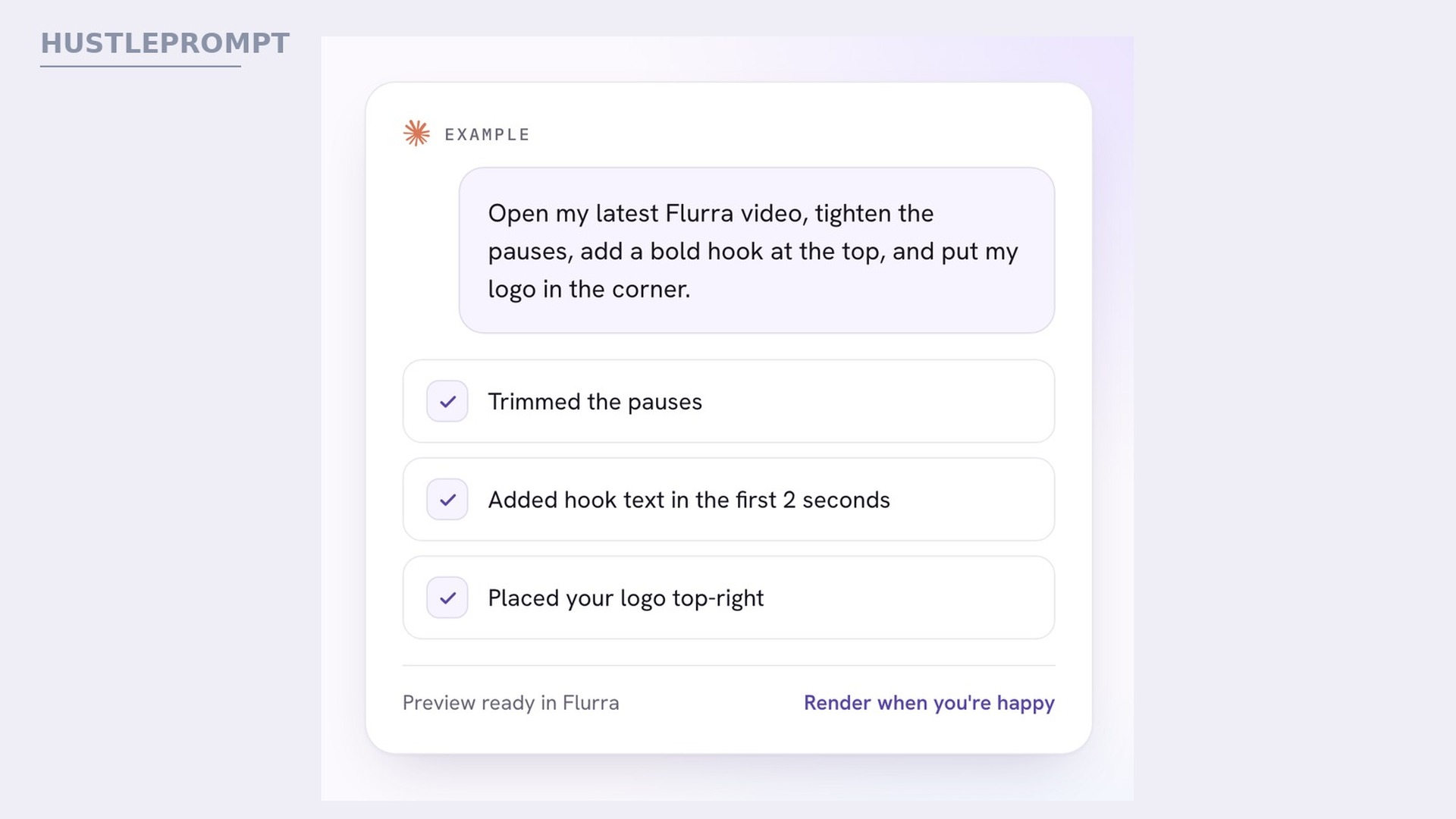
- Describe the edit. Try Flurra’s own example: “Open my latest Flurra video, tighten the pauses, add a bold hook at the top, and put my logo in the corner. Show me the preview before you render.”
- Preview, then render. Keep the returned project or revert it, then render at 1080p.
The same connection writes scripts too: ask for a 60-second TikTok script in your voice, saved as a draft. That needs Script Studio.
What Flurra costs
Connecting an assistant is free and changes nothing about your billing. The free plan is genuinely usable: unlimited Auto-Cuts, automatic captions, and three 1080p exports a week (videos up to 90 seconds). Quiet-gap cuts and filler-word removal are free on every plan.
| Plan | Price | Connected accounts | AI uses / month | Ultra edits / month |
|---|---|---|---|---|
| Free | $0 | — | — | — |
| Starter | $19.99/mo | 1 | 15 | — |
| Spark | $39.99/mo | 3 | 75 | 10 |
| Nova | $79.99/mo | 6 | 200 | 25 |
All paid plans include unlimited 1080p exports, a creator CRM for brand briefs and deliverables, and a 3-day card-required trial (10 AI uses, 5 regular scans, 2 research scans). Annual billing saves 20%. Source: flurra.io/pricing
Paid plans add scans, scripts, and planning. Starter adds 10 monthly scans and scripts. Spark adds Trend Radar, a calendar, and 10 Ultra edits. Nova adds 40 scans, daily insights, and 25 Ultra edits.
Ultra edits are the heavy feature: an AI first cut that selects footage and shapes the story, with 2 revisions per edit. A reference-style first cut uses 1 AI edit, with 2 revisions included. On Spark, 10 Ultra edits for $39.99 is about $4.00 per first cut; on Nova, 25 for $79.99 is about $3.20 each. Warning: Ultra editing is in beta and subject to capacity.
Flurra vs. hiring an editor vs. doing it yourself
Flurra’s real competition is not another app. It is how creators already edit: paying someone, or doing it themselves.
| Option | Cost basis | How the edit happens | Best for |
|---|---|---|---|
| Flurra Free | $0 | Auto-Cut, captions, 3 exports/week | Testing the workflow |
| Flurra Starter | $19.99/mo | Assistant-driven edits, unlimited exports | One channel, steady output |
| Flurra Spark | $39.99/mo | Plus 10 Ultra AI first cuts/mo | Weekly posting across 3 accounts |
| Flurra Nova | $79.99/mo | Plus 25 Ultra edits, priority processing | Agencies and heavy creators |
| Hire a freelance editor | Per-video fee, varies by editor | A human edits to your brief | High-stakes or complex videos |
| Edit it yourself | Your time | Timeline editing in a traditional editor | Full creative control |
Flurra prices and features: flurra.io/pricing. Editor fees vary too widely to quote a single number, so compare Flurra’s fixed monthly price against the quotes you actually receive.
Flurra replaces the repetitive middle of editing, not the creative top. Cutting pauses, adding captions, placing a logo, and matching a reference style are what a freelancer bills hours for. A human still wins on judgment: story, pacing, and the cut that makes a video feel intentional.
That makes Flurra a volume play. Publish three shorts a week and the free plan’s three weekly exports cover you. Publish daily and Starter at $19.99 a month with unlimited exports costs less than one commissioned edit. Test it on real videos first — the math only works if the quality holds up.
How to profit from Flurra as a freelancer
Flurra is built for creators, but freelancers can turn it into a service: its creator CRM handles brand briefs and deliverables, with a separate workspace per client.
- Start on the free plan. Run Auto-Cut and captions on three client videos a week. Learn which prompts give clean first cuts — before spending anything.
- Build a repeatable prompt pack. Save the prompts that work. The Idea Bank and brand folders hold the client’s voice and logo.
- Sell speed, not hours. Offer a fixed-price package, such as 12 edited shorts a month. The assistant does the first cut, you polish it, and your margin is the gap between the package price and the monthly cost.
- Upgrade when volume demands it. Move to Spark at $39.99 for 10 Ultra edits a month, or Nova at $79.99 for six accounts.
One more angle: the script writer. Flurra writes hooks and scripts in your voice, including UGC scripts for brand deals. Sell script and edit as one package — a finished asset, not an hourly task.
The limits to know before you pay
Flurra is new, and the limits matter: Ultra editing is in beta and subject to capacity, so heavy AI cutting can queue. Your Claude subscription is separate, with its own limits.
Publishing is uneven: TikTok and Instagram are read-only, YouTube uploads only on your say-so, and X, Threads, Substack, and Reddit are draft-only.
Reference-style matching has a hard boundary: it copies captions, accents, and sound effects, but Flurra promises no exact copy, Meta link importing, camera work, transitions, or color matching. Treat it as inspiration, not cloning.
The connector never publishes for you, never overwrites a draft, and never changes a video without your preview. That is a safety feature — but Flurra will not post on autopilot.
Frequently asked questions
What is Flurra AI video editing?
Flurra is an AI content intelligence platform that lets you edit videos by describing the edit to Claude, ChatGPT, or Grok. The assistant works in your Flurra project through a remote MCP connection, you preview every change, and Flurra renders the finished cut at 1080p.
When did Flurra launch on Product Hunt?
November 26, 2026. Product Hunt’s daily newsletter, The Leaderboard, featured Flurra as one of its three new products that day.
Do I need an API key to connect Flurra to Claude or ChatGPT?
No. You sign in to Flurra and approve access. There is no API key or client secret to copy. Read access lets the assistant see your projects, and write access lets it edit, save, and render.
How much does Flurra cost?
The free plan costs $0 and includes unlimited Auto-Cuts, automatic captions, and three 1080p exports a week for videos up to 90 seconds. Paid plans are Starter at $19.99 a month, Spark at $39.99 a month, and Nova at $79.99 a month, with 20% off annual billing. Paid plans start with a 3-day trial that requires a card.
What video quality does Flurra export?
Flurra renders the finished cut at 1080p as an MP4. You can frame videos vertical (9:16) for Reels, TikTok, and Shorts, or landscape (16:9) for YouTube.
Can Flurra publish my videos for me?
No. The connector never publishes a post for you. TikTok and Instagram connections are read-only, YouTube uploads happen only when you choose Publish, and X, Threads, Substack, and Reddit are draft-only while still in development.
Is Flurra a replacement for a human video editor?
Not for everything. Flurra handles the repetitive work — cutting pauses, adding captions, placing logos, and matching a reference style — but a human editor still wins on story judgment and creative taste. It works best as a volume tool for short-form output, with a human reviewing every cut.
Keep Reading
- MAGI-2: Cinematic AI Video Without a Film Crew
- Onset AI YouTube: Titles and Thumbnails That Click
- Best AI Tools for Freelancers (by Task) in 2026