
On November 17, 2026, Google AI Studio removed the last thing that made an AI-built app look like a demo. You can now buy a custom domain and ship your app under your own brand, right from the Publish panel — and test the Android version first in a high-definition emulator with real audio. The app you built in an afternoon can now look, and sell, like a real product.
Two announcements landed the same day: custom domains for web apps built in Build mode, and full-stack Android app building with Gemini 4 Carbon and Hydrogen — a faster HD emulator, one-click screenshots to the coding agent, and publishing straight to your personal Google Play library. Together, they turn AI Studio from a prototyping toy into a shipping lane.
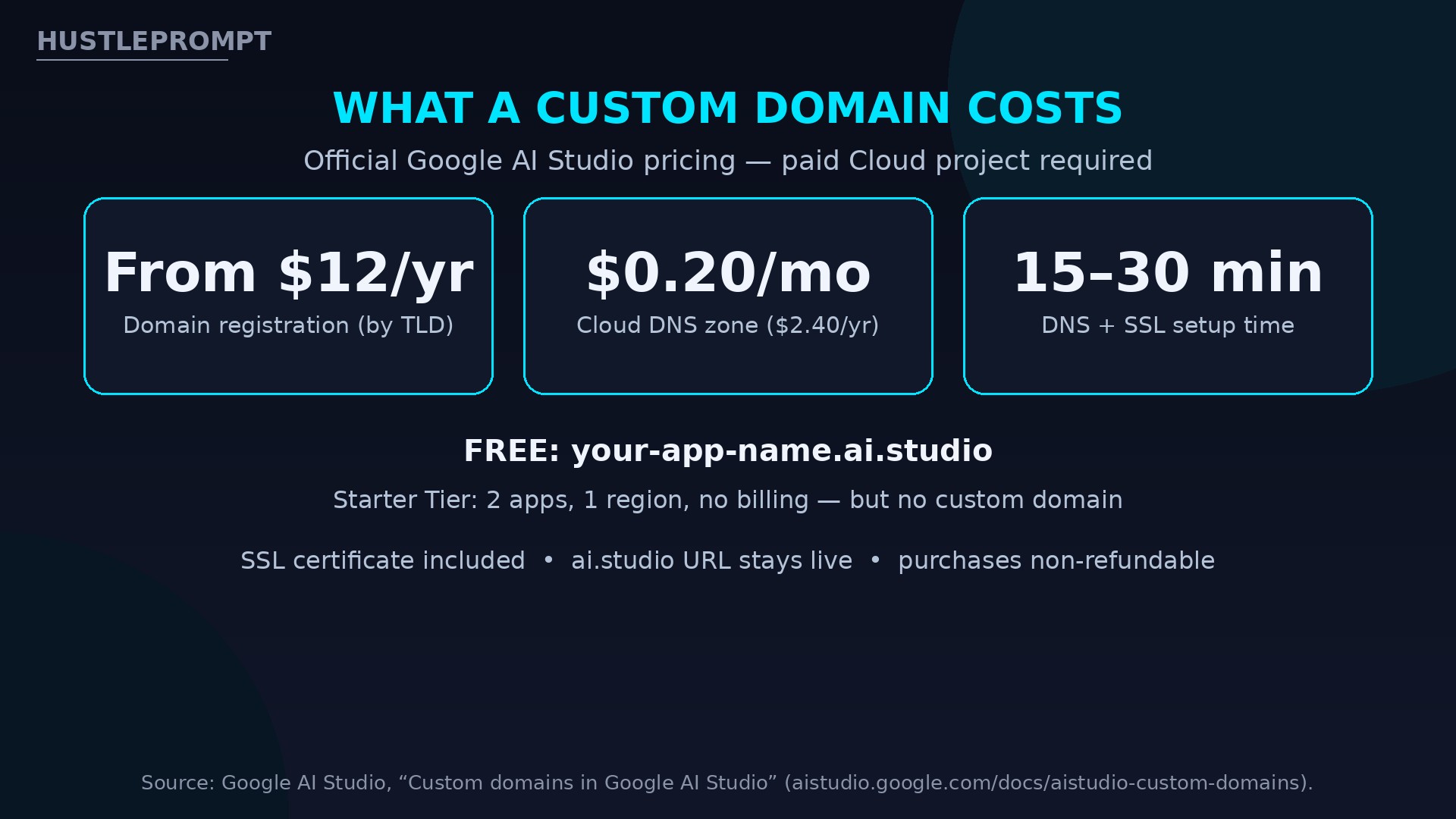
For a freelancer or indie builder, the math is what matters. A domain starts at $12 a year, the DNS zone costs $0.20 a month, and the SSL certificate is included. This is what launched, what it costs, and how to turn it into income.
What Google launched on November 17
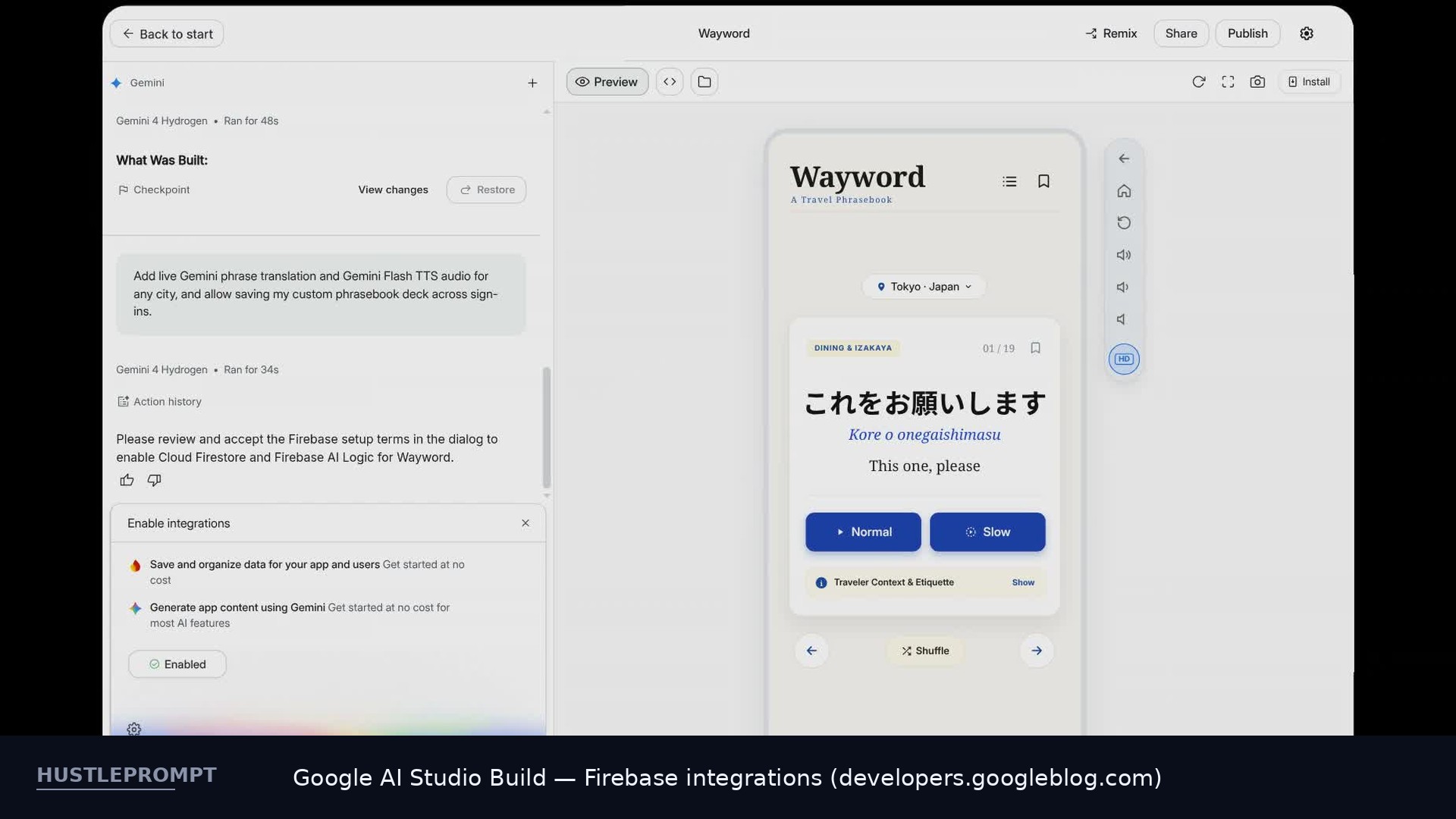
The Android side of the launch is the bigger engineering change. Until now, apps generated in AI Studio were limited to local session storage. Now the Build agent provisions a real backend when your prompt needs one — and does the wiring itself.
- Full-stack persistence and sign-in: the agent provisions a Cloud Firestore database with Security Rules and Google Sign-In, so user data syncs across sessions and devices, with offline caching.
- Secure Gemini API calls: your app calls Gemini models without exposing API keys in the APK, protected by Firebase AI Logic and Firebase App Check using Google Fraud Defense.
- Personal Google Play publishing: set up a Play account in a few clicks and ship the app to your personal Google Play library. AI Studio builds and signs the Android App Bundle (.aab) behind the scenes.
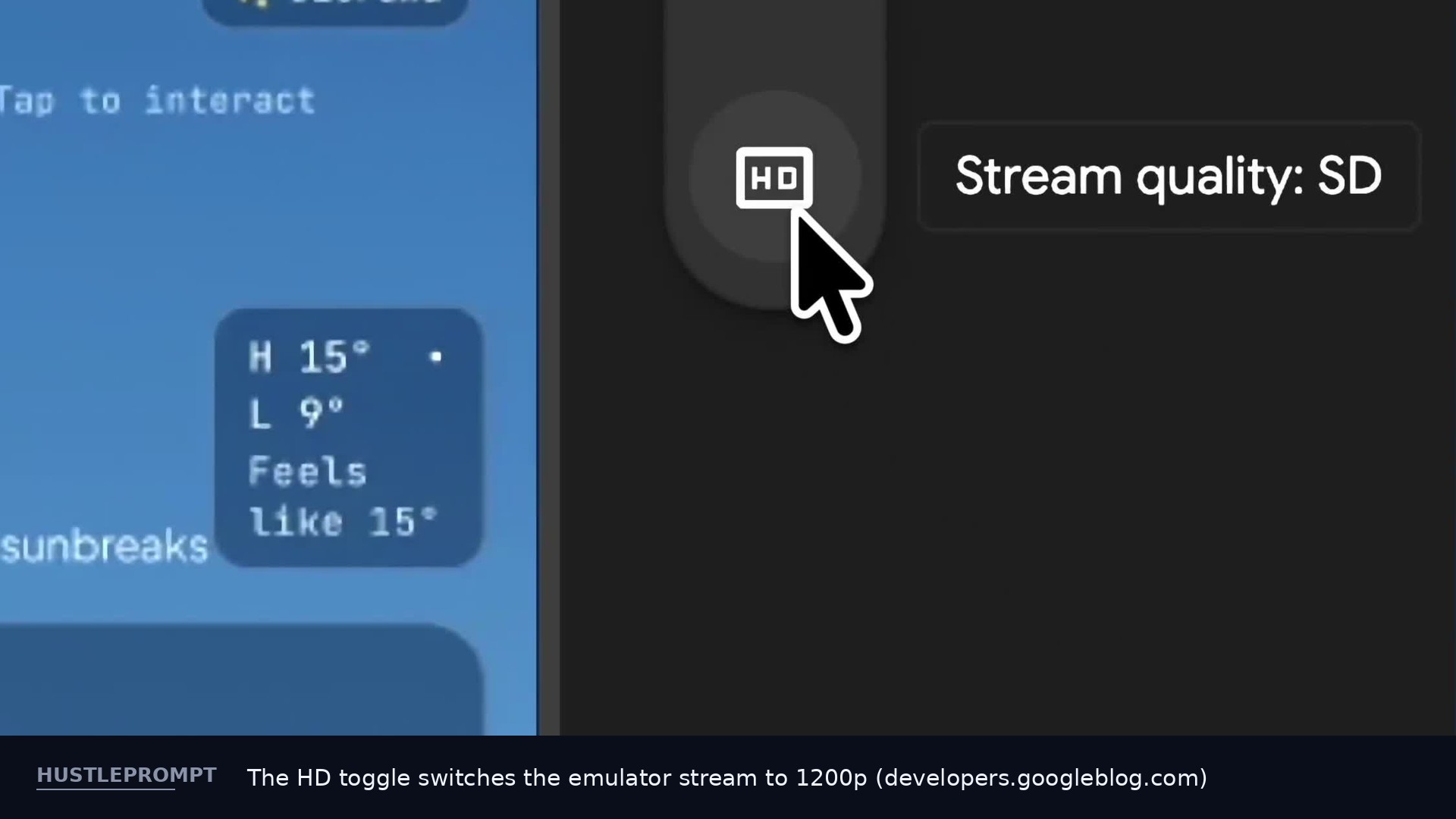
- Faster, high-definition emulator with audio: emulators boot with lower latency, and an HD toggle in the toolbar switches the stream to 1200p, with real-time audio output in the browser.
- One-click screenshot to agent: capture a live frame from the running emulator and attach it to your prompt, so Gemini updates the Kotlin UI code with full visual context.
- Custom fonts and Android CLI: style Jetpack Compose UIs with custom typography, backed by the official Android CLI for project scaffolding and Gradle builds.
The custom-domains side is simpler but more valuable commercially. As Google AI Studio put it in its announcement: turn your idea into a live, branded app with a custom domain, all within AI Studio Build. The app keeps its free ai.studio subdomain too, so the old link never breaks.
Custom domains: your brand on the URL bar
A generated Cloud Run URL tells a client you built a prototype. Your own domain tells them you built a product. That is the whole commercial difference, and it is now a checkout inside the tool.
On a paid Google Cloud project, you buy and connect a domain such as example.com from the Publish panel, or reuse a domain you already bought in AI Studio. Google registers the domain through Cloud Domains, configures Cloud DNS routing, and creates a managed SSL certificate. DNS and SSL setup takes 15 to 30 minutes, and your app stays reachable at its ai.studio URL while it completes.
The catch is the project tier. Custom domains are not available on the free Google Cloud Starter Tier, which lets eligible accounts publish up to two full-stack apps with no billing account.
To add one, attach a billing account and convert to a standard paid project — upgrading preserves your published apps. You also need Owner or Editor access, and your registrant email must be verified within 15 days or the registrar suspends the domain.
| What a custom domain costs | Price (official Google AI Studio docs) |
|---|---|
| Domain registration | Starting at $12.00/year, varies by top-level domain (.com, .net, .app, .cloud); billed upfront for 1 year, renews annually |
| Cloud DNS managed zone | Starting at $2.40/year ($0.20/month per managed zone), plus query usage fees |
| Managed SSL certificate | Included — Google issues it for your Cloud Run service |
| Free ai.studio subdomain | $0 — your-app-name.ai.studio, on Starter Tier and paid projects; first come, first served |
| Starter Tier (no custom domain) | $0 — up to 2 published apps, single Cloud Run region, no billing account |
Three limits from the same docs are worth knowing before you quote a client. Domain purchases are non-refundable once registered. Only one custom domain can be attached per app — connecting a new one replaces the old.
Only domains bought inside AI Studio in the same Google Cloud project can be reused for now; Google plans to support transfers from external registrars in the future. Custom domains also work with web apps only, not Android apps or Starter Tier apps.
The HD emulator: test like you own the device
The emulator upgrades solve the most expensive part of mobile testing for a solo builder: devices. Emulators now boot with lower latency, and the HD toggle switches the stream to 1200p, making it easy to inspect fine Jetpack Compose spacing, animations, and dense layouts.
Real-time audio matters more than it sounds. You can now build and test voice-driven Gemini Live API companions, text-to-speech coaches, sound-enabled games, and media apps without leaving AI Studio — the audio plays directly in your browser.
The one-click screenshot is the quiet productivity win. Instead of describing a layout issue in paragraphs, click Take a screenshot in the emulator toolbar, attach the live frame to your prompt, and point at what you want changed. Gemini updates the Kotlin UI code with the visual context in front of it.
| What launched November 17, 2026 | Detail (official Google Developers Blog) |
|---|---|
| HD emulator stream | 1200p via the HD toggle, with lower-latency startup |
| Real-time audio | Live audio output from the emulator directly in the browser |
| One-click screenshot to agent | Capture a live frame and attach it to your prompt for visual UI edits |
| Play publishing | Ship to your personal Google Play library; AI Studio builds and signs the .aab |
| Models behind the agent | Gemini 4 Carbon and Hydrogen |
| Backend | Cloud Firestore, Firebase Authentication with Google Sign-In, Firebase AI Logic |
| Domain setup time | 15 to 30 minutes for DNS + SSL (official custom-domains docs) |
Historically, installing a newly built Android app on a phone meant USB debugging cables, signing keystores, or a full developer console account. Now you publish straight to your personal Google Play library and install it on your phone in clicks — and Google says you can build and test on your own device directly from the Play Store at no cost. One reported limit: Google’s Logan Kilpatrick noted the Play install path is US only for now — confirm availability before promising a client a phone install.
Watch: Google shows how to plan and build an app in Google AI Studio, on the official Grow with Google channel. This video covers the Build workflow, not the November 17 custom-domains launch — there is no domains-specific official video yet.
PROMPT → BUILD → TEST → PUBLISH → SELL
1. PROMPT
Describe the app in one prompt. Gemini 4 Carbon or Hydrogen writes the Kotlin code and the Firebase backend.
2. BUILD
The Build agent provisions Cloud Firestore, Google Sign-In, and Firebase AI Logic — no manual backend setup.
3. TEST
Run it in the 1200p HD emulator with real audio. Screenshot any visual issue straight to the agent.
4. PUBLISH
Buy a custom domain in the Publish panel from $12/yr, or ship the Android app to your personal Play library.
5. SELL
Deliver it on the client’s own domain, under their brand, with HTTPS included — a white-label product.
How to profit from AI Studio: 5 moves
AI Studio is free to build in, and the Starter Tier publishes two apps at no cost. The paid step is small — a domain from $12 a year plus $0.20 a month for DNS. Here is how to sell it.
- Sell a branded app, not a prototype. Offer a small business a working tool — a booking helper, a quote calculator, a phrasebook for their tour company — delivered on their own domain. The domain is the difference between a demo link and a product they can put on a business card.
- Charge a setup fee plus a small monthly retainer. Quote the build as a fixed setup fee, then a monthly retainer covering the domain renewal, DNS, and Gemini API usage — the infrastructure costs dollars a year; the retainer keeps the app live, updated, and monitored.
- Use the free tier as your sales demo. Build the app, publish it on the free ai.studio subdomain, and let the client try it. Move it to their custom domain only after they pay — the upgrade preserves the app, so nothing is rebuilt.
- Test voice and media apps in the emulator, not on hardware. If a client wants a voice coach or a sound-enabled game, the HD emulator with real-time audio lets you demo and debug it in the browser. No test phones to buy, no cables, no app-store review wait.
- Offer the Android version as an upsell. The same prompt that builds the web app can now produce a full-stack Android app with sign-in and saved data, installed from the client’s personal Play library. Sell the web app first, then the phone version as phase two.
What to watch before you sell it
Four honest limits belong in any article about this launch, because Google prints them in its own docs.
- Custom domains need a paid project. The Starter Tier is free and real, but it caps at two apps in one region and excludes custom domains. The moment a client wants their own domain, billing is on — budget the domain, DNS, Cloud Run, and Gemini API usage together.
- Domains are non-refundable and one per app. Once registered, a domain purchase cannot be refunded. One custom domain attaches per app, and moving a domain between apps means detaching it first. Pick the domain carefully, and verify the registrant email within 15 days or the registrar suspends it.
- You own the code’s security, Google owns the infrastructure. Google manages and secures the Cloud Run infrastructure. You are responsible for your app’s code and dependencies, including code AI Studio generates. Update dependencies and republish after security fixes.
- Play publishing is personal, not public. The app ships to your personal Google Play library — this is not a public Play Store listing. And per Google’s Logan Kilpatrick, the Play install path is US only for now. Do not sell a client a public store launch on the strength of this announcement.
None of that changes the opportunity. The cost of looking like a real software company just fell to about $15 a year, and the cost of testing a mobile app just fell to zero devices.
What to watch next
- External domain transfers. Google says it plans to support transferring domains from external registrars. When that lands, every domain a client already owns becomes attachable.
- Play availability beyond the US. If the personal Play library install expands past the US, the phone-install upsell works for clients everywhere.
- Competitors’ answers. Replit, Cursor, and the rest of the vibe-coding field all ship to their own subdomains. The first to match one-click custom domains at this price sets the floor for the category.
Google AI Studio now builds the app, tests it in HD, and ships it on your own domain — and the branding bill starts at $12 a year. The builders who move first are the ones who put a client’s name on the URL first.
Frequently asked questions
What are custom domains in Google AI Studio?
Custom domains let you buy and connect your own domain, such as example.com, to a web app published from Google AI Studio Build mode. Google registers the domain through Cloud Domains, configures Cloud DNS routing, and creates a managed SSL certificate. Your app keeps its free ai.studio subdomain URL as well.
How much does a custom domain cost in AI Studio?
According to Google’s official custom-domains docs, domain registration starts at $12.00 per year depending on the top-level domain, and the Cloud DNS managed zone starts at $0.20 per month ($2.40 per year) plus query usage fees. The managed SSL certificate is included, and domain purchases are non-refundable once registered.
Do I need a paid Google Cloud project for a custom domain?
Yes. Custom domains require a paid Google Cloud project with an active Cloud Billing account and Owner or Editor access. They are not available on the free Google Cloud Starter Tier, which lets eligible accounts publish up to two apps with no billing account.
What is the HD Android emulator in AI Studio?
It is the upgraded in-browser Android emulator announced November 17, 2026. It boots with lower latency, has an HD toggle that switches the video stream to 1200p, and plays real-time audio in the browser. You can also capture a screenshot from the running emulator with one click and attach it to your prompt so Gemini can fix visual issues in the Kotlin UI code.
Can I publish an AI Studio Android app to Google Play?
You can publish it to your personal Google Play library and install it on your own phone in a few clicks — AI Studio builds and signs the Android App Bundle (.aab) for you. This is not a public Play Store listing, and Google’s Logan Kilpatrick noted the Play install path is US only for now.
How long does it take to set up a custom domain?
Google’s docs say DNS and SSL setup takes 15 to 30 minutes, and DNS changes can take longer to propagate. Your app stays accessible at its ai.studio URL while setup completes. You must also verify your registrant email within 15 days of purchase or the registrar suspends the domain.
Can I use a domain I already own from another registrar?
Not yet. Only domains purchased in Google AI Studio within the same Google Cloud project can be reused under “Use a domain I own.” Google plans to support transfers from external registrars in the future. Domain names can be at most 63 characters long, and only one custom domain attaches per app.
Keep Reading
Sources: Google Developers Blog, “Build full-stack Android apps with Gemini in Google AI Studio” (Nov 17, 2026); Google AI Studio, “Custom domains in Google AI Studio”; Google AI Studio, “Publish your app in Google AI Studio”.