
The 30-hour Microsoft 365 outage is over — and if your business runs on Outlook, Teams, or Copilot, Microsoft may owe you money. The company confirmed on Saturday, November 14 that every affected service is back, named the fault that caused the meltdown, and opened the door to service credits. But the credits are not automatic, and the claim deadline is December 31, 2026.
The outage began on Thursday, November 12, and knocked out the email and scheduling tools hundreds of millions of people use to do their jobs. Outlook mailboxes would not open. Teams calendars broke. Microsoft 365 Copilot — the AI assistant Microsoft sells as the future of work — could not load, answer, or reach a single email. By Saturday morning it was over. This is what happened, what caused it, and exactly how to claim what you are owed.
We covered the outage while it was still unfolding — Outlook down, Microsoft’s first fixes failing, no restoration time in sight. Read that first report here. What follows is the second half of the story: the fix, the cause, the scale, and the money.
What Microsoft confirmed on Saturday
Microsoft closed the incident in the early hours of Saturday, November 14. The final notices for the two incident records — EX1550543 for Exchange Online and MO1550821 for the wider Microsoft 365 suite — went out at 4:15 a.m. and 4:17 a.m. GMT, both marked “Service restored.” The Microsoft 365 Status account then posted that it had “completed our efforts to address the underlying issue of the incident and restored service to the remaining impacted customers and regions.”
The final update put it plainly: “We’ve confirmed that the services across the previously affected environments have fully recovered and the backlog of email messages has been processed, thus this issue is remediated.” By Saturday afternoon, Microsoft’s public status page no longer showed any Microsoft 365 service degradation. The outage that began Thursday was officially over.
That is a very different picture from Friday morning, when Microsoft admitted its first fixes were “not taking as expected” and gave no restoration time at all. The recovery came in stages — restarting affected servers in isolation, validating stability at each step — and it took more than a day to reach every customer and region.
What actually caused the outage
Microsoft’s own incident record names the cause in one sentence: “The incident was introduced by an issue during an earlier network capacity upgrade that surfaced following a recent network change.” In plain terms, a defect from an earlier upgrade sat unnoticed until a later network change exposed it.
Here is how the failure cascaded. A process on affected servers that sets up secure connections became overwhelmed. Those servers started failing their automated health checks and dropped out of service. The remaining servers took on the extra load — and started failing too. Microsoft was explicit about one thing: the elevated load “isn’t driven by an increase in traffic, but by a number of servers being unexpectedly unavailable.” This was not a traffic surge. It was a recovery problem.
Microsoft also ruled out the two theories that always surface first. “This was a technical issue not related to cyber or AI / agents,” the incident record says. No cyberattack, no malicious activity, and no AI agent involvement — despite the outage taking down Copilot itself. The company apologized and said it will publish a full post-incident report once its review is complete. The cause above is preliminary; the detailed report is still to come.
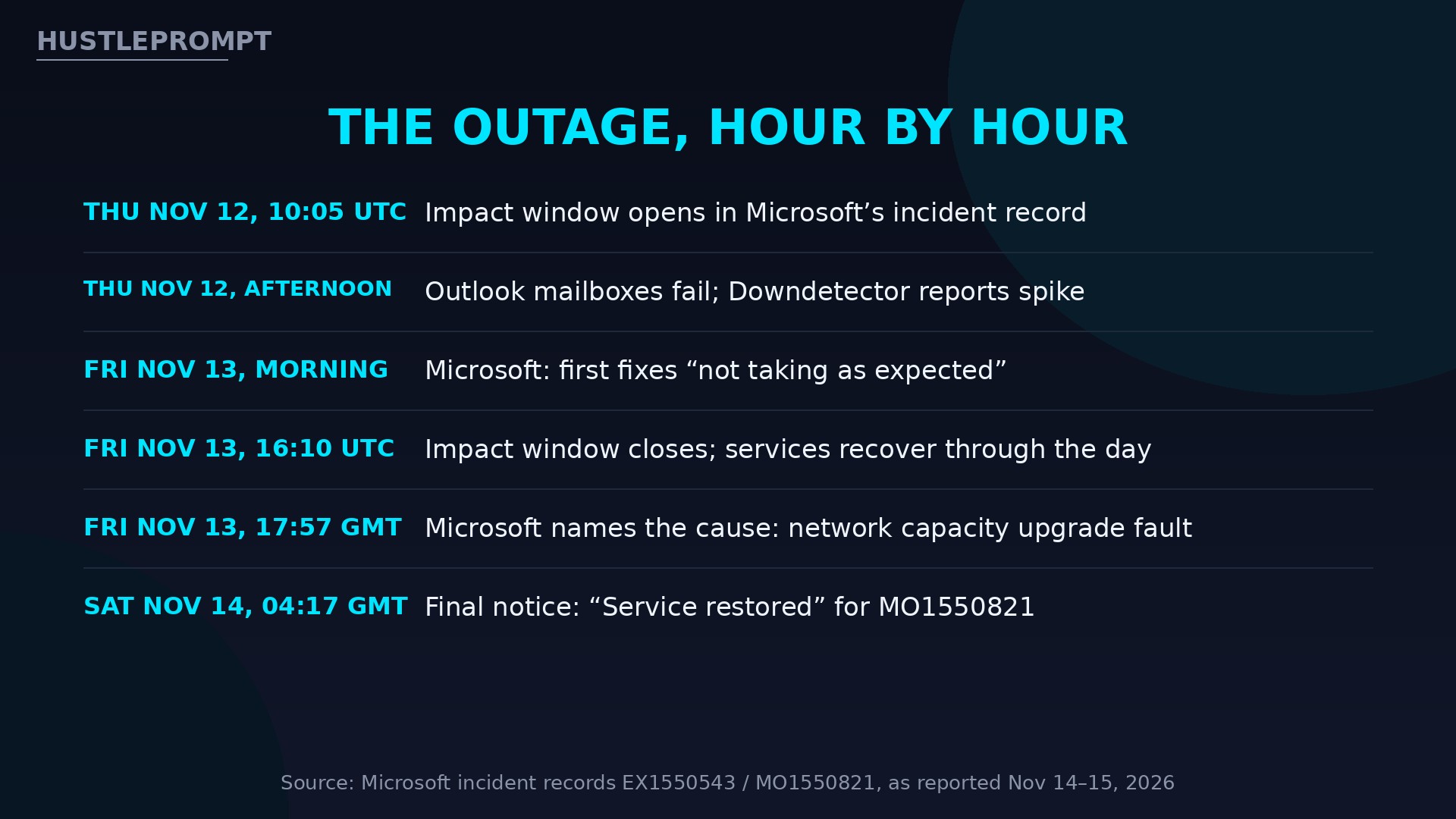
The outage, hour by hour — Microsoft’s own record
| When | What happened |
|---|---|
| Thu Nov 12, 10:05 UTC | Impact window opens in Microsoft’s incident record (MO1550821) |
| Thu Nov 12, afternoon | Outlook mailboxes fail; Downdetector reports spike past 120,000 |
| Fri Nov 13, morning | Microsoft says its first fixes are “not taking as expected” |
| Fri Nov 13, 16:10 UTC | Impact window closes; services recover through the day |
| Fri Nov 13, 17:57 GMT | Microsoft names the cause: a network capacity upgrade fault |
| Sat Nov 14, 04:17 GMT | Final notice: “Service restored” for MO1550821 |
Sources: Microsoft incident records EX1550543 / MO1550821, as reported November 14-15, 2026 (Cointelegraph, Azure Blog, JM Restart). Microsoft’s final record puts the impact window at about 30 hours.
How big was it
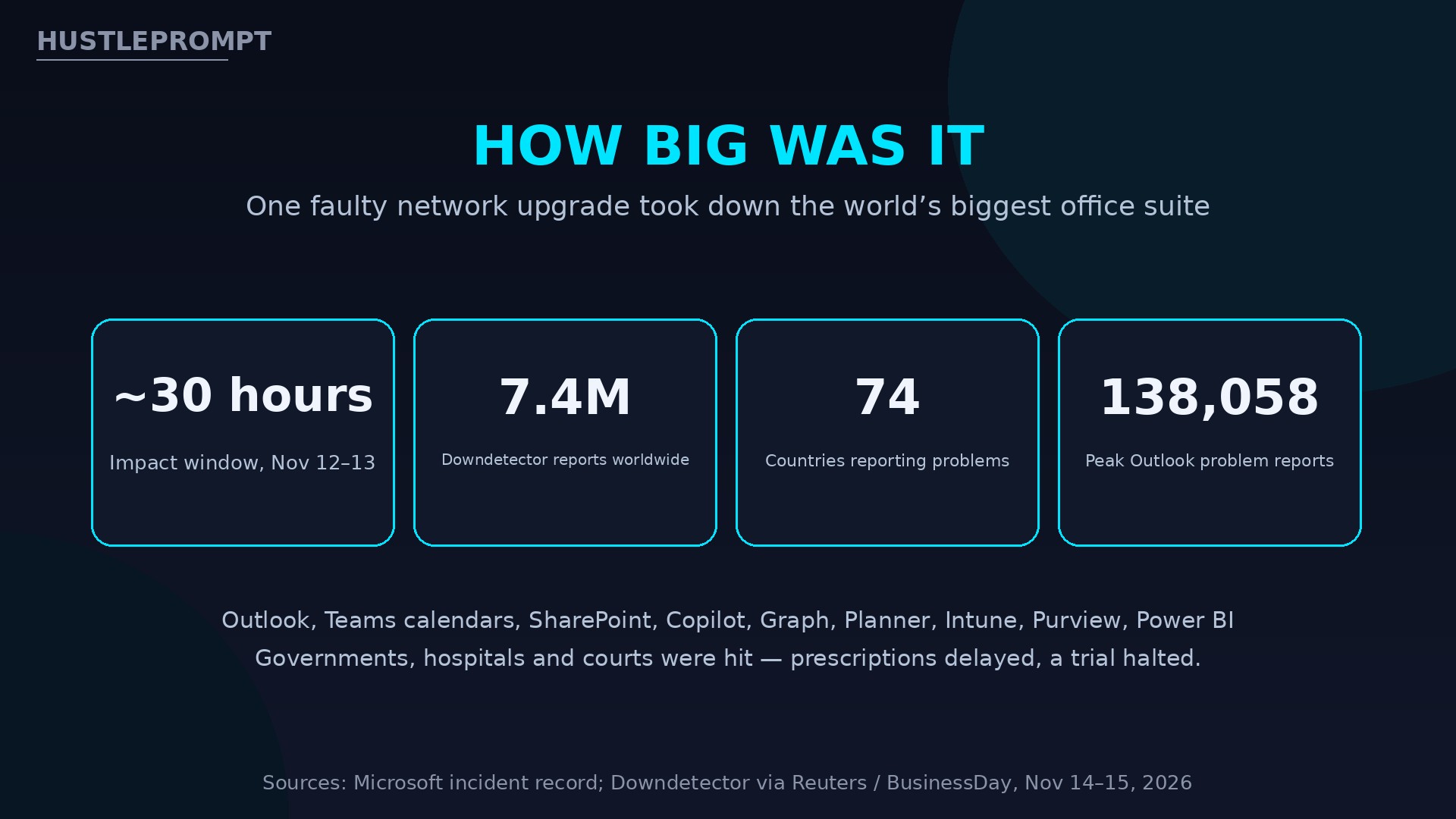
Bigger than almost any Microsoft outage in recent memory. Downdetector logged more than 7.4 million reports worldwide across Microsoft’s services, peaking at nearly 20,000 reports a minute — more than 1,500 times normal levels, according to BusinessDay. Outlook problem reports alone peaked at 138,058, Downdetector reported via Reuters. Problems were reported from 74 countries and territories.
The services hit were the shared plumbing underneath Microsoft 365, not one app. Outlook on web, desktop, and mobile. Mail delivery. Teams calendars and scheduling. SharePoint features that rely on Exchange. Microsoft 365 Copilot. Microsoft Graph, Planner, To Do, Intune, Purview, and Power BI. Teams calls, meetings, and chats mostly kept working — because they do not depend on Exchange — but anything that touched email broke.
The damage went beyond offices. In Britain, the disruption delayed prescriptions, blocked some online crime reporting, and halted a trial in Manchester, according to the Associated Press. Governments in Japan, Australia, and the Philippines could not serve citizens because staff could not get into Outlook. And the outage spilled into the AI world: OpenAI reported problems with ChatGPT, and Anthropic said its Microsoft 365 connector and Claude for Outlook were having difficulties.
The outage by the numbers
| Measure | Figure | Source |
|---|---|---|
| Impact window | About 30 hours | Microsoft incident record MO1550821 |
| Downdetector reports | 7.4 million+ | Downdetector, via BusinessDay |
| Peak report rate | ~20,000 per minute | Downdetector, via BusinessDay |
| Outlook peak reports | 138,058 | Downdetector, via Reuters |
| Countries reporting | 74 | Downdetector |
| Services affected | Outlook, Teams, Copilot + more | Microsoft service health listing |
Sources: Microsoft incident record; Downdetector figures as reported by BusinessDay and Reuters, November 14-15, 2026. Downdetector reports count user-submitted problem reports; they do not equal the number of affected Microsoft customers.
The money part: what the SLA pays
Microsoft promises 99.9% uptime each month, for each Microsoft 365 service separately — Exchange Online, Teams, SharePoint Online, OneDrive, and the rest. That promise lives in the Service Level Agreement for Microsoft Online Services, whose current edition is dated November 1, 2026. A 30-hour outage blows through it by a wide margin.
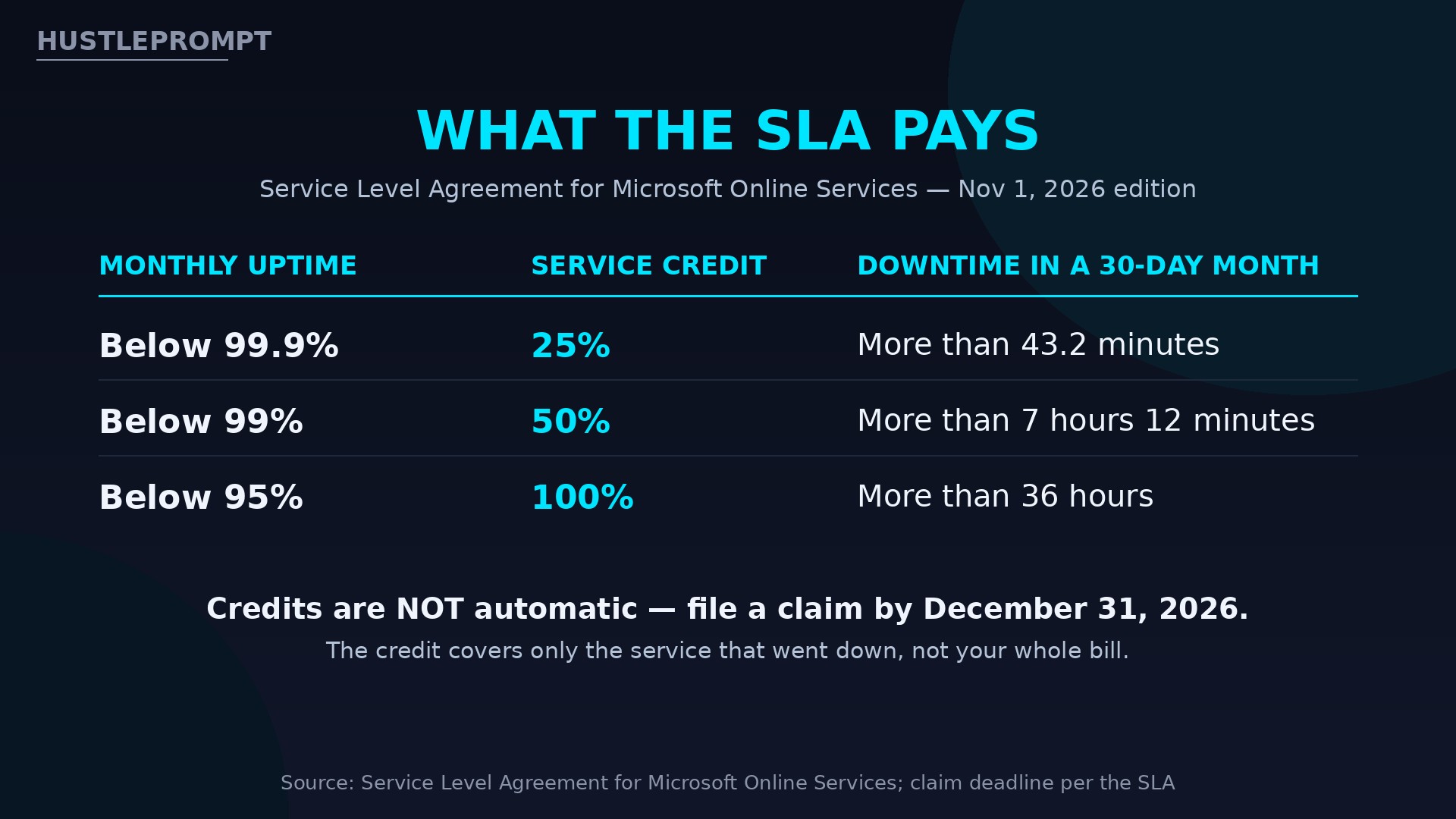
When uptime falls below the promise, Microsoft owes a service credit — a percentage of the fees for the service that went down, applied to a future bill. The tiers are fixed in the SLA, and the downtime is counted in user-minutes, not wall-clock time: monthly uptime equals (user minutes minus downtime) divided by user minutes, times 100. November has 30 days, or 43,200 minutes, so the thresholds work out like this:
Service credit tiers — Microsoft Online Services SLA
| Monthly uptime | Service credit | Downtime in a 30-day month |
|---|---|---|
| Below 99.9% | 25% | More than 43.2 minutes |
| Below 99% | 50% | More than 7 hours 12 minutes |
| Below 95% | 100% | More than 36 hours |
Source: Service Level Agreement for Microsoft Online Services (November 1, 2026 edition). The credit applies only to the affected service’s share of your fees, not your whole Microsoft 365 bill. This outage, at about 30 hours, sits in the 50% tier for the services that were down that long — it does not reach the 100% tier.
Three catches decide what you actually get. First, the credit covers only the service that went down. If only Exchange Online failed for your users, the credit is a percentage of the part of the price Microsoft assigns to Exchange Online — not of your full Microsoft 365 license. Second, Microsoft does not apply credits automatically. You have to file a claim, and the credit is your only contractual remedy: nothing for lost sales, overtime, or missed deadlines. Third, consumer plans do not qualify at all. Outlook.com, Microsoft 365 Personal, and Microsoft 365 Family fall under the Microsoft Services Agreement, which carries no uptime guarantee. The SLA covers paid business, enterprise, education, and government plans. Note too that Microsoft 365 Copilot has no separate uptime tier in the SLA — the claim runs on the underlying services, Exchange Online and Teams.
How much is that in real money? Office Watch’s worked example puts it in perspective: for a one-person business on a Business plan, even a 50% credit is worth at most about $14 off one month’s bill — and a 25% credit at most about $7. For 50 Business Standard users who lost most of a working day, the same claim is worth up to about $350, and the paperwork is suddenly worth doing. The credit is small for a solo operator and real for a team. Either way, it is money Microsoft owes you only if you ask.
How to claim your service credit
File the claim now, while the incident is fresh and the evidence is in your admin center. The SLA says Microsoft must receive the claim by the end of the calendar month after the incident month. This outage happened in November, so the deadline is December 31, 2026. Processing typically takes up to 45 days after that.
Claim your credit in 5 steps
One detail matters for the claim: downtime is counted in user-minutes. A service that was down for 30 hours for all 50 of your users is 90,000 user-minutes of downtime — far past the 99% threshold. A service that was down for some users in one region counts less. Microsoft decides the actual price allocation, so treat the tiers above as the rule and the dollar figure as an estimate until Microsoft confirms it.
What to check now that service is back
Restoration does not prove every message sent during the outage reached its recipient. Microsoft said the backlog of email was processed, but check your sent folder and ask key contacts to confirm they received anything important sent on November 12 or 13. If you use Copilot to draft or summarize email, spot-check a few threads — the assistant was down with everything else.
Watch for the scam wave, too. Reports say scammers moved fast on the confusion, sending phishing emails that pose as Microsoft outage notices and ask users to “verify” their accounts or reset passwords. Microsoft will never ask you to reset a password because of an outage. Check the status at status.cloud.microsoft directly, and treat any outage email with a link as suspect until proven otherwise.
And take the lesson the outage taught. A single cloud suite held the email, calendars, files, and AI assistant of millions of businesses — and one faulty upgrade took all of it down for a day and a half. If Copilot is your only AI assistant, it was offline with everything else. Keep a second AI subscription on a different platform as a backup for the days your main one is down. Our price snapshot of what $20 actually buys across the major AI subscriptions is the fastest way to pick one. When one AI goes down, the backup is what keeps you working.
What this means for AI users
The outage was a reminder that the AI tools people pay for are only as reliable as the cloud underneath them. Microsoft 365 Copilot went down with Outlook and Exchange, because Copilot reads your email, calendar, and files through the same services. The OpenAI and Anthropic connectors to Microsoft 365 broke too. The AI layer did not fail on its own — the plumbing underneath it did.
That is also why the money matters. Microsoft is moving Copilot to a credits model on December 1, where each AI action costs credits. An outage that takes Copilot offline is no longer just an email problem — it is a paid AI service you could not use. The SLA credit is the mechanism that pays you back for exactly that. File it, and keep a backup AI ready for the next time the plumbing breaks.
FAQ
Is the Microsoft 365 outage over?
Yes. Microsoft confirmed on Saturday, November 14, 2026 that all affected services had fully recovered. The final incident notices for EX1550543 and MO1550821 went out at 4:15 a.m. and 4:17 a.m. GMT, both marked “Service restored,” and the public status page no longer shows any Microsoft 365 degradation.
What caused the Microsoft 365 outage?
According to Microsoft’s incident record, “the incident was introduced by an issue during an earlier network capacity upgrade that surfaced following a recent network change.” A process that sets up secure connections became overwhelmed, servers failed their health checks and dropped out, and the remaining servers took on too much load. Microsoft says it was not a cyberattack and not related to AI or AI agents.
How long did the Microsoft 365 outage last?
Microsoft’s final incident record puts the impact window at about 30 hours, from the morning of Thursday, November 12 to Friday afternoon, November 13, 2026 (MO1550821: November 12, 10:05 UTC to November 13, 16:10 UTC). Services were fully restored for the remaining customers and regions on Saturday, November 14.
Can I claim a service credit for the Microsoft 365 outage?
If you are on a paid business, enterprise, education, or government Microsoft 365 plan, yes — file a claim in the Microsoft 365 admin center under Support, then New service request, quoting incident IDs EX1550543 and MO1550821. Consumer plans (Outlook.com, Microsoft 365 Personal or Family) have no uptime guarantee and do not qualify.
How much is the Microsoft 365 service credit worth?
It depends on how far monthly uptime fell for the affected service: below 99.9% earns 25%, below 99% earns 50%, and below 95% earns 100% of the applicable service fees. A 30-hour outage puts the affected services in the 50% tier. The credit covers only the service that went down, not your whole bill — for a one-person business that is at most about $14, for a 50-person team up to about $350, per Office Watch’s worked examples.
What is the deadline to claim the Microsoft 365 outage credit?
December 31, 2026. The SLA requires Microsoft to receive the claim by the end of the calendar month after the incident month, and this outage happened in November 2026. Processing typically takes up to 45 days, and the credit arrives as a reduction on a future bill, not as cash.
Was the Microsoft 365 outage a cyberattack?
No. Microsoft said it found no malicious activity and stated explicitly that “this was a technical issue not related to cyber or AI / agents.” The cause was a fault from an earlier network capacity upgrade that a later network change exposed.
Sources
- Microsoft: Microsoft 365 public status page (status.cloud.microsoft)
- Cointelegraph: Microsoft 365 outage resolved, cyberattack ruled out (November 14, 2026)
- Azure Blog: Microsoft 365 outage, 12 November 2026 — final updates and root cause
- JM Restart: Microsoft 365 and Outlook outage — what to do (updated November 14, 2026)
- LazyAdmin: Claim Microsoft 365 SLA credit after an outage (November 2026)
- Office Watch: Microsoft 365 outage credits — what you can really claim
- BusinessDay: What the Microsoft crash reveals about enterprise vulnerability (November 15, 2026)