
What if a plumber could finish a job at 4 p.m., send a clean invoice by 4:15, and get paid before dinner — without touching a spreadsheet? That is exactly what you can sell with AI invoice automation services, and trades businesses are some of the best buyers for it.
Plumbers, electricians, cleaners, and landscapers are great at the work. The paperwork is what drains them. Quotes sit in text messages, invoices go out days late, and payment reminders never happen at all.
Why Trades Businesses Will Pay for This
Late payment is not a rare annoyance. It is a normal part of running a small service business. Enterprise Nation reported that 42% of small firms had been paid late over the past 12 months, according to its 2026 barometer covered by Credit Connect.
That pain is your sales pitch. You are not selling software. You are selling quotes that go out fast, invoices that go out on time, and reminders that go out without an awkward phone call.
What You Actually Sell
You sell a complete billing workflow, not a single tool. The client keeps owning their business and their money. You build the templates, connect the tools, and hand over a system their team can run.
The Invoice and Quote Workflow
Job notes, photos, and materials are captured on site.
AI turns rough notes into a clear quote or invoice draft.
The owner checks price and scope, then approves in one tap.
The customer gets a pay link and pays online.
Polite reminders follow up automatically until payment lands.
Nothing moves to the customer without owner approval. Automation drafts and chases; the human stays in charge.

Start With Discovery, Not Software
Before you open any invoicing tool, book a 30-minute discovery call. Your job is to learn how money currently moves through the business, because that is what you are rebuilding.
Questions to Ask on the Call
- How do you quote a job today, and how long does it usually take?
- When do invoices go out — same day, end of week, or end of month?
- What payment methods do customers actually use?
- Who chases late payments, and how often does that happen?
- What does a typical job cost, and what varies from job to job?
Build your proposal around the biggest bottleneck. A cleaning company may lose time on recurring quotes, while a landscaper may lose money on unbilled materials.
Build the System in 7 Steps
Use the same build order for every client. It keeps your work repeatable, and it makes your service easier to price.
- Set up the invoicing tool. Add the business profile, tax settings, payment methods, and customer fields. Zoho Invoice is a strong starting point: Zoho describes it as forever free, with up to 2 users, 3 projects, and 500 invoices a year.
- Build quote and invoice templates. Use one clean template per service type, with scope in plain words, line items for labor and materials, tax, total, due date, and a pay link.
- Create a price list. Turn messy rates into a short, reusable list. Common jobs get fixed prices. Custom jobs get hourly rates plus materials. This list makes AI drafting accurate.
- Write the AI drafting prompt. Give AI a strict job: turn job notes into line items, never invent prices, and flag anything missing. Example: “Use only prices from the price list. If a material has no price, leave it blank and flag it.”
- Add the approval workflow. Drafts go to the owner first. Approved drafts send automatically. Nothing reaches a customer unapproved.
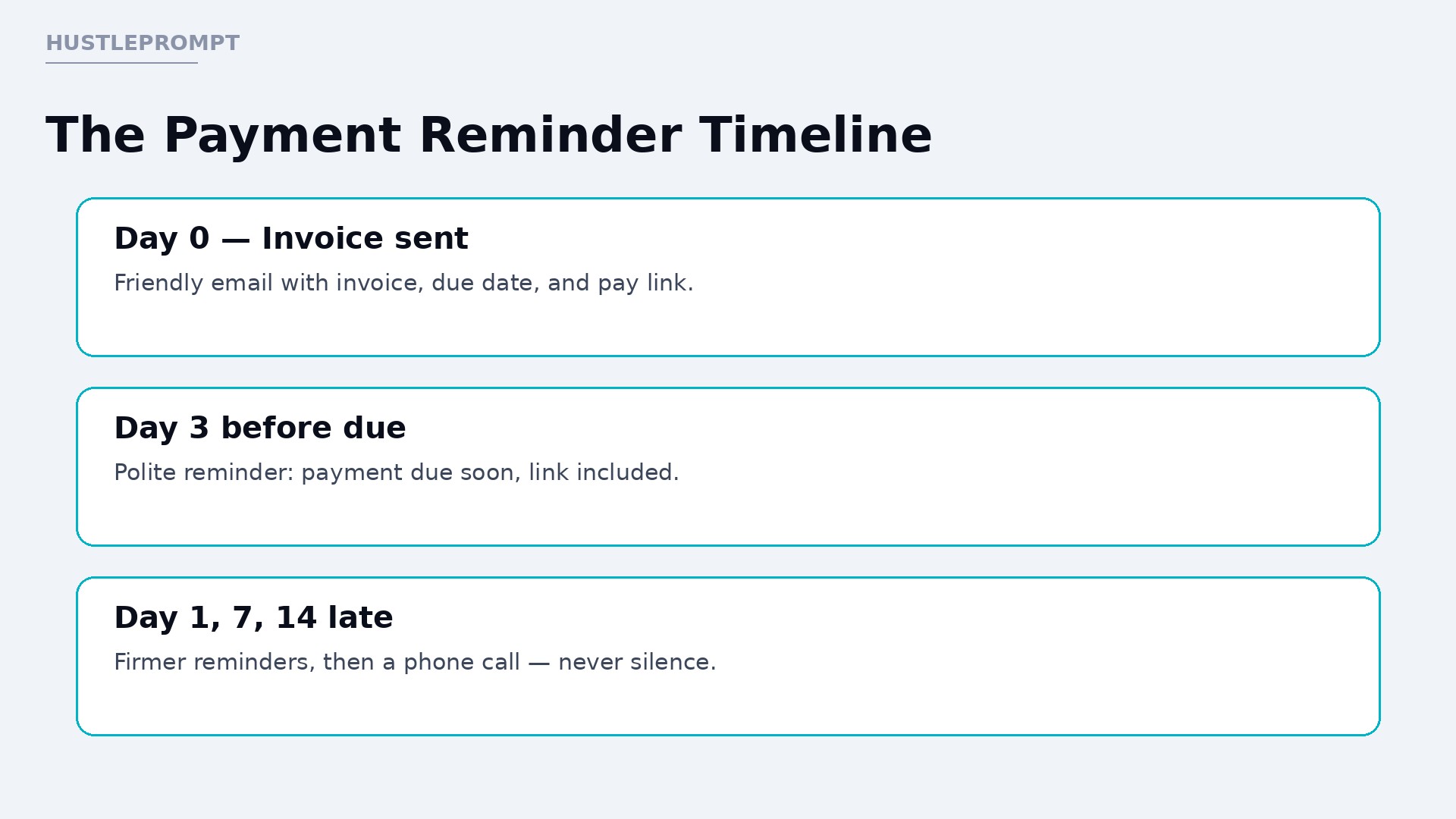
- Set up payment reminders. Use a polite sequence: 3 days before the due date, then day 1, day 7, and day 14 after it. Each message includes the invoice link.
- Test with real jobs. Run three real jobs end to end before handover. Fix the template, price list, and reminder wording. Then record a short walkthrough video the team can replay.
Tools and Pricing: What to Use
Pick tools the client can keep paying for after you leave. Avoid anything that only works while you are logged in. The table below uses only facts verified from official sources, so confirm current prices on the official pages before buying.
| Tool | What It Does Here | Verified Fact |
|---|---|---|
| Zoho Invoice | Quotes, invoices, reminders, customer portal | Free plan: $0, up to 2 users, 3 projects, 500 invoices a year, per Zoho’s official pricing pages |
| QuickBooks Online | Invoicing, payments, recurring invoices, workflow approvals | Intuit publishes an official invoice workflow guide with video; plan availability varies, so check Intuit’s pricing page |
| Zapier or Make | Connects forms, messages, and invoicing tools | Automation connector; pricing depends on tasks and plan — confirm on the official pricing page |
| ChatGPT, Claude, or Gemini | Drafts quotes and invoices from job notes | AI drafting assistant; always pair with owner approval and the client’s real price list |
Stat highlights, with sources, help you sell the problem honestly:
- 42% of small firms had been paid late over the past 12 months (Enterprise Nation barometer, via Credit Connect).
- 500 invoices a year are included on Zoho Invoice’s free plan, with 2 users and 3 projects (Zoho Invoice pricing).
- Official workflow guidance exists from Intuit for setting up invoice workflows in QuickBooks (Intuit QuickBooks support).

How to Price Your Packages
Price for the outcome and the setup work, not for your hours alone. The prices below are ILLUSTRATIVE examples only — gross amounts before tool costs and taxes, not income promises. Set your own prices based on your market, your costs, and each client’s size.
| Package | What Is Included | Illustrative Price |
|---|---|---|
| Quick Setup | One invoicing tool, one quote template, one invoice template, reminder sequence | $450 one-time (illustrative) |
| Full Billing System | Quick Setup, plus price list, AI drafting prompts, approval workflow, staff walkthrough video | $950 one-time (illustrative) |
| Monthly Care | Template tweaks, reminder tuning, monthly overdue report, 1 support call | $120 per month (illustrative) |
Charge setup as a one-time project, and offer monthly care as an optional retainer. Monthly care is where this service becomes steady income, because templates and prices change as the business grows. Tax advice, bookkeeping, and debt collection are separate services — refer those to qualified professionals.
How to Find Your First 3 Clients
Trades businesses trust referrals, local visibility, and proof.
- Offer a free 20-minute billing audit to 10 local trades businesses, and show them one fix on the spot.
- Ask each happy client for one introduction and one short testimonial you can quote.
- Post a before-and-after example: a messy text-message quote next to a clean branded quote, with names removed.
- Partner with a local accountant, who meets owners drowning in late invoices every week.
On a sales call, demo with the owner’s own numbers. Take one recent job, draft the quote live, and show the approval step. Their own job, cleaned up in minutes, is persuasive.
Watch: Set Up an Invoice Workflow
See how invoice workflows work inside a real invoicing tool before you build one for a client. Intuit’s official QuickBooks guide walks through setting up an invoice workflow step by step.
Common Mistakes to Avoid
- Skipping owner approval and letting AI send prices straight to customers.
- Using one vague template for every job type, so quotes confuse customers.
- Writing reminders that sound like threats instead of helpful nudges.
- Forgetting deposits on large jobs, then chasing the full amount at the end.
- Building in your own accounts, so the client cannot run the system without you.
Frequently Asked Questions
Do I need to be an accountant to sell this service?
No — you build quotes, invoices, and reminders. You do not give tax advice or do bookkeeping. Refer those questions to a qualified professional.
Which invoicing tool should I start with?
Start with the tool your client already uses, if they have one. If they have none, Zoho Invoice’s free plan is a low-risk start for small clients, within its limits.
How does AI help without making pricing mistakes?
AI drafts from job notes and a fixed price list, and it must flag missing prices instead of inventing them. The owner approves every quote and invoice first.
What if a business still takes cash and checks?
Keep those options. Add a pay link as an extra choice, not a replacement. Reminders still help, because they remind check payers too.
How long does a typical setup take?
A simple setup usually takes a few focused working days, including testing with real jobs. Larger businesses with many services take longer, so scope the job first.
Can I charge a monthly fee after setup?
Yes, if you keep delivering value. Monthly care can cover template updates, reminder tuning, and a regular overdue report. Price it separately, with reasonable cancellation terms.