
Google just killed its own naming scheme — again. The Gems holding your best prompts are being converted into Skills: reusable instructions you call mid-chat with a slash and stack on top of each other. The Gemini Gems to Skills migration starts in November 2026 for personal accounts, and Google says it will happen automatically — but “automatic” does not mean “lossless.”
If your prompts are business assets — and for freelancers, they are — this is a deadline, not a footnote. Here is the official timeline, what changes, and the backup checklist to run before November.
What Skills actually are
A Skill is a saved set of instructions, optionally with reference files (plain text, PDFs, images), that tells Gemini how to do a recurring task. Google announced them on September 30, 2026 in a blog post by product manager Deven Tokuno.
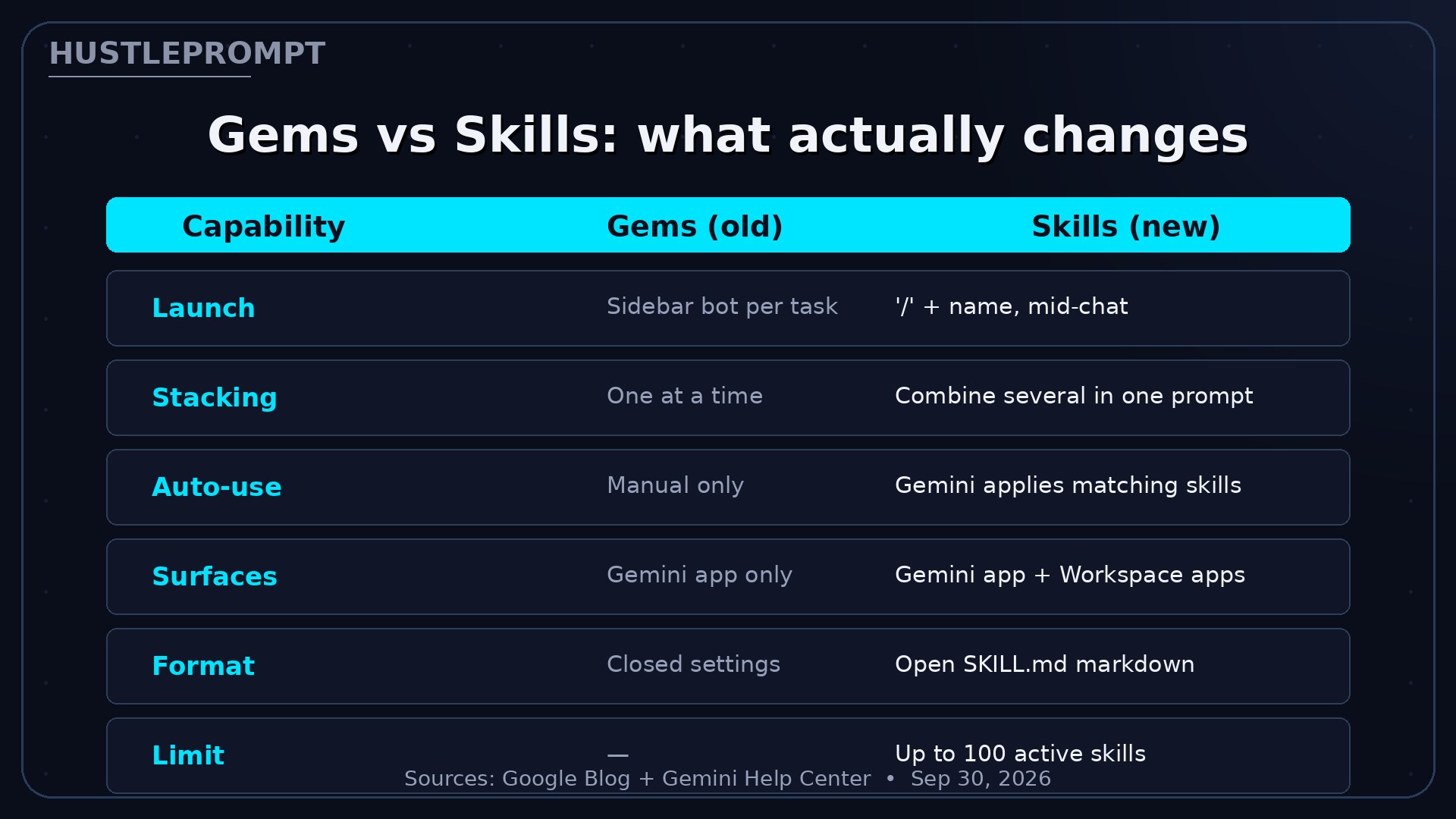
The headline difference: instead of opening a separate chat for each custom bot, you type / and the skill’s name in any conversation (Google says @ is coming). Gemini can also apply a skill automatically when your prompt matches it — and you can stack multiple skills in one prompt, like combining a writing-style skill with a brand-guidelines skill.
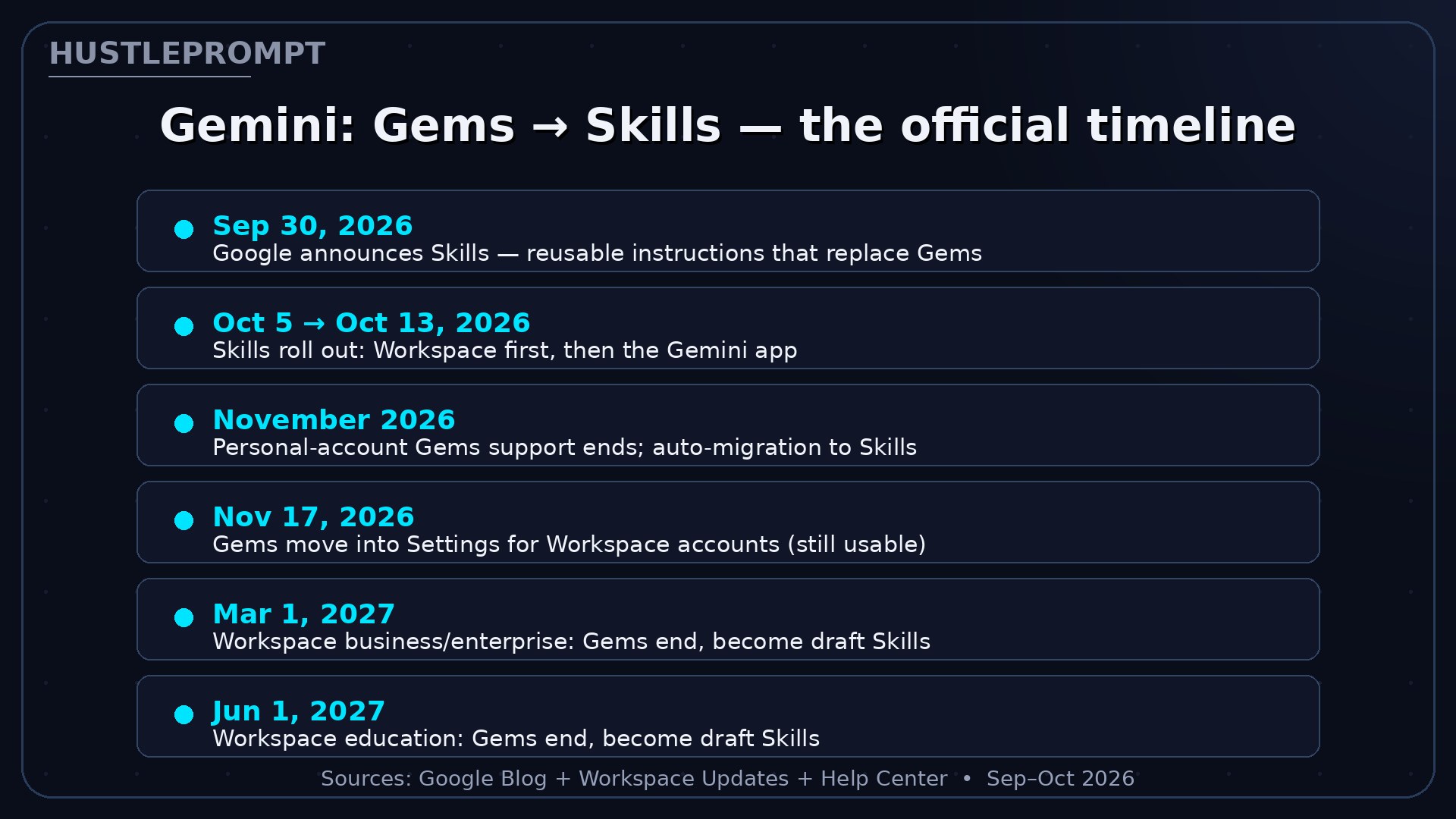
The official timeline, by account type
| Date | What happens |
|---|---|
| Sep 30, 2026 | Skills announced; rolling out into Gemini chat globally |
| Oct 5, 2026 | Skills begin rolling out in Workspace (completion by mid-November) |
| Oct 13, 2026 | Skills begin rolling out in the Gemini app; Workspace Studio rollout delayed until further notice |
| November 2026 | Support for Gems ends for personal accounts; Gems auto-migrate to Skills |
| Nov 17, 2026 | Gems move to the Settings panel for Workspace accounts — still creatable, editable, and usable |
| Mar 1, 2027 (earliest) | Workspace business/enterprise: Gems end, remaining ones become draft Skills |
| Jun 1, 2027 (earliest) | Workspace education: Gems end, remaining ones become draft Skills |
Gems vs Skills: what actually changes
One more shift worth knowing: Google’s renaming spree continues. The background agent Spark is now Task (a Chat/Task toggle plus a Scheduled page), and Extensions became apps earlier in 2025. Even Google’s Sissie Hsiao has admitted the renames confuse users — save your work in your own files, not in Google’s UI labels.
What the automatic migration does — and doesn’t do
Google says remaining Gems become draft skills, not live ones. The Help Center is explicit about the details:
- Draft status: migrated Gems land as inactive drafts. You must review and activate each one before using it.
- Preserved content: names, descriptions, custom instructions, and uploaded knowledge files carry over.
- Permissions transfer: Drive permissions and sharing settings move with the skill.
- Not yet supported in Skills: Canvas, Deep Research, video/music creation, and Guided Learning — plus sharing and Drive attachments are still “coming soon.”
- No sync: skills don’t sync between the Gemini app and Workspace. Need it in both? Recreate it in each.
Those last two bullets are why “do nothing and let Google handle it” is the risky option.
How to profit: the pre-migration checklist (do this now)
Your Gem instructions are prompt assets — IP refined over dozens of iterations. Treat the migration like a data backup:
1 · Export every Gem this week
Copy each Gem’s full instructions into a Markdown file (SKILL.md format is future-proof) and download every attached knowledge file. One hour protects assets you spent months building.
2 · Test your skills before the cutoff
Rebuild your top 3 revenue-linked Gems as Skills now. If a Gem leans on Canvas, Deep Research, or Guided Learning, keep using the Gem until Google ships those tools in Skills — but keep the SKILL.md backup ready.
3 · Productize the transition
Thousands of freelancers and small teams don’t know the migration is happening. Sell two things:
- Skill-stacking workflow templates ($79–$199): pre-built skill packs for a niche — e.g., a real-estate pack (listing writer + brand voice + market summarizer) that runs in one stacked prompt.
- Gem rescue audits ($200–$500): migrate a client’s whole Gem library to Skills, activate and test each one, and hand over the backup folder. Agencies with 10+ Gems will pay to not think about it.
Frequently asked questions
Is Google getting rid of Gemini Gems?
Yes. Google announced on September 30, 2026 that Skills replace Gems. Support ends starting November 2026 for personal accounts, no sooner than March 2027 for Workspace business/enterprise/nonprofit, and no sooner than June 2027 for education.
Do I lose my Gems on November 17?
Not instantly. Google’s admin timeline lists Nov 17, 2026 as the day Gems move into Settings for Workspace accounts — where they keep working until the 2027 cutoff. For personal accounts, Google says support ends starting in November 2026. Plan as if your personal Gems could convert at any point in November, and back them up first.
What is a Gemini Skill, exactly?
Reusable instructions you invoke by typing / and the skill’s name in any chat. Stack several in one conversation; Gemini can apply matching skills automatically.
Do I need a paid Google plan to use Skills?
Google’s Help Center says Skills are available without a Google AI subscription, across all tiers. Availability depends on the rollout reaching your account.
What doesn’t migrate?
Premade Gems by Google Labs and the Opal mini-app experiment turn down in November without migrating. Skills don’t yet support Canvas, Deep Research, video/music creation, or Guided Learning.
What happened to Spark?
Spark, the background agent, is now Task — a Chat/Task toggle in the main chat plus a Scheduled page. Extensions were renamed “apps” earlier in 2025.
Sources
- Let skills in Gemini tackle your most repetitive tasks — Google Blog, Deven Tokuno (Sep 30, 2026)
- Introducing skills in the Gemini app and Workspace, plus what’s next for Gems — Google Workspace Updates (updated Oct 13, 2026)
- About the transition from Gems to skills — Gemini App Help Center (updated Sep 30, 2026)