
On November 20, 2026, Perplexity’s AI agent moved into the browser where most freelance work already happens. Perplexity Computer — the agent that plans and runs multi-step work — now works directly inside Google Chrome and other Chromium browsers through the Perplexity extension. Hand off a task from the side panel and watch the agent work across your tabs and tools.
That is a bigger shift than it sounds. Until now, Computer lived mostly in Perplexity’s own apps and in Comet, its browser. Freelance work — research across a dozen tabs, drafts in Google Docs, numbers in a dashboard, forms on a client portal — happens in Chrome. Now the agent meets the work where it is, using the sites you are already signed into.
What changed on November 20
The Perplexity extension, version 0.0.8, updated November 20, 2026 in the Chrome Web Store, turns any Chromium browser into a Computer workspace. It works in Chrome, Edge, Brave, and Arc, plus other browsers that install from the store. Comet users do not need it — the same capabilities are built in.
Once installed, you start a task at perplexity.ai or open the side panel beside the page you are on. Computer can open sites, read pages, fill forms, and finish tasks in the tabs you already use. Perplexity’s own examples show the range: leave suggestion comments on a Google Docs draft; pull last week’s numbers from an analytics dashboard and draft the Monday update; or compare listings across tabs and pull the details into one answer.
It also works with sites that need a login, using your existing signed-in sessions for email, dashboards, and internal tools — the part that matters for real client work. Perplexity says Computer only acts during a task you started, and only in this browser. It does not collect browsing data in the background.
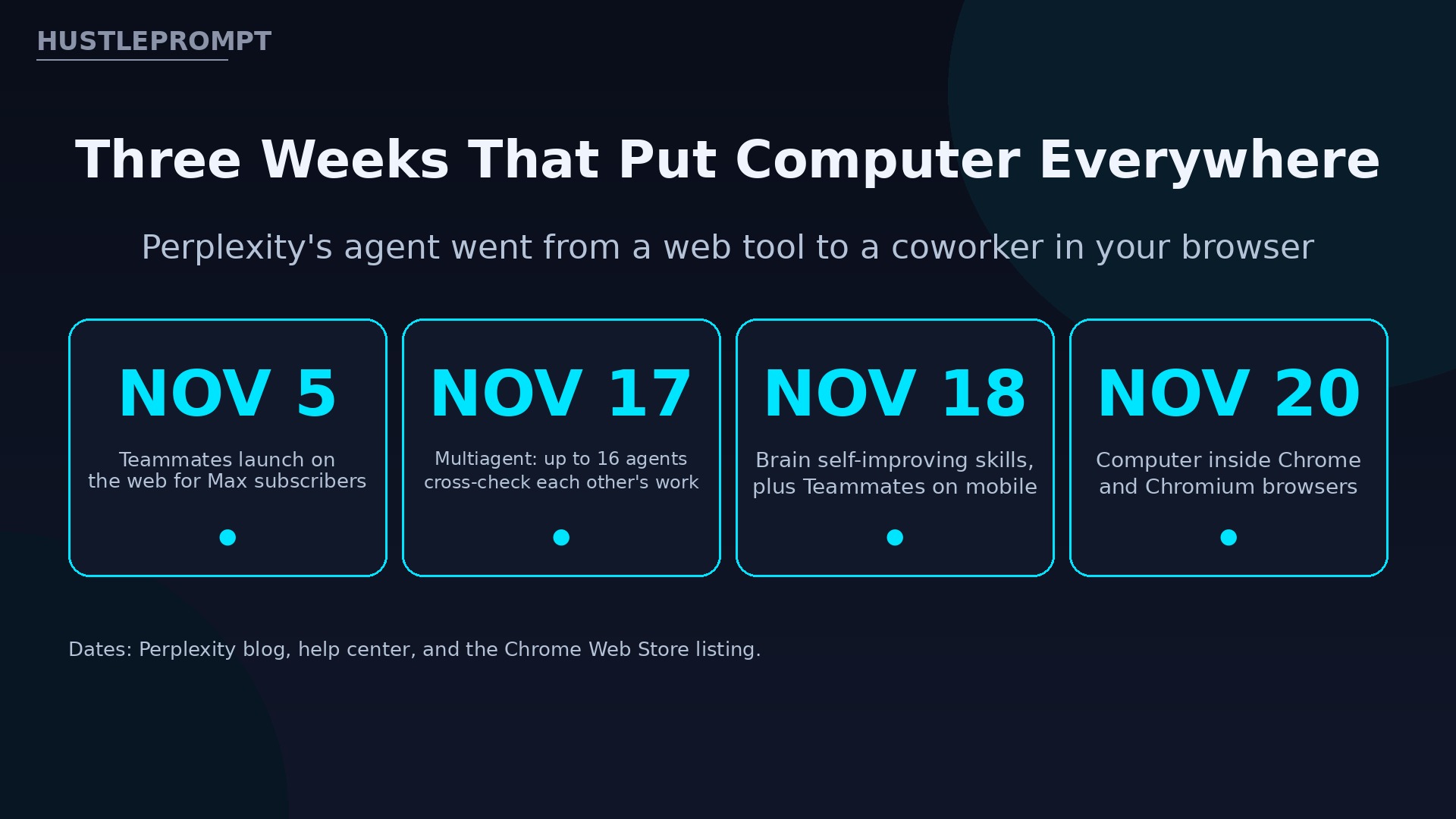
Three weeks that put Computer everywhere
The Chromium launch caps three weeks of releases that turned Computer into something closer to a coworker. Teammates arrived on the web for Max subscribers on November 5. Multiagent — up to 16 agents cross-checking each other’s work — landed on November 17. Brain’s self-improving skills and Teammates on mobile followed on November 18. Then, on November 20, the browser extension and prompt-box Teammate creation closed the loop: the agent now lives where the work happens.
| Date (2026) | What shipped | Who gets it |
|---|---|---|
| November 5 | Teammates launch on the web | Max subscribers |
| November 17 | Multiagent: up to 16 agents cross-check work | Max subscribers, web |
| November 18 | Brain self-improving skills; Teammates on mobile | US Max subscribers; Max mobile |
| November 20 | Computer in Chromium browsers; Teammates from the prompt box | Computer users; Max on the web |
Teammates, straight from the prompt box
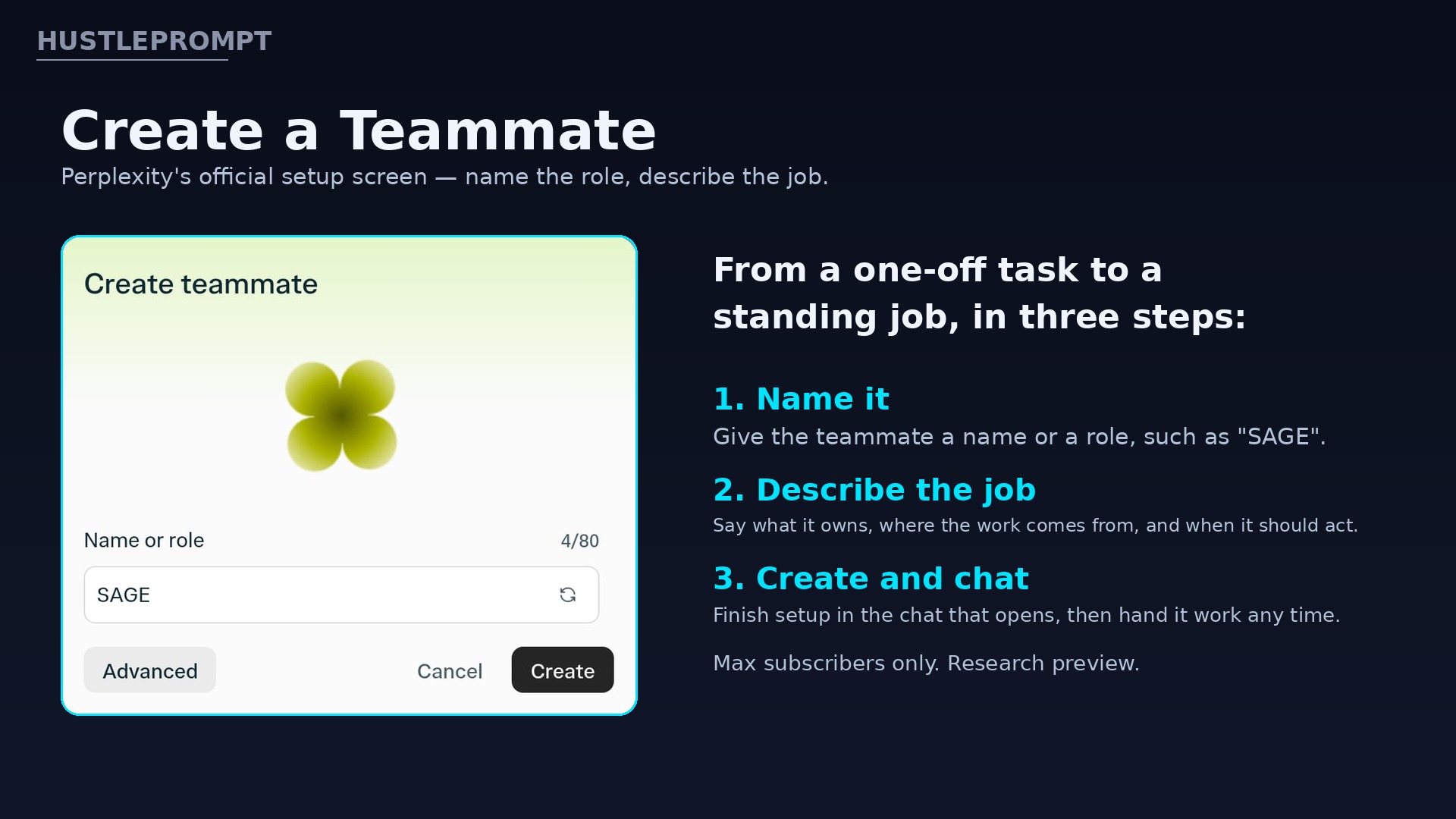
In parallel with the browser launch, Max subscribers on the web gained a faster way to create a persistent Teammate. Turn on the Computer toggle in the prompt box, ask Computer to set one up from any active Computer task, and it draws on the current thread plus memory from past sessions to configure the new agent. You can rename it, change its role, or swap its avatar in the same conversation.
A Teammate is different from a one-off Computer task: it owns ongoing work. Perplexity’s help center describes teammates as agents that take a responsibility — triaging bug reports, tracking metrics, researching a market — and keep working until the result is ready for review. They monitor connected tools such as Slack, GitHub, and Linear, and start work when something arrives. Each teammate runs on its own isolated computer, and new teammates use Claude Opus 5.5 by default.
The catch is the price tag. Teammates are a research preview for Max subscribers on individual and Enterprise plans; Pro is not included. Max costs $200 a month, or $2,000 a year, according to Engadget and TechRepublic. For a freelancer, that is $2,000 a year for an agent that never sleeps — worth it only if it takes over work that would otherwise eat billable hours.
What it costs, and who gets what
| Feature | Who can use it | Status |
|---|---|---|
| Computer in Chromium browsers | Computer users; no separate tier announced for the extension | Live November 20, 2026 |
| Teammates from the prompt box | Max subscribers, on the web | Live November 20, 2026 |
| Teammates (in general) | Max on individual and Enterprise plans; Pro not included | Research preview |
| Multiagent (up to 16 agents) | Max subscribers, on the web | Live November 17, 2026 |
| Brain personal skills | US Max subscribers, on by default | Live November 18, 2026 |
How to put it to work
Setup takes minutes. The interesting part is what you delegate first.
- Install the extension from the Chrome Web Store and sign in.
- Open the side panel beside the page you are working on.
- Give Computer a task in plain language.
- Watch it work across your tabs, then review the result before anything goes out.
Start with work that is tedious, repeatable, and easy to check: a weekly research brief on your niche, outreach prep that pulls a prospect’s recent posts and drafts a first-touch email for your review, the same admin form you fill every week, or a competitor watch that summarizes pricing-page changes.
Keep one rule: the agent drafts, you decide. Review everything before it leaves your accounts, connect only the tools a task needs, and treat login prompts as checkpoints. CAPTCHAs, passkeys, multi-factor prompts, anti-bot systems, and expired sessions can pause or block a run, according to reporting — the agent stops and waits for you.
From a side-panel prompt to finished work
1. HAND IT OFF
Open the side panel in Chrome and describe the task in plain language.
2. COMPUTER PLANS
The agent breaks the job into steps and picks the tabs and tools it needs.
3. WORKS YOUR TABS
It opens sites, reads pages, and fills forms using your signed-in sessions.
4. YOU REVIEW
Check the result before anything is sent, filed, or published.
Why this matters for freelancers
The browser launch matters because it removes the last context switch. Research, outreach, and admin no longer live in three different apps. The assistant sits in the same window as the work, with access to the same logged-in tools you already use, and you watch it work.
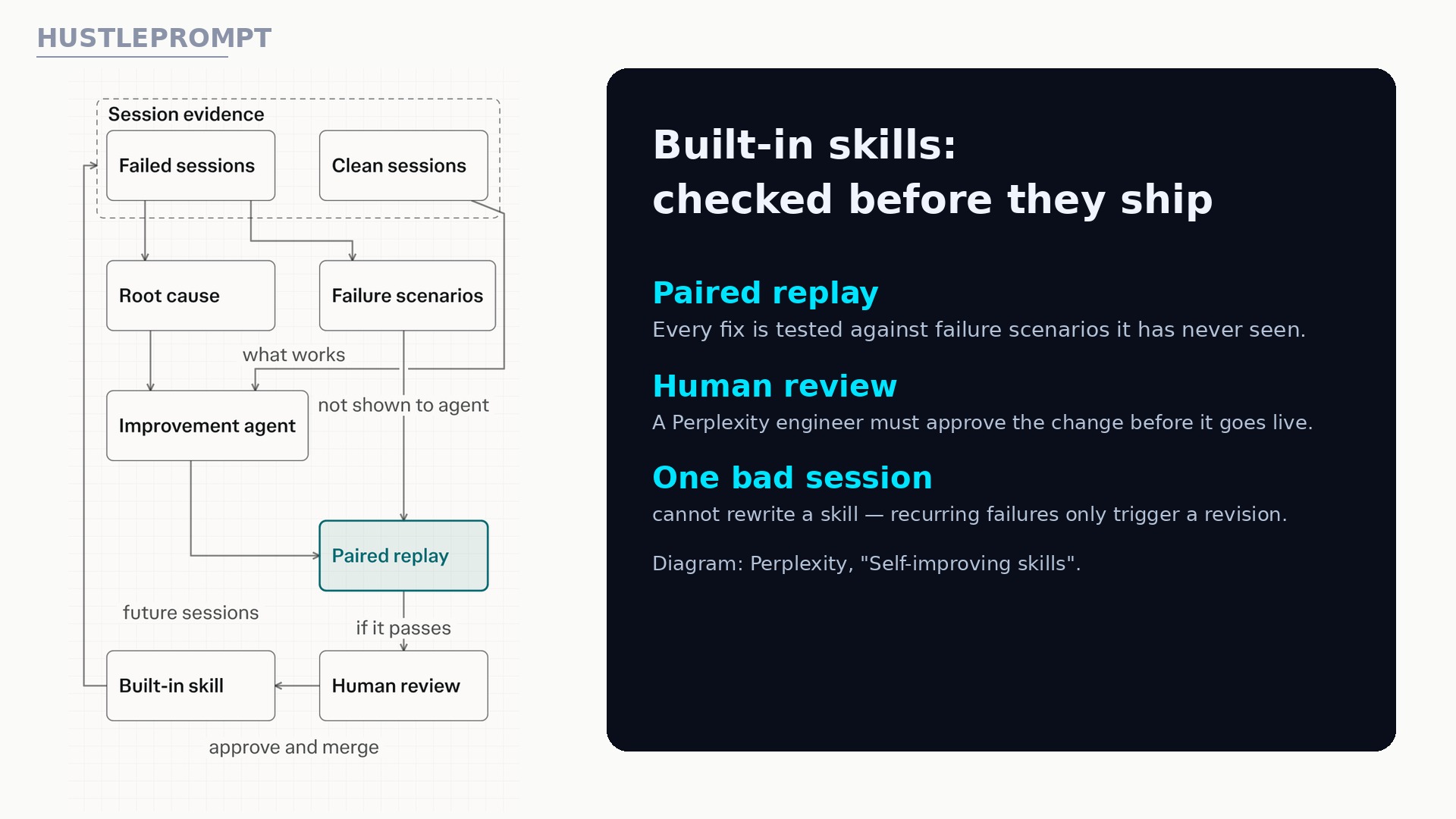
It also gets better at your procedures. Brain, Computer’s self-improvement system, now writes and updates reusable skills from your past sessions. In an eight-week production test, 72.9% of users with automatic skill improvement on received at least one new personal skill, against 6.5% who added one by hand, and tool-call failures fell 11%. Between August 1 and November 14, Brain wrote more than 80,000 personal skills for over 20,000 users. For a solo operator, it is a hire that trains itself.
What it cannot do (yet)
Be honest about the edges. The extension has no announced tier of its own, so Computer access still follows your Perplexity plan. Teammates remain a research preview, and Perplexity warns the feature is still under development and its behavior may change. No agent should touch money, contracts, or client-facing messages without your review. Used as a supervised coworker inside the browser, though, this is the most practical version of Computer Perplexity has shipped — because it finally works where the work already is.
Perplexity’s official video introduces Computer for Enterprise. It is not about this specific Chromium launch, but it shows how Computer plans and runs multi-step work.
Frequently asked questions
What is Perplexity Computer?
Computer is Perplexity’s agent that plans and runs multi-step work across the browser, files, and connected tools. You describe an outcome in plain language, and it breaks the job into tasks, uses sub-agents on different models, and works through them until the result is ready for review. It launched in February 2026, and Perplexity has since added effort levels, Multiagent teams of up to 16 agents, Teammates for ongoing work, and Brain, which learns your procedures from past sessions.
Which browsers does the extension work in?
Chrome, Edge, Brave, Arc, and other Chromium browsers that install from the Chrome Web Store. The extension is version 0.0.8, updated November 20, 2026.
Do I need Perplexity’s Comet browser to use Computer?
No. The extension brings Computer to the Chromium browser you already use. If you do use Comet, you do not need the extension, because the same capabilities are built in.
How much does it cost to use Computer in Chrome?
The extension itself is free to install, and Perplexity has not announced a separate tier for it — Computer access follows your Perplexity plan. Teammates, the persistent agents, are the expensive part: they need a Max subscription, which costs $200 a month or $2,000 a year, according to reporting on the launch.
What is a Perplexity Teammate, and how is it different from a Computer task?
A Computer task is a one-off job. A Teammate is a persistent agent that owns ongoing work — a responsibility such as triaging bug reports or tracking metrics — and keeps working across sessions, monitoring connected tools and reaching out when it needs input. Since November 20, Max subscribers on the web can create one directly from any Computer task via the prompt box.
Does Computer collect my browsing data?
According to the Chrome Web Store listing, Computer only acts during a task you started, and only in the browser where the extension runs. It does not collect browsing data in the background, and it handles authentication information and website content only while a task is running.
What happens when Computer hits a CAPTCHA or a login prompt?
According to reporting on the launch, CAPTCHAs, passkeys, multi-factor prompts, anti-bot systems, and expired sessions can pause or block a run. The agent stops and waits for you instead of pushing through your accounts on its own.
Keep Reading
- Perplexity Computer Brain Gets Self-Improving Skills
- Perplexity Multiagent: 16 AI Agents That Cross-Check Work
- Perplexity Orchestrator Puts 45+ AI Models on One Key
Sources
- Perplexity — Chrome Web Store listing (version 0.0.8, updated November 20, 2026)
- Perplexity — Self-improving skills (Computer Brain)
- Perplexity Help Center — Get started with Perplexity teammates
- Fathom — Perplexity AI Agent Can Work Across Chrome Tabs
- AI Compass — Perplexity brings Computer to Chromium extensions and Teammates
- Engadget — Perplexity’s ‘Teammates’ are the company’s AI agents for daily work tasks
- AlphaSignal — Perplexity Brings its Computer Agent to Chrome Without Installing Comet