
On November 18, 2026, Slack stopped treating AI agents as a side chat. Its launch post, “Bring Agents Into Your Workflows, Right in Slack,” puts Slack Workflow Builder, Slackbot, and third-party AI agents to work together in one place. The pitch is simple: the tool your team already lives in becomes the automation hub, with no new app and no code.
The change fixes a specific annoyance. Until now, a workflow could run a process and an agent could do the thinking, but a person had to sit between them, copying and pasting between them. Slack’s example is onboarding: the workflow sends every new hire the same welcome message, while an agent could personalize each one. Now the workflow hands the work to the agent directly.
What Slack launched on November 18
The launch has four parts:
- Two new Workflow Builder steps that start a conversation with Slackbot or any third-party or custom agent.
- Slackbot Tasks that start on Slack events, such as a new message, a reaction, or an updated list item.
- Agent Tasks that save a prompt to a third-party agent and run it on a schedule or on a Slack event.
- A human review step that Workflow Builder adds after every AI step, before content reaches Jira, Google Sheets, or Salesforce.
One detail matters. The agent steps and event-triggered Slackbot tasks already appeared in Slack’s October 2026 updates, with review-by-default listed there too. November 18 is the formal launch that packages them with Agent Tasks and the Tasks tab, dated the same day.
Two new steps hand work to an agent
The heart of the launch is a pair of steps inside Workflow Builder. Start conversation with Slackbot sends a prompt you write once, and Slackbot opens in the person’s sidebar with that prompt already sent. Add variables, skills, and knowledge sources to guide it. Start conversation with Agent does the same with any third-party or custom agent.
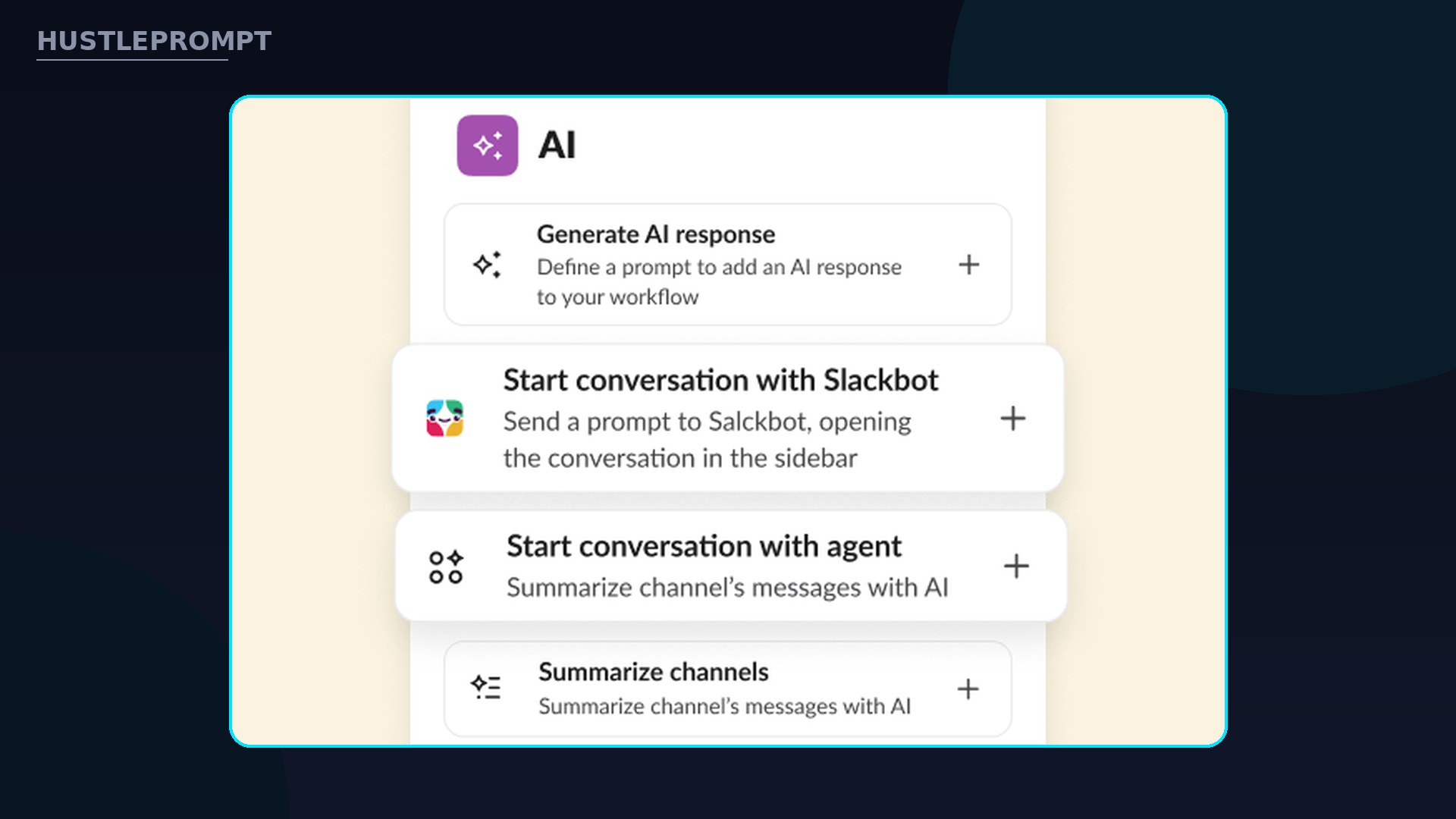
Slack’s examples show the pattern. A stand-up workflow posts a morning check-in with a “Draft with Slackbot” button, and one click opens Slackbot. An IT help desk workflow posts troubleshooting steps for a VPN problem, and a “Need more help” click pulls in the Help Desk agent with the question already sent.
| Workflow step | What it does | Best for |
|---|---|---|
| Start conversation with Slackbot | Opens Slackbot in the sidebar with your prompt already sent; supports variables, skills, and knowledge sources | Drafting, summaries, and answers that use your team’s Slack context |
| Start conversation with Agent | Hands the prompt to a third-party or custom agent you pick; the agent already knows team context and respects permissions | Specialist work, such as a help desk agent or a sales agent |
Slackbot Tasks start on events, Agent Tasks run on a schedule
Not every job belongs in a workflow. Slackbot Tasks start the moment something happens in Slack: a message is posted, a reaction is added, or a list item is updated. You describe the task to Slackbot, and it gets to work. Slack says Calendar, Salesforce, and PagerDuty triggers are coming next, and the October updates raised the limit to 15 automatic runs per day.
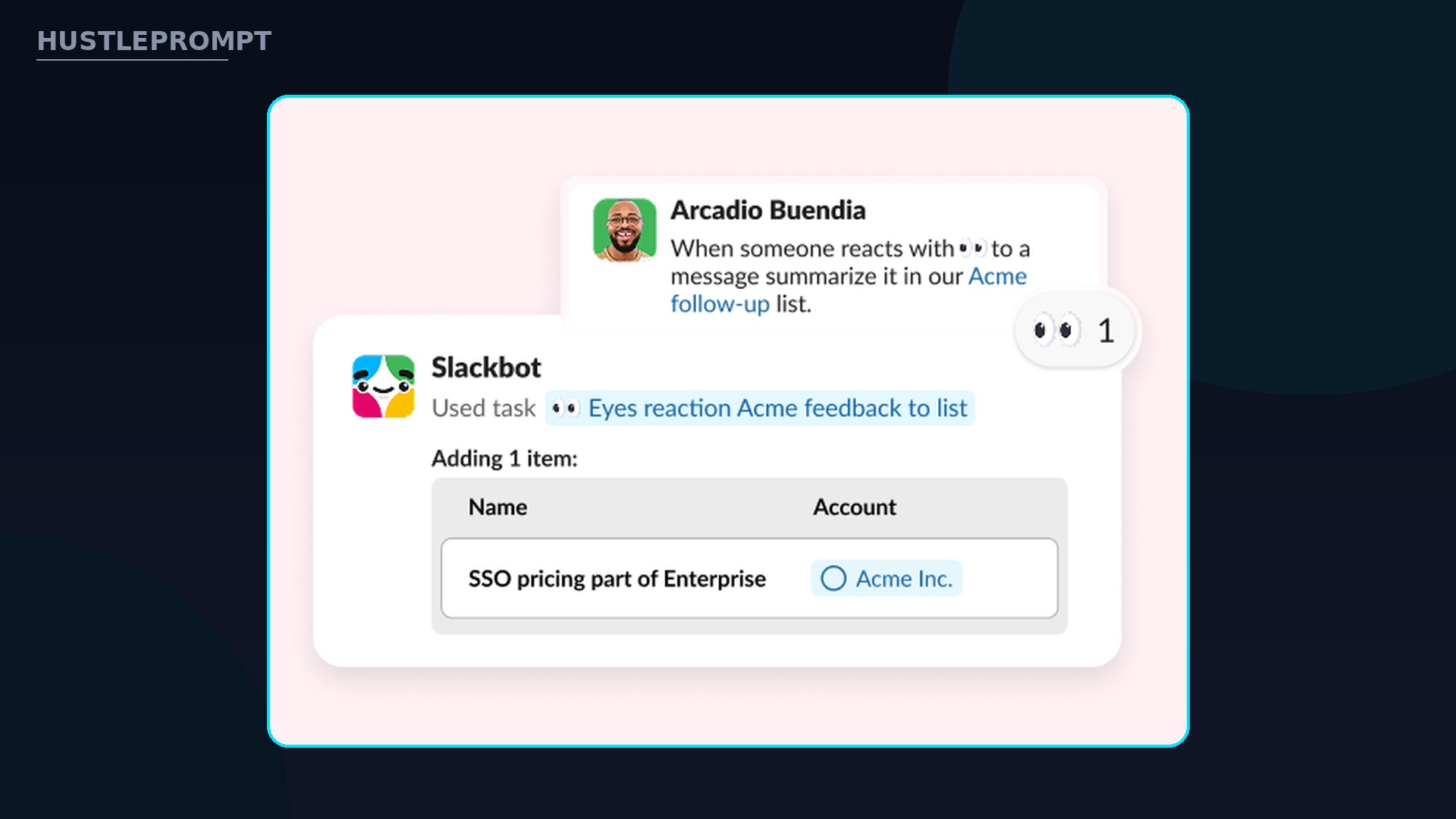
Agent Tasks cover the other half of recurring work: the prompt you wish would run itself. Open the agent’s direct message, add a Task, write your prompt once, and pick when it runs. Slack’s example is a weekly pipeline review: every Wednesday at 8:45 a.m., a thread opens asking for owned opportunities ranked by size.
| Feature | Slackbot Tasks | Agent Tasks |
|---|---|---|
| Trigger | Slack events: message, reaction, list item update, channel join | Schedule or Slack event, set in the agent’s direct message |
| Agent | Slackbot | Any third-party agent |
| Setup | Describe the task to Slackbot | Save a prompt once, pick when it runs |
| Result | Draft ready for review, such as a reply summary | Answer in a thread you can continue |
| Limit noted by Slack | 15 automatic task runs per day | Admin controls keep scheduled tasks governed |
Developers get a Tasks tab in the direct message of agents that use Slack’s Agent messaging experience. It is on by default, needs the agent_view feature and the assistant:write scope, and switching it off pauses tasks.
A human still reviews before anything reaches your tools
The part small businesses should care about most is the review step. Teams hesitate to let AI write to business tools unchecked, because one wrong detail in a Sheet or a ticket can spread fast. So Workflow Builder adds a review step after every AI step: the workflow pauses, shows the content to the right person in an editable form, and only after approval sends it on.
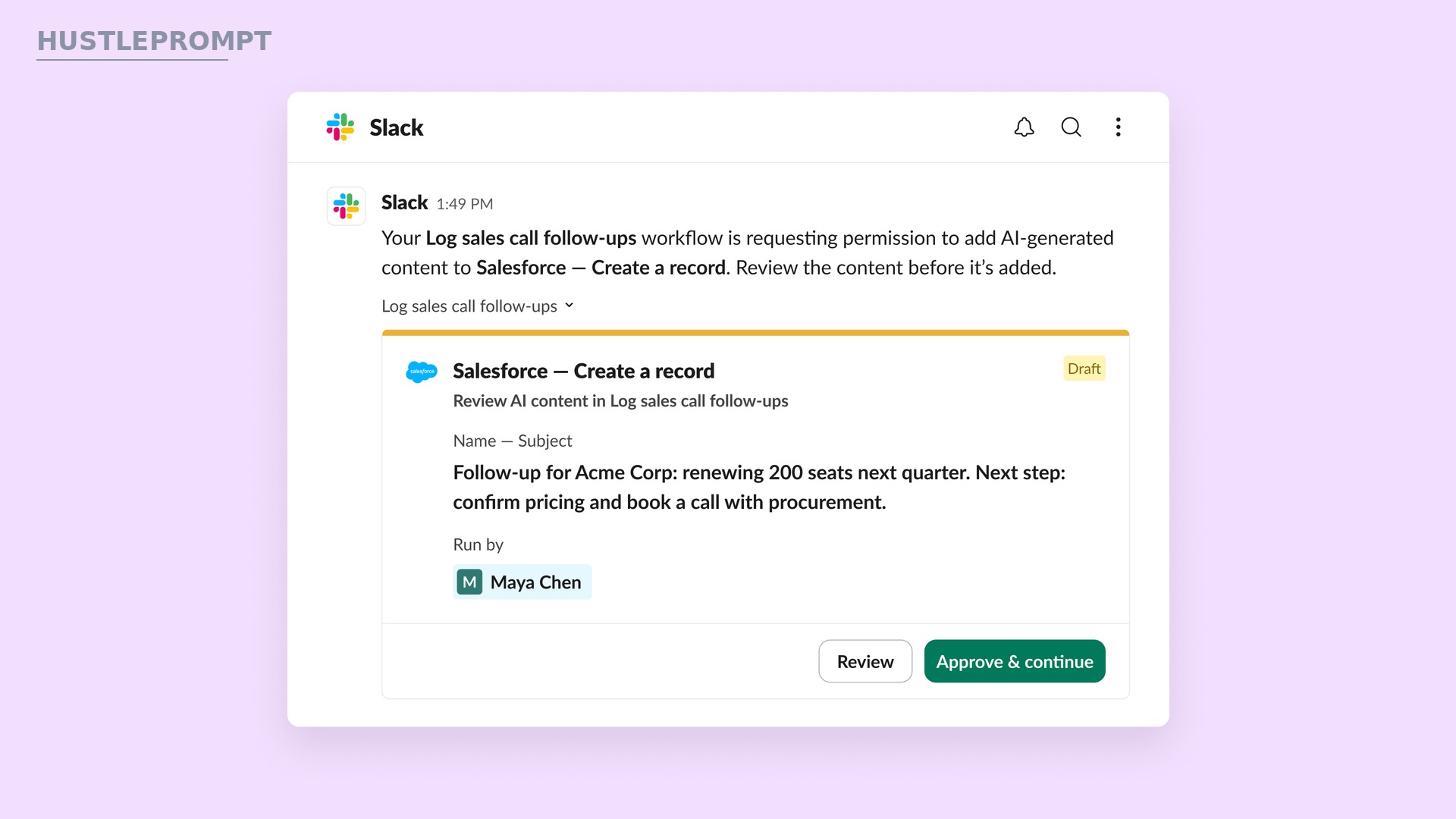
Slack’s updates page adds a control detail: by default a workflow pauses for human review when it sends AI-generated content to a third-party app, but admins can customize when review is required. A Friday status draft gets tweaked and approved before the row lands in the tracker.
What it costs
Workflow Builder is included in Pro, Business+, and Enterprise plans today, according to the launch post. Note the naming: Slack’s pricing page calls the top tier Enterprise+. Slack announced no separate price for the agent capabilities.
| Slack plan | Price per user, per month (annual billing) | Price per user, per month (monthly billing) | Slackbot allowance |
|---|---|---|---|
| Pro | $7.25 | $8.75 | Included; limits vary by plan |
| Business+ | $15 | $18 | 15 messages per user each week |
| Enterprise+ | $45 | Contact sales | No weekly message limits |
Prices are from Slack’s pricing page as read on November 22, 2026. The same page lists over 2,600 apps in the Slack App Directory.
How a job flows through Slack now
Together, the four pieces form one loop.
No copy and paste between steps. The thinking happens inside the process, not beside it.
How a small business can use it this week
Nothing here needs a new tool or a developer. The team already lives in Slack, so start with one repetitive job, not five.
- Pick one job with a clear trigger: lead follow-ups, a weekly report, or support triage.
- Write the prompt once, with the variables the agent needs.
- Name the reviewer who checks each draft first.
- Connect one destination tool, such as a single Google Sheet or Jira project.
- Watch the first week, checking the 15-runs-a-day limit and the review queue, before adding more.
Three starters map onto the launch: a reaction on a customer message drafts a reply, a Wednesday Agent Task ranks the pipeline, and a Friday status workflow files the approved update.
What to watch before you build
The limits are the honest part. Slackbot Tasks cap at 15 automatic runs per day, and Slackbot message limits vary by plan: Business+ allows 15 messages per user each week, while Enterprise+ has no weekly cap. Calendar, Salesforce, and PagerDuty triggers are coming next, not live yet. The review step is the whole control model: approve drafts without reading them, and the automation just moves mistakes faster.
Frequently asked questions
When did Slack launch AI agents in Workflow Builder?
Slack announced the launch on November 18, 2026, in the blog post “Bring Agents Into Your Workflows, Right in Slack.” The agent steps and event-triggered Slackbot tasks had already appeared in Slack’s October 2026 updates, so November 18 is the formal launch, not the first sighting.
What is the difference between Slackbot Tasks and Agent Tasks?
Slackbot Tasks use Slackbot and start automatically on Slack events, such as a message, a reaction, or a list item update. Agent Tasks save a prompt to any third-party agent and run it on a schedule or on a Slack event, with results landing in a thread.
Do I need to write code to use agents in Slack workflows?
No. Slack says no code is required: you add a step in Workflow Builder, write the prompt once, and publish. Agent Tasks need no workflow at all, just a saved prompt in the agent’s direct message.
Which Slack plans include Workflow Builder?
According to Slack’s launch post, Workflow Builder is included in Pro, Business+, and Enterprise plans. Slack’s pricing page lists Pro at $7.25 per user per month on annual billing, Business+ at $15, and Enterprise+ at $45.
Does Slack charge extra for the agent steps?
Slack announced no separate standalone price for these capabilities. The cost is the plan itself, though Slackbot message limits vary by plan, so heavy Slackbot use may need a higher tier.
Can AI write directly to Jira, Google Sheets, or Salesforce?
Not unchecked. Workflow Builder automatically adds a review step after every AI step, and the workflow pauses until a person edits and approves the content. Admins can customize when review is required.
What can trigger a Slackbot Task?
A message being posted, a reaction being added, a list item being updated, or someone joining a channel. Slack says Calendar, Salesforce, and service triggers from tools like PagerDuty are coming next.
Keep Reading
- OpenAI Dots Come to ChatGPT Plus: A $20 Agent That Works 24/7
- Sell AI Spreadsheet Automation Services
- Your AI Just Started Working Without You
Sources
- Slack, “Bring Agents Into Your Workflows, Right in Slack,” November 18, 2026
- Slack Developer Changelog, “Introducing the Tasks tab for agents,” November 18, 2026
- Slack, “Slack updates and changes” (November and October 2026 sections)
- Slack, “What’s New” (October 2026 section)
- Slack, “Pricing Plans,” read November 22, 2026