
Webflow Premium costs $25 a month billed annually. For that you get a visual designer that outputs real HTML and CSS, a content system that holds 20,000 items, and hosting that scales to millions of visits — without a plugin in sight.
The free plan already builds real sites, with Webflow AI included. So the question is not whether Webflow works — it does — but whether the paid plans earn their money, and which one you actually need.
This review breaks down Webflow’s verified November 2026 pricing, what each plan really includes, where the free plan stops, and how it compares with Framer and Wix. In short: Webflow is worth $25 a month if you sell websites or run a content site — and a waste of money if you just need a simple page online fast.
What Is Webflow and How Does It Work?
Webflow is a visual web design platform that lets you design, build, and publish websites without writing code — while it generates clean, production-ready HTML, CSS, and JavaScript behind the scenes.
Three parts work together. The Designer is the visual canvas where you build pages, style elements, and set up interactions. The CMS (content management system) holds structured content — blog posts, team members, listings, products — that repeats across pages. Hosting publishes the site on Webflow’s infrastructure, with a free SSL certificate and a global content delivery network (CDN) that serves pages fast.
On top sits Webflow AI, an assistant that builds sections, updates styles, and drafts whole pages from plain-language prompts. Every site plan includes it, including the free Starter plan. Webflow also ships an MCP server (Model Context Protocol), so AI agents can manage your site from tools like Claude and Gemini.
For people who do want to write code, Webflow supports custom code at the site, page, and element level. Paid Workspace plans can also export a site’s code and host it anywhere, with no attribution required — although dynamic content exports collection by collection, and forms stop working off Webflow hosting.
Key Features: What Webflow Actually Gives You in 2026
The Designer: a pro-grade visual canvas
The Designer is Webflow’s core, and it is the reason designers pick it over simpler builders. You place elements on a canvas and control layout with the same tools developers use: flexbox, grid, spacing, and positioning. Every change updates real CSS, so what you see is what ships.
That power has a cost: a learning curve. The Designer is not drag-and-drop in the Wix sense — expect a few days of practice, and use Webflow University’s free courses to learn the layout model. The payoff is design freedom no template builder matches: custom layouts, animations, and interactions without touching code.
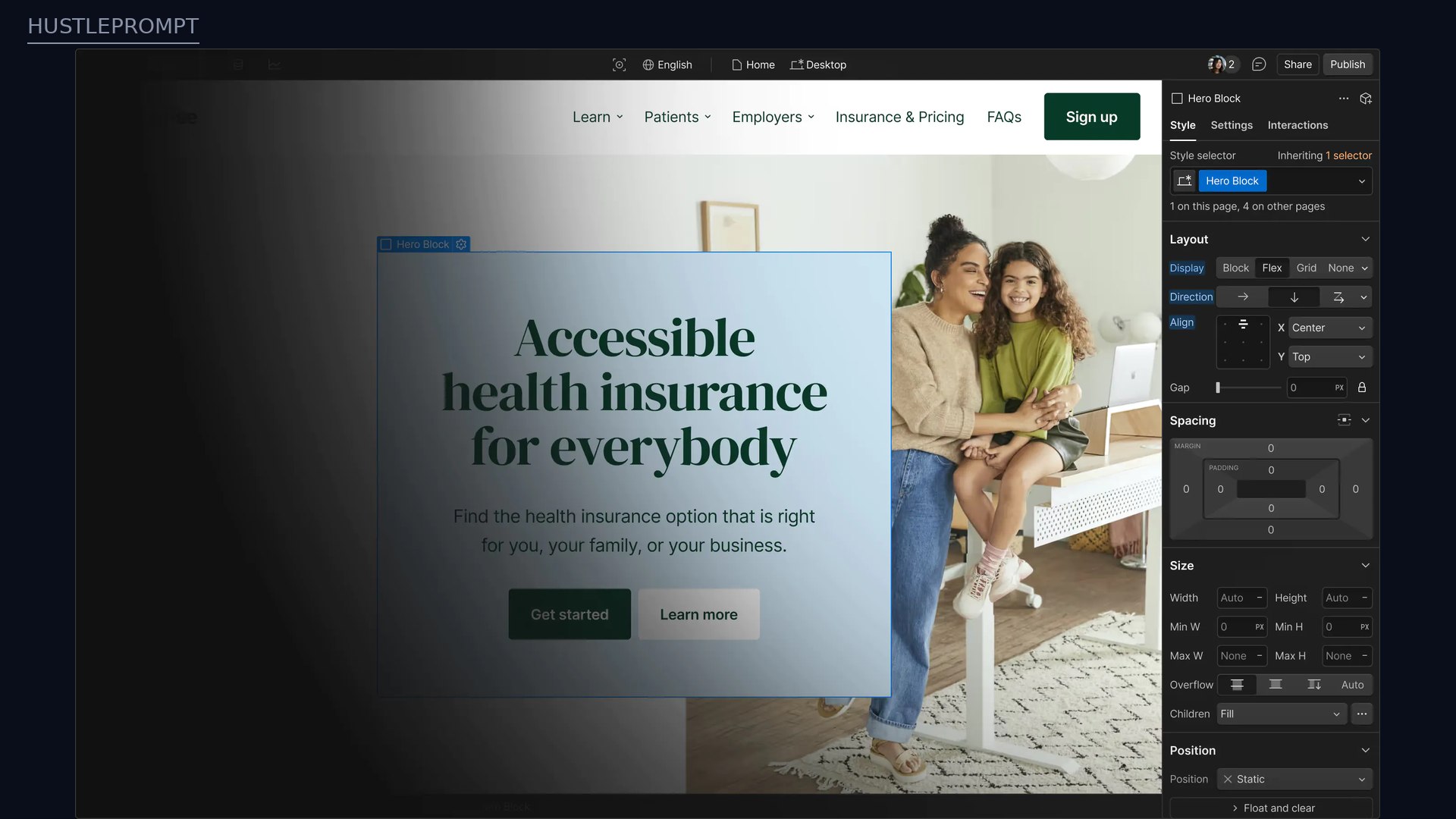
The Designer in action: a hero block being styled with the Style panel. Official Webflow product screenshot from webflow.com.
Webflow CMS: real content management, not a blog add-on
The CMS is what separates Webflow from page builders. You define collections — say, blog posts or portfolio pieces — with custom fields, then design one template page that renders every item. Add a post and the site updates itself.
Premium includes 40 CMS collections and 20,000 items, which covers serious content sites. The free Starter plan includes a limited CMS (20 collections, 50 items), and Basic has no CMS at all — the single biggest reason to pay for Premium over Basic.
Webflow AI: prompt your way to a first draft
Webflow AI builds sections, restyles elements, and drafts full pages from a text prompt, right inside the Designer. It is included on every site plan, including free. AI usage runs on credits: the free Starter Workspace includes 200 credits a month, Core 300, and Growth 400. Need more? A 2,000-credit monthly add-on costs $20 a month billed yearly.
Treat the AI output as a first draft, not a finished site. It starts the structure and copy fast; you still need a human eye for layout, spacing, and brand consistency before anything goes live.
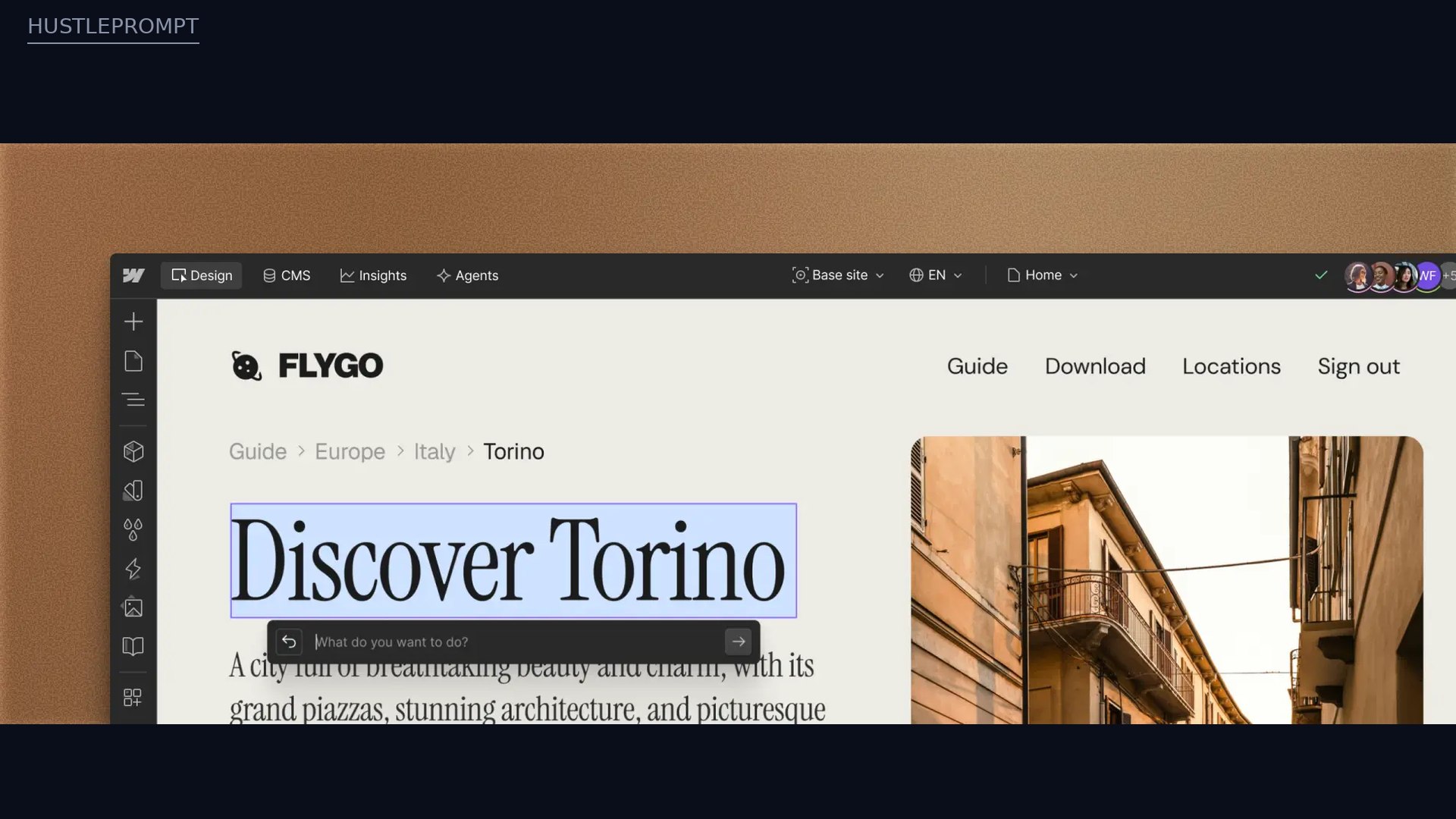
Webflow AI inside the Designer: type what you want and it builds or edits the page. Official Webflow product screenshot from webflow.com.
Hosting, SEO, and speed — included, not bolted on
Every paid site plan includes hosting that Webflow says scales automatically to millions of simultaneous visits, on Cloudflare’s CDN. You get a free SSL certificate, and pages are mobile-friendly by default.
SEO controls are built in: editable titles, meta descriptions, alt text, sitemaps, and 301 redirects (redirects need a Growth Workspace or higher). Webflow says its sites are SEO-friendly, citing fast hosting, standards-based code, free SSL, and mobile-friendliness.
Ecommerce and add-ons: stores, analytics, and localization
Webflow sells three ecommerce site plans for online stores, with custom carts and checkout. Standard ($29 a month billed annually) covers 500 items with a 2% transaction fee; Plus ($74) covers 5,000 items with no fee; Advanced ($212) covers 15,000 items with no fee.
Three add-ons extend any site: Optimize (from $299 a month) for A/B testing, personalization, and AI optimization; Analyze (from $9) for site analytics; Localize (Essential $9, Advanced $29) for AI translation and localized SEO. The Team plan ($2,500 a month on an annual contract) bundles them for larger organizations.
How to Build Your First Site in Webflow
The fastest path from zero to a published site takes an afternoon.
- Start free. Create an account at webflow.com. The Starter plan costs nothing, needs no card, and includes Webflow AI, so you can learn the Designer on a real project.
- Pick a starting point. A blank canvas, a free template, or a Webflow AI prompt that drafts the first version of your page. Templates are the fastest route if the design is not the point.
- Build the homepage in the Designer. A navigation bar, a hero section, and a footer. Learn the layout tools — sections, containers, flexbox, and grid — before you style anything. A clean structure saves hours later.
- Add a CMS collection if you need repeating content. Set up a blog or portfolio collection, connect it to a template page, and publish one item to see the system work. If you only need static pages, skip this step and stay on Basic.
- Publish when it is ready. Upgrade to Basic ($15 a month billed annually) for a custom domain, or Premium ($25) if you need the CMS. Connect your domain, check the mobile views, and publish. Never pay monthly: Premium costs $468 a year month to month, against $300 billed annually.
Webflow Pricing 2026 (Verified)
Prices below are US list prices in dollars, per site, read live on Webflow’s official pricing page on November 25, 2026 — annual rates from the page, monthly rates with the billing toggle set to Monthly. Prices exclude tax. Confirm your price on the official page before subscribing.
Webflow site plans — November 2026 (US list prices)
“Start building with Webflow’s AI-native platform for free. Upgrade any time to unlock advanced features.” — Webflow’s own pitch on its pricing page.
| Plan | Price, billed annually | Price, billed monthly | Key extras |
|---|---|---|---|
| Starter | $0 | $0 | webflow.io domain, limited CMS (20 collections, 50 items), 2 static pages, 1 GB bandwidth, 50 form submissions, Webflow AI, MCP server |
| Basic | $15/mo ($180/yr) | $25/mo ($300/yr) | Custom domain, 300 static pages, 10 GB bandwidth, unlimited form submissions, password protection, Webflow AI, MCP server; no CMS |
| Premium | $25/mo ($300/yr) | $39/mo ($468/yr) | Everything in Basic, plus Webflow CMS (40 collections, 20,000 items), 50 GB bandwidth, code components, site search, form file upload, well-known files |
| Ecommerce Standard | $29/mo ($348/yr) | $42/mo ($504/yr) | 500 ecommerce items, 2% transaction fee, custom cart and checkout |
| Ecommerce Plus | $74/mo ($888/yr) | $84/mo ($1,008/yr) | 5,000 ecommerce items, 0% transaction fee, unbranded emails |
| Ecommerce Advanced | $212/mo ($2,544/yr) | $235/mo ($2,820/yr) | 15,000 ecommerce items, 0% transaction fee, unbranded emails |
Plan prices and features: Webflow’s official pricing page (webflow.com/pricing), read live November 25, 2026. Yearly totals are our arithmetic from the monthly rates, not printed totals. Premium’s 50 GB bandwidth is the default; 100 GB costs $69 a month billed monthly.
Three pricing details matter more than the headline numbers:
- Monthly billing is expensive. Basic costs $25 a month billed monthly against $15 billed annually — a 67% markup. Premium costs $39 against $25, a 56% markup. On Premium, annual billing saves $168 a year ($468 minus $300). Pay annually or do not pay at all.
- Premium is the real Webflow. Basic has no CMS, so any blog, portfolio, or directory needs Premium. The $10 gap between Basic and Premium buys the entire content system, 50 GB of bandwidth, and site search. If your site has repeating content, skip Basic.
- Site plans are per site, and Workspace plans are separate. Every published site needs its own site plan; the Workspace covers staging and collaboration: Starter is free (2 staging sites, 200 AI credits), Core is $19 a month billed annually (10 staging, 300 credits), and Growth is $49 (unlimited staging, 400 credits). Freelancers get their own track: Freelancer $16 a month billed annually, Agency $35. Extra full seats cost $39 a month each, billed annually.
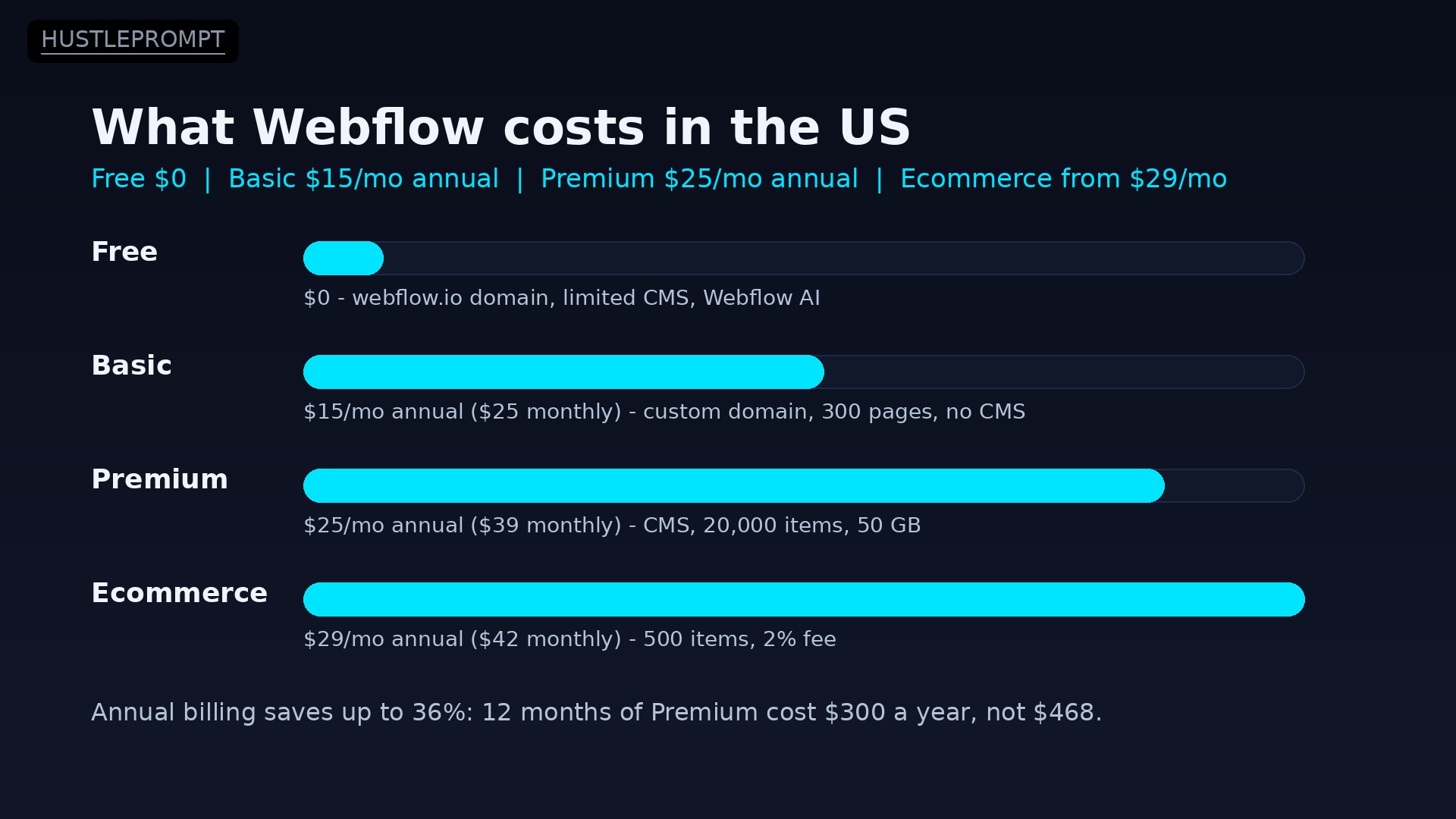
US list prices, per month, billed annually (monthly billing in brackets): Free $0, Basic $15 ($25), Premium $25 ($39), Ecommerce Standard $29 ($42). HustlePrompt illustration (not a Webflow screenshot).
Webflow by the Numbers
What the official pricing page actually says
Sources: Webflow’s official pricing page (webflow.com/pricing), read live November 25, 2026 (plans, prices, billing, features, CMS limits, bandwidth). The $168 saving is our arithmetic: $468 minus $300.
The 60-Second Decision
Should you pay for Webflow?
Just a simple site?
Get Basic ($15/mo annual). A custom domain, 300 pages, and hosting cover a brochure site or a portfolio with no blog.
A blog, directory, or content site?
Get Premium ($25/mo annual). The CMS, 20,000 items, and 50 GB of bandwidth are the whole reason to choose Webflow.
Selling products online?
Get Ecommerce Standard ($29/mo annual) for up to 500 items, or Plus ($74) once the 2% fee costs more than the upgrade.
Want it cheaper and faster?
Try Framer Basic ($10/mo annual) for a quick AI-generated site, or Wix Light ($17/mo yearly) for the easiest builder of the three.
Webflow vs. the Alternatives
| Tool | Entry paid price | What you get for it | The catch |
|---|---|---|---|
| Webflow Premium | $25/mo billed annually ($300/yr); $39/mo monthly | Visual designer, CMS with 20,000 items and 40 collections, 300 pages, 50 GB bandwidth, hosting, SEO controls, Webflow AI | Monthly billing costs 56% more than annual; real learning curve; CMS locked behind Premium |
| Framer Pro | $30/mo billed annually ($360/yr); $45/mo monthly | AI site generation, 150 pages, 10 CMS collections with 2,500 items, 100 GB bandwidth, staging, Branching, analytics for 90 days | Costs $5/mo more than Webflow Premium on annual billing, for a smaller CMS (2,500 vs. 20,000 items) and fewer pages (150 vs. 300) |
| Wix Business | $39/mo on a yearly subscription | Easiest drag-and-drop builder of the three, 100 GB storage, Standard ecommerce with 50,000 products, free domain for 1 year, AI creation tools | 2% transaction fee; design freedom is template-bound; no monthly rate displayed on the pricing page |
Framer Pro is the faster rival. At $30 a month billed annually ($360 a year), it costs $5 a month more than Webflow Premium, and its CMS caps are far smaller: 2,500 items against Webflow’s 20,000, and 150 pages against 300. What Framer wins on is speed: its AI generates a whole site from a prompt, and its canvas is easier to learn than Webflow’s Designer. Framer’s Basic plan ($10 a month billed annually) is also the cheapest paid plan in this comparison, with 1,000 CMS items and a custom domain. Choose Framer when you want a beautiful site live this week and your content is light; choose Webflow when the site will grow into hundreds of pages or thousands of CMS items. Framer’s prices come from its official pricing page, read live on November 6, 2026 (our Framer review), with the same limits confirmed on Framer’s FAQ page on November 25, 2026.
Wix Business is the easiest rival. At $39 a month on a yearly subscription, it costs the same as Webflow Premium billed monthly — and $14 a month more than Premium billed annually. In return you get the simplest builder of the three, 100 GB of storage, Standard ecommerce with 50,000 products, and a free domain for a year. The trade-off is control: Wix sites start from templates and stay inside them, while Webflow lets you design from a blank canvas. Wix also charges a 2% transaction fee on Business (0% on Elite at $159 a month), and its pricing page shows no monthly-billing rate. Choose Wix when you want a decent site online today with zero learning curve, especially a small store. Choose Webflow when design freedom and a real CMS matter more than speed. Wix’s prices come from wix.com/plans, read live on November 25, 2026; Wix notes that prices vary by location, so confirm yours at checkout.
Competitor figures are November 2026 pricing as shown live on the dates above — confirm them on the official sites before subscribing. Webflow’s and Framer’s prices are in US dollars and exclude tax; Wix shows its prices with a dollar sign on a yearly subscription and notes prices vary by location.
Pros and Cons
| Pros | Cons |
|---|---|
| Real design freedom: a pro-grade canvas that outputs clean HTML, CSS, and JavaScript | A real learning curve — the Designer takes days to learn, not minutes |
| A serious CMS: 20,000 items and 40 collections on Premium | Monthly billing costs up to 67% more than annual (Basic $25 vs. $15) |
| Hosting, SSL, CDN, and SEO controls included — no plugins to maintain | No CMS on Basic, so blogs and directories force the Premium upgrade |
| Webflow AI included on every plan, even the free one | Add-ons get expensive fast: Optimize starts at $299 a month |
| Code export on paid Workspace plans, with no attribution required | Support is by email, with a 48-hour reply target — no live chat on the page |
| A genuinely useful free plan: real sites, AI included, no card needed | Per-site pricing: every client site needs its own site plan, plus Workspace costs |
Who Is Webflow For?
- Freelance web designers: the Designer is the product — custom sites for clients, with the CMS and hosting included in one bill.
- Agencies: the Agency Workspace ($35 a month billed annually) covers unlimited staging sites, shared libraries, and client seats.
- Marketers and content teams: the CMS, publishing workflows, and Localize add-on let a team ship pages and translations without developers.
- Founders who want a custom site: a site that looks designed, not templated, with SEO controls and room to grow into thousands of pages.
- Small stores: Ecommerce Standard covers 500 products with a custom cart and checkout, all inside the same Designer.
It is not for people who want a site live this afternoon with no learning — Wix or Framer get you there faster — or for anyone who needs a store with low fees at scale, where the 2% fee on Standard and the per-site pricing add up quickly.
How Freelancers Actually Profit With Webflow
Webflow Premium at $25 a month billed annually is cheap enough that one client project covers a year of it. Four playbooks that work right now:
1. Client websites, designed and built in Webflow
Offer complete websites to local businesses: design, build, CMS setup, and launch. The Designer is your selling point — clients get a custom site, not a template — and the CMS lets them update their own content after handoff. Price per project, with hosting as a separate line item.
2. Content sites and directories for local businesses
Build blog-powered sites, business directories, and listing pages on the CMS. A restaurant group, a real-estate agency, or a local magazine all need repeating content, and Webflow’s collections handle it without a developer. Add a monthly care plan for new pages, updates, and SEO checks.
3. Landing pages and conversion work for marketers
Sell landing-page packages to startups and agencies: fast builds in the Designer, forms and analytics built in, and quick iteration on copy and layout. The Optimize add-on ($299 a month and up) is a separate upsell for clients with real traffic — do not bundle it into a small package.
4. Website localization as a service
Sell multilingual versions of existing sites with the Localize add-on (Essential from $9 a month). Small businesses that export or serve tourists need their site in two or three languages, and Webflow’s AI translation plus localized SEO makes the delivery fast. Charge per language, with the add-on cost passed through.
FAQ
How much does Webflow cost?
Site plans, per site: Starter is free; Basic is $15 a month billed annually ($180 a year) or $25 a month billed monthly; Premium is $25 a month billed annually ($300 a year) or $39 a month billed monthly. Ecommerce plans start at $29 a month billed annually (Standard, 500 items, 2% fee). Workspace plans are separate: Core $19 a month billed annually, Growth $49, Freelancer $16, Agency $35. Prices are in US dollars and exclude tax.
Is there a free plan for Webflow?
Yes. The Starter plan costs $0 and includes a webflow.io domain, a limited CMS (20 collections, 50 items), 2 static pages, 1 GB of bandwidth, 50 form submissions, Webflow AI, and the MCP server. You can build and test real sites for free; you pay when you want a custom domain or the full CMS.
What is the difference between Basic and Premium?
Basic ($15 a month billed annually) is for simple sites with no CMS: custom domain, 300 static pages, 10 GB of bandwidth, unlimited forms, and password protection. Premium ($25) adds the whole content system — 40 CMS collections, 20,000 items, 50 GB of bandwidth, code components, site search, form file upload, and well-known files. Any blog, portfolio, or repeating content needs Premium.
Webflow vs. Framer — which should I pay for?
Webflow Premium at $25 a month billed annually if your site will grow: 20,000 CMS items, 300 pages, and a pro-grade Designer. Framer Pro at $30 a month billed annually if you want a beautiful site live fast: its AI generates whole sites, and its canvas is easier to learn — but its CMS caps at 2,500 items and 150 pages. Framer Basic at $10 a month billed annually is the cheapest paid plan of the two for a simple site.
Webflow vs. Wix — which is better for a small business?
Wix Business at $39 a month on a yearly subscription if you want the easiest builder and a store out of the box: drag-and-drop editing, 100 GB of storage, and Standard ecommerce with 50,000 products. Webflow Premium at $25 a month billed annually if design freedom and a real CMS matter more: you design from a blank canvas, and the CMS holds 20,000 items. Wix charges 2% on Business; Webflow charges 2% on Ecommerce Standard and 0% on Plus and Advanced.
Can I export my Webflow site’s code?
Yes, with a paid Workspace plan. Webflow lets you export your site and host it anywhere, with no attribution required. Two limits apply: dynamic content exports collection by collection, and forms stop working once the site leaves Webflow hosting.
Is Webflow worth $25 a month?
Yes, if you sell websites or run a content site — a freelance designer, an agency, or a marketer shipping pages every week. The Designer, the CMS, and the hosting together replace three separate tools, and $300 a year is one small client project. No, if you only need a simple page online fast: the free plan covers a test site, Framer Basic costs less, and Wix is easier to learn. Start on Free and upgrade to Premium the week your site needs a blog or a directory.
Watch: Welcome to Webflow: Build, Launch, Optimize
Webflow’s own 3-minute introduction to building visually, working with AI, and managing sites on its platform. From Webflow’s official YouTube channel (@Webflow), in English.
Verdict: Is Webflow Worth $25/Month?
Yes — Webflow Premium at $25 a month billed annually is worth it if you sell websites or run a content site. No rival at this price combines a pro-grade visual designer, a CMS with 20,000 items, and hosting with SEO controls in one product.
Start on Free if you are still learning — one real site will tell you whether the Designer clicks. Step up to Premium when the site needs a blog, a directory, or a client handoff, and never pay monthly: at $39 a month, the same plan costs $168 more a year than the $300 annual plan.
Bottom line: at $300 a year billed annually, Webflow pays for itself with a single client website or a single quarter of content work. Just count your CMS items and your pages before you pick a plan, because those two numbers decide everything.
Sources: Webflow’s official pricing page (webflow.com/pricing), read live November 25, 2026 (site plans, ecommerce, Workspace, add-ons, CMS limits, bandwidth, AI credits, support, code export, hosting, SEO); Webflow’s homepage (webflow.com), read live November 25, 2026 (Designer, CMS, Webflow AI, MCP server screenshots); Webflow’s official YouTube channel @Webflow (“Welcome to Webflow: Build, Launch, Optimize,” 3:10, July 2026); Framer’s pricing page (framer.com/pricing), read live November 6, 2026 in our Framer review (Basic $10/$15, Pro $30/$45, CMS caps), corroborated November 25, 2026 on Framer’s FAQ page; Wix’s pricing page (wix.com/plans), read live November 25, 2026 (Light $17, Core $29, Business $39, Business Elite $159 a month on yearly subscriptions; storage, collaborators, transaction fees). Prices change — confirm on the official sites before subscribing.