
A 100-million-user workspace just made its biggest pricing move in years. Notion AI is no longer a paid add-on — it is bundled into the Business plan, turning a $20-per-user seat into an AI teammate that reads your docs, your Slack, and your Drive. This review breaks down Notion AI’s verified 2026 features and pricing, how it stacks up against ClickUp Brain, Microsoft 365 Copilot, and Evernote, and whether you should actually pay for it.
What Is Notion AI?
Notion AI is the built-in AI layer of Notion 3.0, the workspace where teams keep docs, wikis, tasks, and databases. It is not a chatbot bolted onto the side — it works directly in your pages, docs, tasks, and databases, using context from your workspace and connected apps.
The headline shift for 2026: Notion repositioned AI from a side dish to the main course. Instead of selling AI as an extra, the company now includes core AI features with Business and Enterprise plans.
Key Features
Notion Agent
Chat with Notion Agent to hand off entire tasks. Using context from your workspace and connected apps, it creates and edits pages and databases for you — ask for a bug tracker built from last week’s customer feedback and it assembles it.
Custom Agents
Custom Agents automate recurring work on a schedule or trigger: answering questions on Slack, routing tasks, sharing project updates. Set it once and the agent handles it 24/7, whether you’re online or not.
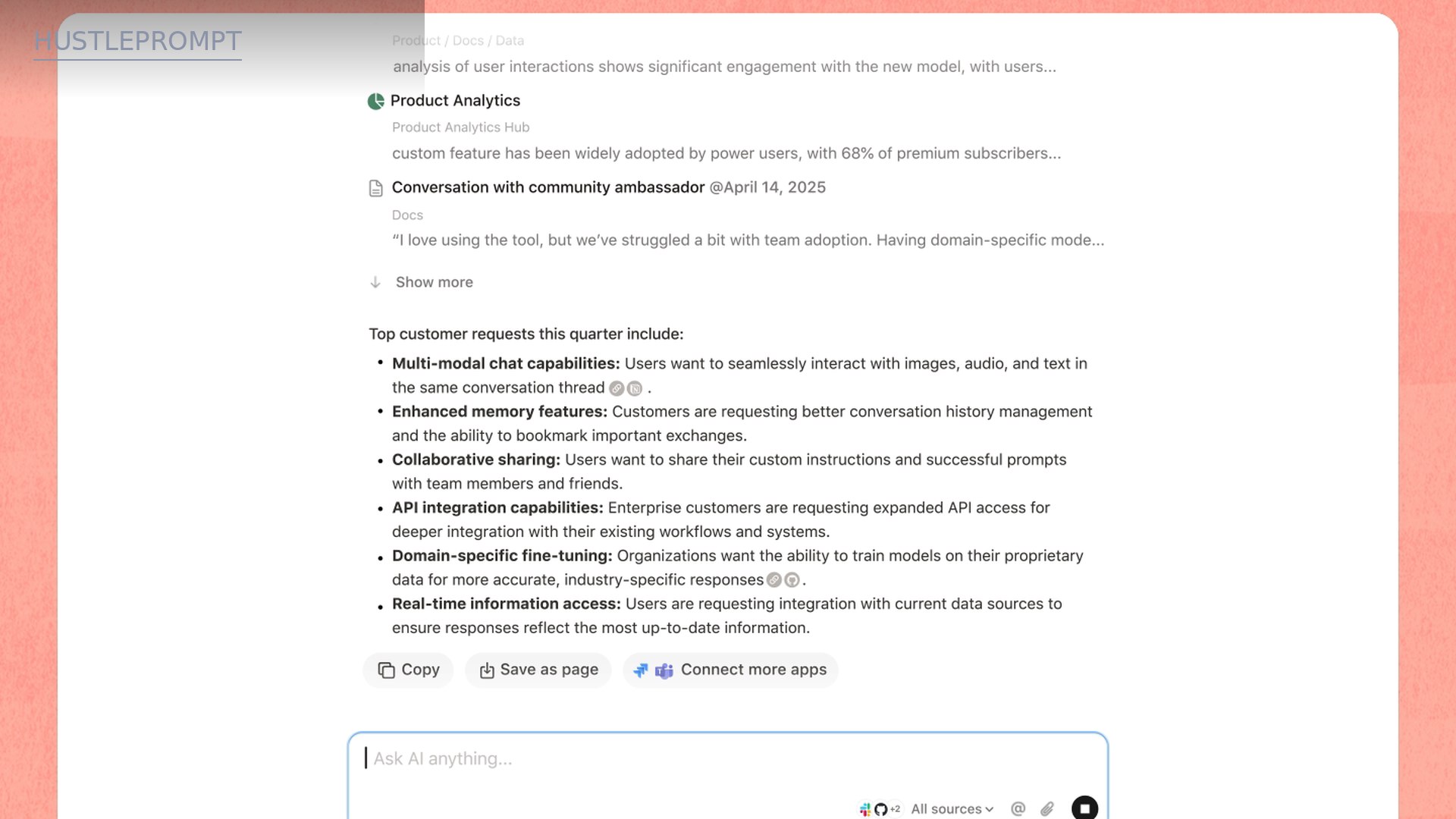
Enterprise Search + Notion AI Connectors
Enterprise Search finds answers across your workspace and connected apps like Slack and Google Drive, with citations showing where each answer came from.
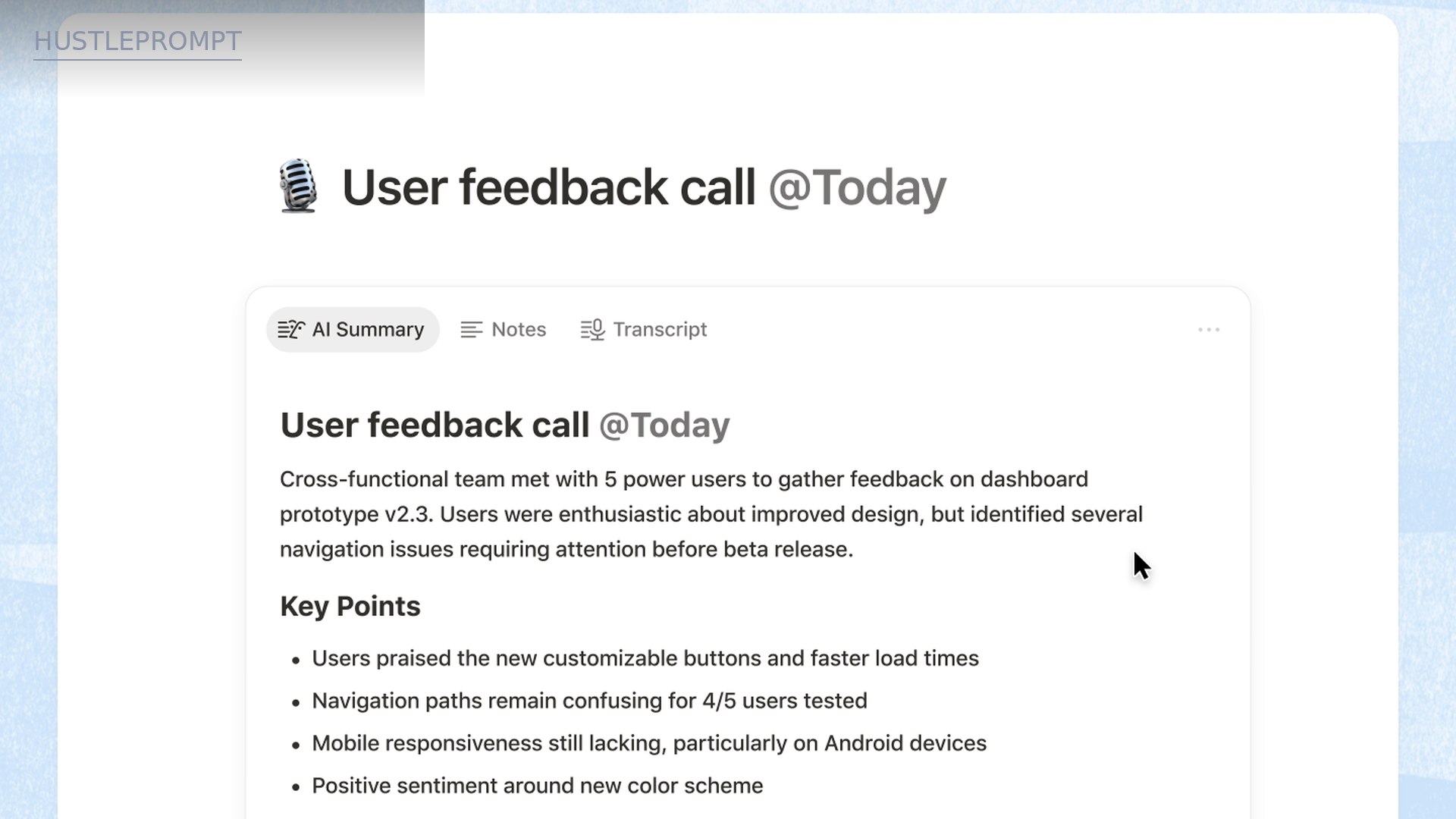
AI Meeting Notes
AI Meeting Notes transcribe conversations and summarize key points and action items automatically — client meetings become structured follow-ups with zero manual write-up.
Research Mode, AI Blocks, and Autofill
Research Mode generates detailed reports on any topic. AI blocks improve writing or generate drafts directly in your pages. Autofill auto-populates database properties for smarter automations.
Trust and Governance
Notion contractually prohibits its AI subprocessors from training models on your data. The platform holds SOC 2 Type 2 and ISO 27001, maps to GDPR and CCPA, and offers zero data retention with LLM providers on Enterprise.
Notion AI Pricing (October 2026)
The official pricing page confirms the plan structure, what’s included, and AI terms — but dollar amounts don’t render as extractable text on notion.so/pricing. Figures below come from six independent roundups that all verified notion.com/pricing between August and October 2026 and agree exactly. Confirm current prices on the official page before purchasing.
| Plan | Monthly billing | Annual billing (per user/mo) | Notion AI access |
|---|---|---|---|
| Free | $0 | $0 | Limited trial usage |
| Plus | $12 | $10 | Limited trial usage |
| Business | $24 | $20 | Full AI included — Notion Agent, Custom Agents, AI Meeting Notes, Enterprise Search |
| Enterprise | Custom | Custom | Full AI included + zero data retention, SCIM, audit log |
Two official facts shape the whole value story. First: the old standalone $8–10/member/month AI add-on has been discontinued — AI is now bundled, not bolted on. Second: Custom Agents cost $10 per 1,000 monthly Notion credits (official), free through May 3, 2026, with credits starting May 4, 2026. Students and educators get Plus free for a 1-member workspace (official).

The Numbers: What Full AI Actually Costs You
The comparison that matters is the per-user annual cost of a plan with real AI:
| Workspace AI | Plan with full AI (annual) | AI cost model | Effective AI price / user / mo |
|---|---|---|---|
| Notion AI | Business $20 | Included in seat | $20 (all-in) |
| ClickUp Brain | Business $17 + Brain add-on ~$9* | Separate add-on | ~$26 |
| Microsoft 365 Copilot | Copilot add-on $30 (official) | Add-on on top of M365 seat | $30+ |
| Evernote | Advanced $24.99/mo ($249.99/yr) | Included in tier | ~$20.83 |
*ClickUp’s official page (checked October 2026) now shows renamed plans — Core $9/user/mo yearly and Business $17/user/mo yearly, up to 33% off with annual billing. The Brain add-on price (~$9/user/mo) comes from third-party roundups; the official AI section didn’t render prices. Evernote dollars are official (help.evernote.com); Copilot $30/user/mo yearly is official (microsoft.com).
The math favors Notion’s bundling. The old Notion AI add-on alone cost ~$10/user/month on top of a seat; now Business at $20 annual delivers seat + full AI together — cheaper than ClickUp’s stack (~$26) and far below Copilot’s $30 add-on.
Stat check from official pages (observed 2026-10-21): 100M users in 50+ countries, 62% of the Fortune 100, over 50% of YC companies, and G2’s #1 knowledge base three years running (G2 itself: 4.6/5 across 10,886 reviews).
Should You Pay for Notion AI?
The 60-second decision
How It Works
From signup to your first AI agent in about half an hour:
- Start a workspace. Free plan works; Business trial unlocks the full AI set for evaluation.
- Bring your knowledge in. Import docs, connect Slack and Google Drive so the AI has context beyond your pages.
- Ask, don’t organize. Use Enterprise Search or the Agent to find and build — the demo pulls 118 results across three apps in one query.
- Delegate a task. Tell Notion Agent to create a database, draft a brief, or summarize a project — it edits pages and databases directly.
- Automate the repetitive. Build a Custom Agent with a trigger or schedule (status updates, Slack answers) and track usage in the credits dashboard.
Notion AI vs the Competition
| Notion AI | ClickUp Brain | Microsoft 365 Copilot | Evernote | |
|---|---|---|---|---|
| Full-AI cost (annual) | Business $20/user/mo, AI included | Business $17 + Brain ~$9 = ~$26 | $30/user/mo add-on (M365 seat extra) | Advanced ~$20.83/mo (AI included) |
| AI model | Agents, Q&A, meeting notes, search | AI assistant, writing, automation | Deep M365 integration | AI meeting notes, transcription |
| Cross-app search | Yes — Slack, Drive, Gmail (cited) | Connected search (tier-dependent) | Yes — M365 graph | Limited; semantic search “coming soon” |
| Autonomous agents | Yes — Notion Agent + Custom Agents | Automations with AI | Copilot agents (M365) | No |
| Best for | Docs-first teams, freelancers | Task-heavy project teams | Microsoft-locked enterprises | Personal note archives |
Competitor figures: official pages for ClickUp plan dollars, Copilot $30, and Evernote tiers; ClickUp Brain add-on ~$9 from third-party roundups. Confirm on each vendor’s official pricing page before buying.
ClickUp Brain
ClickUp wins when tasks and projects are the center of gravity. But its AI is a separate ~$9/user/month add-on, landing the stack around $26/user/month — ~30% above Notion Business with AI included.
Microsoft 365 Copilot
Copilot’s $30/user/month add-on (official) is the priciest option and sits on top of a Microsoft 365 subscription. If your company already lives in Outlook, Teams, and SharePoint, its depth is unmatched. Everyone else pays a premium for integration they don’t need.
Evernote
Evernote’s Advanced tier (~$20.83/mo annual) is price-competitive, but its AI story is thinner: meeting notes and transcription today, semantic search and AI assistant still “coming soon” — and no autonomous agents. Fine for personal archives; not a team AI platform.
How Freelancers Actually Profit With It
Notion AI pays for itself when your workspace is your business. Four playbooks:
1. Client meeting → proposal pipeline
AI Meeting Notes transcribe the call and pull key points and action items; Research Mode turns them into a client brief. The meeting-to-proposal turnaround that took an evening now takes an hour — at $75–$150/hour freelance rates, one saved evening covers months of the $20 seat.
2. 24/7 client-status agents
A Custom Agent answers routine client questions on Slack or posts project updates on a schedule — while you’re with other clients. The credits dashboard keeps the $10-per-1,000-credits spend visible.
3. Research and content briefs
Connect Drive and Slack, then let Enterprise Search and Research Mode assemble sourced briefs from scattered materials. Freelance researchers can deliver $300–$800 brief packages with a fraction of the digging.
4. Content repurposing systems
One database of raw notes becomes, via AI blocks and Autofill, a content pipeline: drafts, summaries, formatted posts. Creators sell this as a $500–$1,500 setup service to clients drowning in unstructured docs.
Pros and Cons
| Pros | Cons |
|---|---|
| AI bundled into Business ($20) — no add-on math, ~30% cheaper than ClickUp’s AI stack | Full AI gated at Business — Plus users get trial usage only; the real AI price is a plan upgrade |
| True agents, not just chat — creates databases, searches Slack/Drive/Gmail with citations | Custom Agents metered — $10/1,000 credits on top; heavy automation needs budgeting |
| Privacy posture is serious — no training on your data, SOC 2 Type 2, zero retention on Enterprise | AI quality scales with your docs — a messy workspace gives mediocre answers |
| Ecosystem gravity — 100M users, 62% of Fortune 100, G2 #1 knowledge base 3 years | Not for task-centric teams — ClickUp still wins if projects, not docs, are your center |
Who Should Buy It (and Who Shouldn’t)
Buy it if your work already lives in Notion and you want AI that reads your actual docs — freelancers running client work, agencies standardizing proposals, research-heavy teams. At $20/user/month annual with AI included, it’s the best-priced serious workspace AI of the four compared.
Skip it if your team runs on tasks (look at ClickUp), on Microsoft 365 (Copilot’s depth justifies the $30 if you’re locked in), or if you just need personal notes — Free or Plus covers that.
Verdict: Is Notion AI Worth the Money?
Yes — with one condition: you have to actually live in Notion. The bundling move is the story. The old $10 add-on is gone; Business at $20/user/month (annual) ships a seat plus a genuine AI teammate — agents that build databases, search three apps with citations, and transcribe your meetings. Nothing else at $20 does all of that.
Rating: 4.5/5 for docs-first teams and freelancers; 3/5 if you’re not already a Notion user (don’t adopt a workspace for its AI alone).
Dollar figures summarized from six independent roundups that verified notion.com/pricing in August–October 2026 (USD, per user/month, taxes excluded). The official page confirms plan structure, AI inclusion terms, and the $10/1,000-credits figure. Prices and plans change — confirm current details before purchasing.
Frequently Asked Questions
Is Notion AI free?
Partially. Free and Plus plans get limited trial usage of Notion AI (official). Full access — Notion Agent, Custom Agents, AI Meeting Notes, Enterprise Search — requires Business or Enterprise.
How much does Notion AI cost now?
There is no separate AI subscription anymore. AI is included in Business ($20/user/month billed annually) and Enterprise. Custom Agents cost $10 per 1,000 monthly Notion credits on top — free through May 3, 2026.
What happened to the old $10 AI add-on?
Notion discontinued the standalone AI add-on in 2026 and folded AI into the Business and Enterprise plans. If you were paying for the old add-on, check your workspace settings — the billing model has changed.
How is Notion AI different from ChatGPT?
ChatGPT is a general chatbot; Notion AI is an agent inside your workspace that reads your docs, tasks, databases, and connected apps, then creates and edits pages directly. The context — your actual work — is the difference.
Does Notion AI train on my data?
No. Notion has contractual agreements with AI subprocessors prohibiting model training on customer data, and it doesn’t train unless you opt in. Enterprise gets zero data retention with LLM providers.
Which plan do I need for full AI access?
Business ($20/user/month annual) is the entry point — it includes Notion Agent, Custom Agents, AI Meeting Notes, and Enterprise Search. Plus ($10) only gets limited trial usage, so budget the upgrade, not an add-on.