
Zapier Professional starts at $19.99 a month for 750 tasks. For that you get a visual editor that connects 9,000+ apps, AI steps that draft, summarize, and decide inside your workflows, and a platform trusted by more than 3 million businesses.
The free plan already automates real work, with unlimited Zaps and Copilot included. So the question is not whether Zapier works — it does — but whether 750 tasks a month is enough, what the AI features really cost in tasks, and when a cheaper rival makes more sense.
This review breaks down Zapier’s verified November 2026 pricing, what each plan really includes, where the free plan stops, and how it compares with Make and n8n. In short: Zapier is worth $19.99 a month if you automate client work or run a small business on connected apps — and a waste of money if your workflows are simple enough for the free plan or cheap enough for Make.
What Is Zapier and How Does It Work?
Zapier is an automation platform that connects your apps so work moves between them without you copying and pasting. You build a Zap, an automated workflow with a trigger and one or more actions: when the trigger fires, the actions run.
A trigger is the event that starts a Zap — a new form submission, a new row in a spreadsheet, a new support ticket. An action is what happens next — create a CRM record, send a Slack message, draft a reply. Each successful action counts as one task. Triggers cost nothing, and Zapier’s built-in tools — Filter, Formatter, Paths, Delay, Tables, Forms — cost nothing either.
That task math is the whole pricing model. A Zap with five actions that runs 150 times a month uses 750 tasks — exactly the Professional starting tier. A Zap with one action that runs 750 times uses 750 tasks too. Count your actions, not your Zaps.
Zapier calls itself an AI orchestration platform, and the 2026 version earns the label. Zapier Copilot builds Zaps from a plain-language description. AI by Zapier adds model-powered steps inside a Zap: draft text, summarize a ticket, decide which branch to take. And agent-managed Zaps let an AI assistant watch a workflow, explain what went wrong, and fix it — the same assistant you can see in the screenshots below.
Around the core sit Tables (a built-in database for your workflow data), Forms (forms that feed straight into Zaps), Canvas (a visual map of your automations), MCP (lets AI assistants take action across your apps), and an SDK for developers. All plans include the full platform; the paid plans add the management features and the task volume.
Key Features: What Zapier Actually Gives You in 2026
The Zap editor: a visual canvas for workflows
The editor is a vertical canvas: trigger on top, actions below, branches where you add logic. You pick an app, pick an event, map the fields, and turn the Zap on. Version control, custom error notifications, and advanced Zap settings come with every paid plan, so a broken Zap tells you what failed instead of failing silently.
Polling speed depends on your plan: the free plan checks for new data every 15 minutes, Professional every 2 minutes, Team and Enterprise every minute. For a lead follow-up Zap, that 13-minute gap is the difference between replying first and replying third.
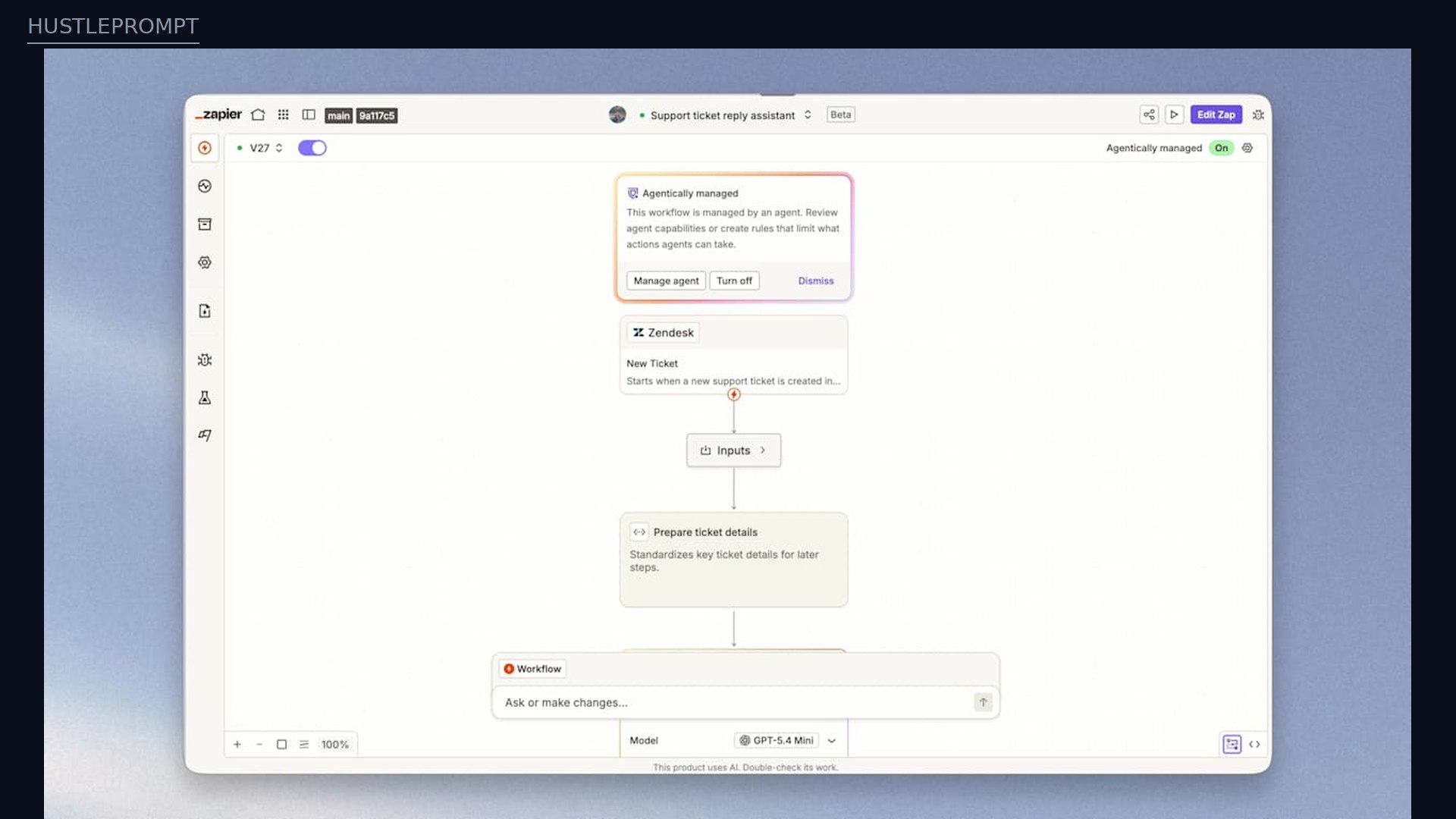
The Zap editor: an agent-managed support ticket workflow with a Zendesk trigger and a model picker at the bottom. Official Zapier product screenshot from zapier.com.
AI by Zapier: Copilot, AI steps, and an assistant that fixes Zaps
Copilot turns a sentence into a working Zap — describe the workflow and it drafts the trigger, the actions, and the field mapping. AI fields pull structured data out of messy text, and AI steps run a model inside the Zap. The catch is the task rate card: a Standard AI step costs 1 task, Advanced costs 3, and Premium costs 5. A Zap that leans on Premium AI steps burns through 750 tasks five times faster than a plain one.
The AI Assistant goes further: it watches agent-managed Zaps, explains failures in plain language, and proposes the fix — adding a branch when a step finds nothing, for example. It is the most useful AI feature in the product, because debugging is where automation usually dies.
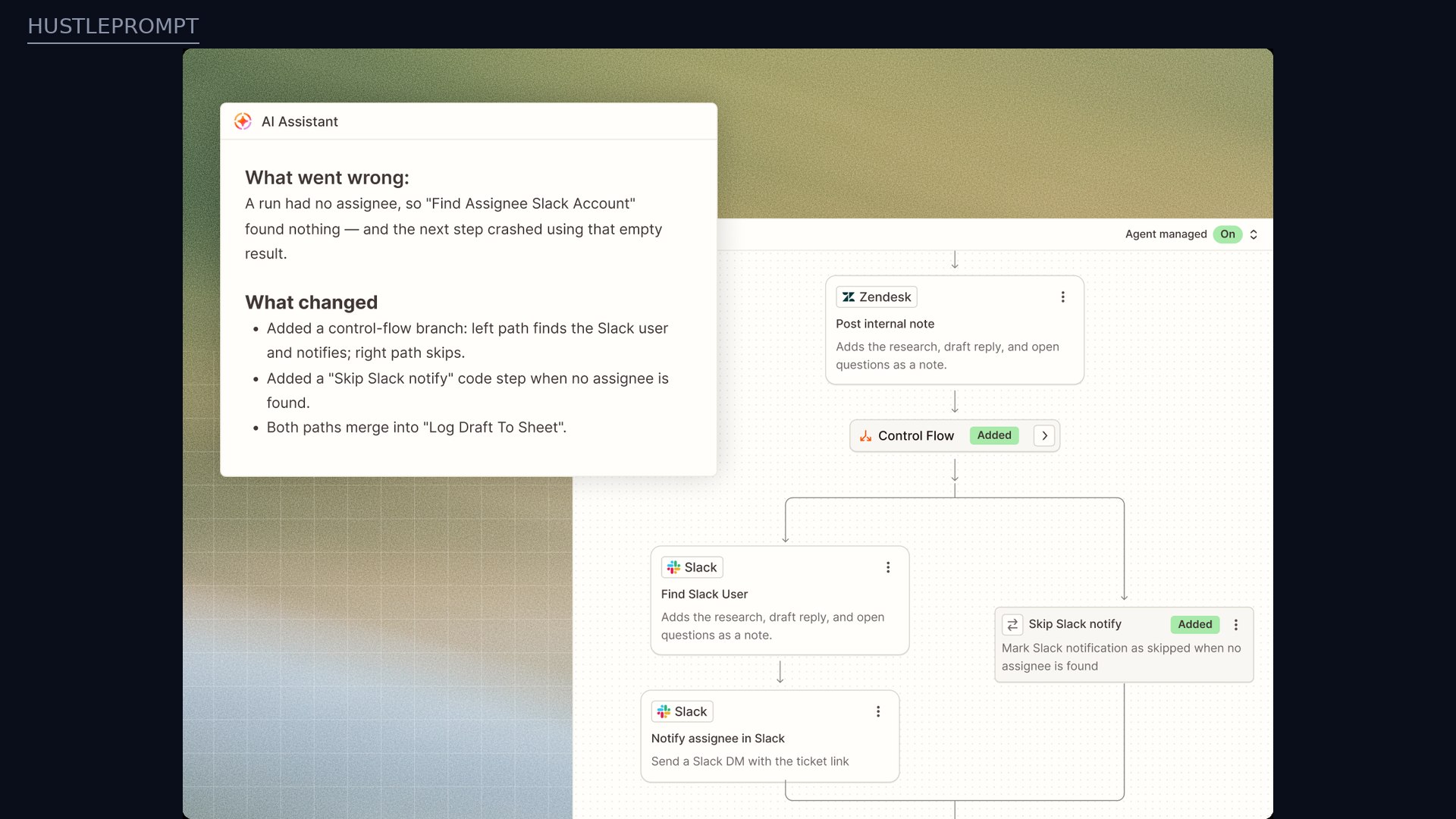
The AI Assistant explains a failed run and the fix it applied, next to the Zendesk and Slack steps. Official Zapier product screenshot from zapier.com.
Tables and Forms: a database and a front door, built in
Tables stores the data your Zaps read and write — leads, tickets, inventory — without a separate spreadsheet or database. The free plan holds 2,500 records per account, Professional 100,000, and Team 500,000. Forms collects it: 10 pages per account on Free, 50 on Professional, 150 on Team, with conditional logic on paid plans.
Both are unlimited in count on every plan. The limits that matter are records and pages, and they grow fast enough that most solo users never hit them.
MCP and the SDK: your AI assistants can use your apps
Zapier MCP lets AI assistants take action across your 9,000+ connected apps — ask Claude to file the ticket, update the sheet, and ping the channel. MCP tool calls normally cost 2 tasks each, and they are free through noon Eastern time on January 5, 2027. The SDK is free while in beta and lets developers connect agents and code to Zapier actions.
This is where Zapier’s lead over its rivals is widest: no other automation tool plugs 9,000 apps into AI assistants this directly.
How to Build Your First Zap
The fastest path from zero to a working automation takes an afternoon.
- Start free. Create an account at zapier.com. The free plan costs nothing, needs no card, and includes Copilot, so you can build a real Zap before paying anything.
- Pick one boring, repeated task. New lead in a form, new order in a store, new ticket in support. One trigger, one or two actions. Do not automate five things at once.
- Build it with Copilot. Describe the workflow in one sentence and let Copilot draft the Zap, then check every field mapping yourself. AI drafts; you verify.
- Test with real data. Run the Zap once with a real submission and read the output. A Zap that works on a test record and breaks on a real one is the most common beginner failure.
- Count your tasks before you pay. Multiply actions per run by runs per month. Under 750, stay free or take the 14-day Professional trial. Over 750, pay annually: Professional costs $239.88 a year billed annually against $359.88 billed monthly.
Zapier Pricing 2026 (Verified)
Prices below are US list prices in dollars, read live on Zapier’s official pricing page on November 27, 2026. Annual rates are the page default (labeled “Pay yearly (Save 33%)”); monthly rates come from the same page with the billing toggle set to Monthly. Prices exclude tax. Confirm your price on the official page before subscribing.
Zapier plans — November 2026 (US list prices)
“The most connected AI orchestration platform.” — Zapier’s own description of itself on its homepage.
| Plan | Price, billed annually | Price, billed monthly | Tasks and key extras |
|---|---|---|---|
| Free | $0 | $0 | Unlimited Zaps, Tables, and Forms; two-step Zaps; Copilot (daily message limit); 1 seat; 15-minute polling; 2,500 Table records; 10 Form pages |
| Professional | $19.99/mo ($239.88/yr) | $29.99/mo ($359.88/yr) | Starting from 750 tasks/mo; multi-step Zaps; unlimited premium apps; webhooks; email and live chat support; AI fields; 100,000 Table records; 50 Form pages; 2-minute polling |
| Team | $69/mo ($828/yr) | $103.50/mo ($1,242/yr) | Starting from 2,000 tasks/mo; 25 users; shared Zaps, folders, and app connections; SAML SSO; priority support; 500,000 Table records; 150 Form pages; 1-minute polling |
| Enterprise | Contact for pricing | Contact for pricing | Unlimited users; annual task limits; advanced admin permissions and app controls; observability; Technical Account Manager; priority support with screen sharing |
Plan prices and features: Zapier’s official pricing page (zapier.com/pricing), read live November 27, 2026 (plans, prices, billing, task tiers, support, seats, polling, Tables and Forms limits). Yearly totals are our arithmetic from the monthly rates, not printed totals. The free plan’s card prints no task number, so no task count is listed for it here. Add-ons: Agents Pro $33.33 a month billed annually ($400 a year, 1,500 activities a month); Chatbots Pro $13.33 a month billed annually ($160 a year, 5 chatbots) and Advanced $66.67 ($800 a year, 20 chatbots).
Three pricing details matter more than the headline numbers:
- Annual billing saves a third. Professional costs $19.99 a month billed annually against $29.99 billed monthly — $120 a year saved ($359.88 minus $239.88). Team saves $414 a year ($1,242 minus $828). Never pay monthly.
- Tasks are the budget, and AI steps spend it faster. A Standard AI step costs 1 task, Advanced 3, and Premium 5. A Zap that runs a Premium AI step 150 times a month burns the whole 750-task tier on that step alone. Budget AI steps like paid API calls, because that is what they are.
- Overage is automatic unless you switch it off. Hit your task limit and Zapier moves you to pay-per-task billing at a higher per-task rate, unless you turn it off — in which case your Zaps pause until the next period. Set a task alert the day you subscribe, or a busy month can surprise you.
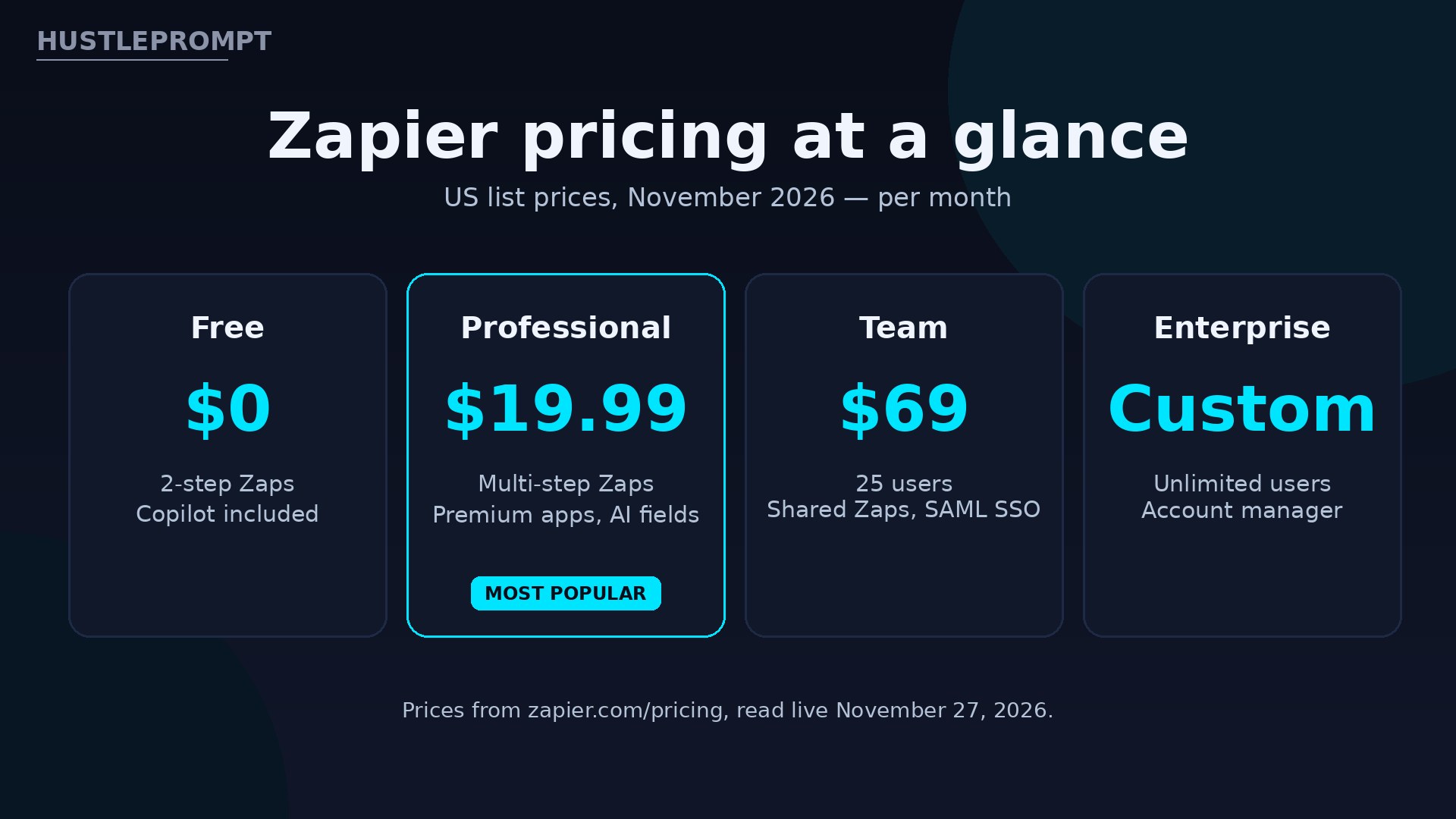
US list prices, per month, billed annually (monthly billing in brackets): Free $0, Professional $19.99 ($29.99), Team $69 ($103.50), Enterprise custom. HustlePrompt illustration (not a Zapier screenshot).
Zapier by the Numbers
What Zapier itself publishes
Sources: Zapier’s homepage (zapier.com), read live November 27, 2026 (9,000+ apps, 3 million+ businesses, founded 2011); Zapier’s Palo Alto Networks customer story (zapier.com/customer-stories/palo-alto-networks), read live November 27, 2026 ($150K saved annually, 3,000+ internal users served); Zapier’s pricing page (750 tasks on Professional’s starting tier). The 150-run figure is our arithmetic: 750 divided by 5 actions.
The 60-Second Decision
Should you pay for Zapier?
Just a couple of simple Zaps?
Stay on Free ($0). Two-step Zaps, unlimited Zaps, and Copilot cover a surprising amount of real work.
Automating client or business work?
Get Professional ($19.99/mo annual). Multi-step Zaps, 750 tasks, premium apps, and AI fields are the whole product.
A team building together?
Get Team ($69/mo annual) for 25 users, shared connections, 2,000 tasks, and SAML SSO.
High volume, simple logic?
Try Make Core ($9/mo annual) for 10,000 credits, or n8n Starter (€20/mo annual) for 2,500 whole-workflow executions.
Zapier vs. the Alternatives
| Tool | Entry paid price | What you get for it | The catch |
|---|---|---|---|
| Zapier Professional | $19.99/mo billed annually ($239.88/yr); $29.99/mo monthly | 750 tasks/mo; 9,000+ apps; multi-step Zaps; Copilot; AI steps; Tables (100,000 records); MCP; 1 seat | Tasks run out fast on multi-action or AI-heavy Zaps; 1 seat only; monthly billing costs 50% more |
| Make Core | $9/mo billed annually ($108/yr); $10.59/mo monthly | 10,000 credits/mo; 3,500+ apps; visual scenario builder; unlimited scenarios; 1-minute scheduling; API access | Smaller app catalog; visual builder has a steeper learning curve; AI modules cost extra credits |
| n8n Starter | €20/mo billed annually (€240/yr); €24/mo monthly | 2,500 workflow executions/mo; unlimited users and workflows; all integrations; 1,600 Assistant credits (preview) | Priced in euros; cloud plans are the expensive route — self-hosting is free but you run the server |
Make Core is the value rival. At $9 a month billed annually ($108 a year), it costs less than half of Zapier Professional and includes 10,000 credits — against Zapier’s 750 tasks. The units are not identical: a Make credit is one module action, and the trigger is capped at 1 credit per run, while a Zapier task is one successful action with the trigger free. Even so, the gap is real: the same five-action workflow run 150 times a month uses 750 Zapier tasks and about 750 Make credits, and Make still has 9,250 credits left. Choose Make when your workflows are high-volume and your logic is straightforward, and when you do not need Zapier’s AI assistant or its 9,000-app catalog. Choose Zapier when you want the easiest builder, the widest app coverage, and AI that debugs your workflows. Make’s prices come from make.com/pricing, read live on November 27, 2026 (annual default, “Save 15%”; monthly rates with the billing toggle).
n8n Starter is the builder’s rival. At €20 a month billed annually (€240 a year), it charges per whole workflow execution — one run costs one execution no matter how many steps it has. That makes it the cheapest option for long, complex workflows: a ten-step workflow run 150 times costs 150 executions on n8n, 1,500 tasks on Zapier, and about 1,500 credits on Make. The trade-offs are real: n8n’s cloud prices are in euros, the builder expects more technical skill, and the genuinely free route is the self-hosted Community Edition, which means running your own server. Choose n8n when your workflows are long and technical and you are comfortable with code. Choose Zapier when you want the workflow running today with no server to maintain. n8n’s prices come from n8n.io/pricing/, read live on November 27, 2026 (annual default, “Save 17%”; monthly rates with the billing toggle).
Competitor figures are November 2026 pricing as shown live on the dates above — confirm them on the official sites before subscribing. Zapier’s and Make’s prices are in US dollars and exclude tax; Make shows its prices with a dollar sign and no currency code on the page; n8n’s prices are in euros.
Pros and Cons
| Pros | Cons |
|---|---|
| The widest app catalog: 9,000+ apps, more than any rival here | 750 tasks run out fast on multi-action or AI-heavy Zaps |
| The easiest builder: Copilot drafts Zaps from one sentence | Monthly billing costs 50% more than annual ($29.99 vs. $19.99) |
| An AI assistant that explains failures and proposes fixes | AI steps cost 1, 3, or 5 tasks each — Premium steps drain the tier |
| Tables, Forms, Canvas, MCP, and SDK included on every plan | Professional is 1 seat only; teams must jump to $69 a month |
| Triggers and built-in tools cost zero tasks | Pay-per-task overage kicks in automatically unless you switch it off |
| A genuinely useful free plan: unlimited Zaps, Copilot included | Free polling is 15 minutes — slow for anything time-sensitive |
Who Is Zapier For?
- Freelancers selling automation: the whole business model — build Zaps for clients who pay for the outcome, not the tool.
- Small business owners: leads, orders, tickets, and follow-ups moving between apps with nobody babysitting them.
- Marketers and ops teams: form-to-CRM, lead routing, reporting Zaps that run every day without a developer.
- Support teams: ticket triage, auto-replies, and Slack alerts, with the AI Assistant catching the failures.
- AI-curious builders: MCP and AI steps are the fastest way to put an AI assistant to work across real business apps.
It is not for high-volume, simple workflows — Make Core at $9 a month covers 10,000 credits where Zapier covers 750 tasks — or for technical teams who want to self-host, where n8n’s free Community Edition wins on price.
How Freelancers Actually Profit With Zapier
Zapier Professional at $19.99 a month billed annually is cheap enough that one client setup covers a year of it. Four playbooks that work right now:
1. Automation setups for local businesses
Sell one-time Zap builds to dentists, gyms, realtors, and trades: new lead in a form, instant Slack alert, CRM record, and a follow-up email. The client pays for the setup and the monthly task plan; you charge per build, with a care plan for changes and monitoring.
2. Lead capture and follow-up systems
Build the full path: ad or form to CRM to email to calendar, with an AI step that scores or summarizes each lead. Speed is the selling point — a lead answered in two minutes converts far better than one answered in two hours, and 2-minute polling on Professional makes it real.
3. Content and social operations
Automate the pipeline behind a creator business: new video to social posts, new subscriber to email list, new sale to a spreadsheet and a thank-you message. Bundle it as a monthly retainer: the Zaps run, you watch the task usage and fix the failures.
4. Managed automation retainers
Charge a monthly fee to own a client’s automation: monitor runs, fix broken Zaps, add new ones as the business changes. The AI Assistant’s failure explanations make this cheap to deliver — you read what went wrong instead of debugging blind.
FAQ
How much does Zapier cost?
Free is $0. Professional starts at $19.99 a month billed annually ($239.88 a year) for 750 tasks, or $29.99 a month billed monthly ($359.88 a year). Team starts at $69 a month billed annually ($828 a year) for 2,000 tasks, or $103.50 a month billed monthly. Enterprise is contact for pricing. Prices are in US dollars and exclude tax.
Is there a free plan for Zapier?
Yes. The free plan costs $0 and includes unlimited Zaps, Tables, and Forms, two-step Zaps, and Copilot with a daily message limit. It has 1 seat, 15-minute polling, 2,500 Table records, and 10 Form pages. You pay when you need multi-step Zaps, premium apps, or more tasks.
What is a task, and how many do I need?
A task is one successful action in a Zap — creating a record, sending a message, updating a sheet. Triggers and built-in tools (Filter, Formatter, Paths, Delay, Tables, Forms) cost zero tasks. Count actions per run times runs per month: a Zap with five actions running 150 times a month uses 750 tasks, exactly Professional’s starting tier. AI steps cost more: Standard 1 task, Advanced 3, Premium 5.
Zapier vs. Make — which should I pay for?
Zapier Professional at $19.99 a month billed annually if you want the easiest builder, the 9,000-app catalog, and an AI assistant that debugs your workflows. Make Core at $9 a month billed annually if your workflows are high-volume and simple: 10,000 credits covers far more runs than Zapier’s 750 tasks, but the app catalog is smaller (3,500+ apps) and there is no AI assistant.
Zapier vs. n8n — which is better?
Zapier if you want the workflow running today with no server to maintain: visual builder, Copilot, and 9,000+ apps. n8n Starter at €20 a month billed annually if your workflows are long and technical: it charges per whole workflow execution, so a ten-step workflow costs one execution, not ten tasks. n8n’s free Community Edition is self-hosted, which means you run the server yourself.
Can Zapier use AI?
Yes, three ways. Copilot builds Zaps from plain-language descriptions. AI steps run a model inside a Zap — draft, summarize, decide — at 1, 3, or 5 tasks per step depending on the model tier. And MCP lets AI assistants take action across your connected apps, at 2 tasks per tool call, free through noon Eastern time on January 5, 2027.
Is Zapier worth $19.99 a month?
Yes, if you automate client work or run a business on connected apps — a freelancer, a small business owner, or an ops lead. The 9,000-app catalog, the Copilot builder, and the AI assistant together replace hours of manual work a week, and $239.88 a year is one small client setup. No, if your workflows are two steps and light: the free plan covers them, and Make Core costs less for high volume. Start on Free and upgrade to Professional the week your task count passes 750.
Watch: What is Zapier? Automate work across 9,000+ apps | Zapier Academy
Zapier’s own 76-second introduction to what a Zap is and how to build one with AI or step by step. From Zapier’s official YouTube channel (@Zapier), in English, published November 24, 2026 — the first video of the free “Zapier Jumpstart: Go from Zero to Zapier” course.
Verdict: Is Zapier Worth $19.99/Month?
Yes — Zapier Professional at $19.99 a month billed annually is worth it if you automate client work or run a business on connected apps. No rival at this price combines a 9,000-app catalog, a Copilot that drafts workflows from a sentence, and an AI assistant that explains and fixes failures.
Start on Free if your workflows are simple — two-step Zaps and Copilot will tell you quickly whether automation clicks. Step up to Professional when your task count passes 750 or you need multi-step Zaps and premium apps, and never pay monthly: at $29.99 a month, the same plan costs $120 more a year than the $239.88 annual plan.
Bottom line: at $239.88 a year billed annually, Zapier pays for itself with a single client automation setup or a single month of hours saved. Just count your tasks before you subscribe, because that one number decides everything.
Sources: Zapier’s official pricing page (zapier.com/pricing), read live November 27, 2026 (plans, prices, billing, task tiers, support, seats, polling, Tables and Forms limits, file upload, code runtime, Copilot limits, Agents and Chatbots add-ons); Zapier’s rates page (zapier.com/pricing/rates), read live November 27, 2026 (task rates: app actions, triggers, built-in tools, Lead Router, code steps, AI steps, MCP tool calls, free MCP period); Zapier’s homepage (zapier.com), read live November 27, 2026 (9,000+ apps, 3 million+ businesses, founded 2011, Palo Alto Networks customer story: $150K saved annually, 3,000+ internal users served); Zapier’s how-it-works page (zapier.com/how-it-works), read live November 27, 2026 (editor screenshots); Zapier’s official YouTube channel @Zapier (“What is Zapier? Automate work across 9,000+ apps | Zapier Academy,” 1:16, November 24, 2026); Make’s pricing page (make.com/pricing), read live November 27, 2026 (Free 1,000 credits; Core $9/$10.59, Pro $16/$18.82, Teams $29/$34.12 a month at 10,000 credits, annual/monthly; 3,500+ apps; 1 credit per module action); n8n’s pricing page (n8n.io/pricing/), read live November 27, 2026 (Starter €20/€24, Pro €50/€60, Business €667/€800 a month, annual/monthly; executions 2.5k/10k/40k; Community Edition free self-hosted). Prices change — confirm on the official sites before subscribing.