
Microsoft Ignite 2026 opened with the boldest claim Microsoft has made about AI at work: Copilot is no longer an assistant sitting on top of Office. Chairman and CEO Satya Nadella called it “the new OS for work” — one place where Chat, Cowork, Code and Autopilot come together, with all of Word, Excel and PowerPoint built in. And this time it is not a preview. Home and Office in Copilot are now generally available, Autopilot is starting to roll out to Frontier customers today, and Workspaces is now available in Frontier.
Nadella opened the keynote by addressing the Microsoft 365 outage that hit customers the week before Ignite, then argued the fix for unreliable AI is not less automation but deeper context, governance and trust built into the stack. That framing is the story of this Ignite: Microsoft is no longer selling a chatbot. It is selling a work operating system, a context layer called Work IQ, and a control plane called Agent 365 that now measures AI spending by the work it completes, not the tokens it burns.
Microsoft first showed this rebuilt Copilot on September 25, and our November update covered that preview bundle. Ignite is the moment it goes real: general availability dates, a Frontier rollout starting today, and two brand-new products — Agent 365 Business Analytics and Copilot Code — that turn AI from a tool into a budget line. Here is everything that changed, what it costs, and how to make money from it.
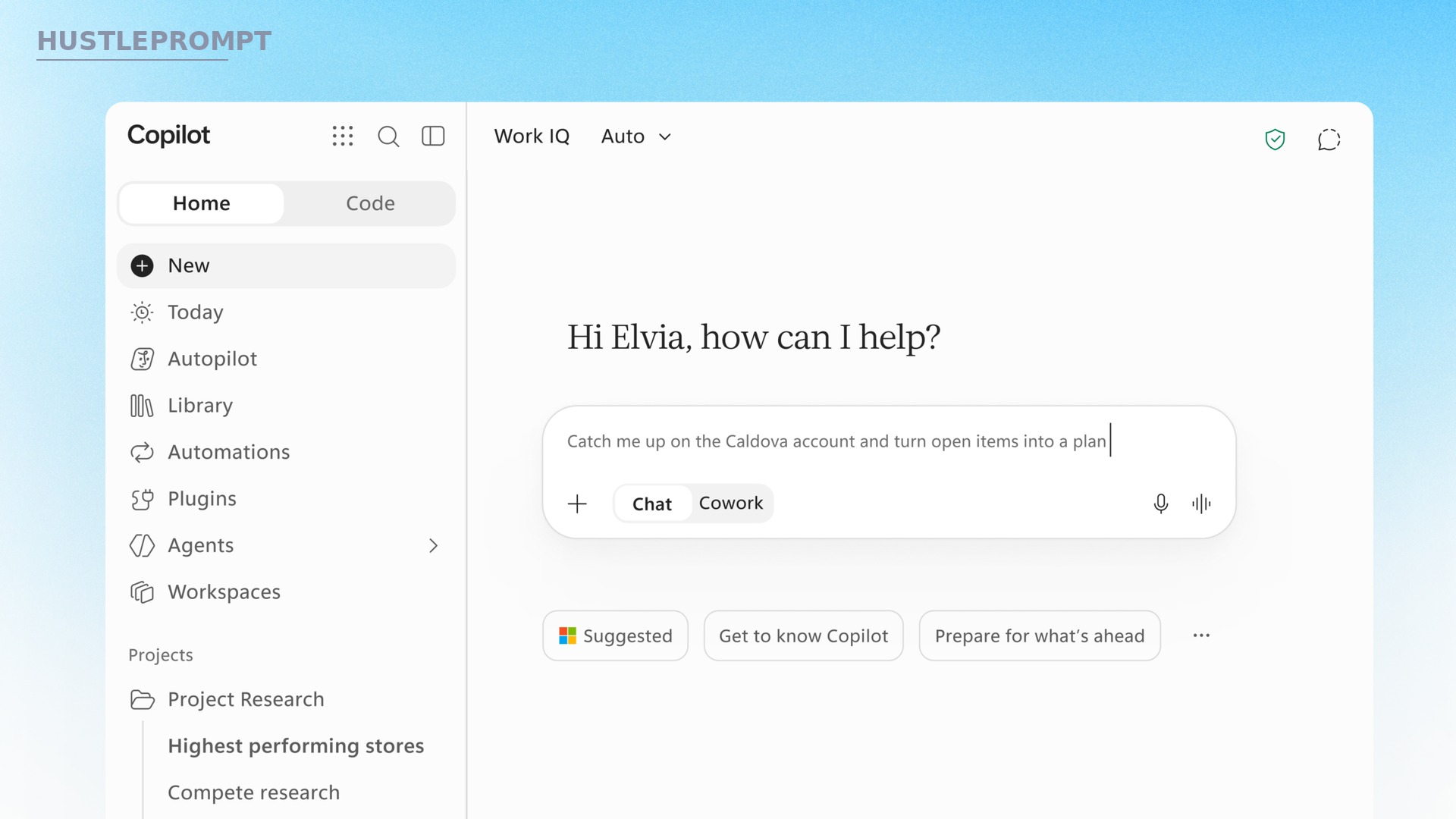
What went generally available today
Ignite keynotes are usually a wall of previews. This one shipped real status changes. Here is the scoreboard from Microsoft’s own announcements:
| What | Status at Ignite | What it means |
|---|---|---|
| Copilot Home | Generally available | Chat and Cowork together on one starting screen |
| Office in Copilot | Generally available | Word, Excel and PowerPoint inside the Copilot app |
| Copilot Managed Runtime | Generally available | Secure hosting and management for apps built in Copilot |
| Copilot Code | GA in the coming weeks | Anyone builds apps and dashboards in plain language |
| Autopilot | Rolling out to Frontier today | Always-on agent with its own identity, memory and tools |
| Copilot Workspaces | Available in Frontier | Shared space where people and agents work as one team |
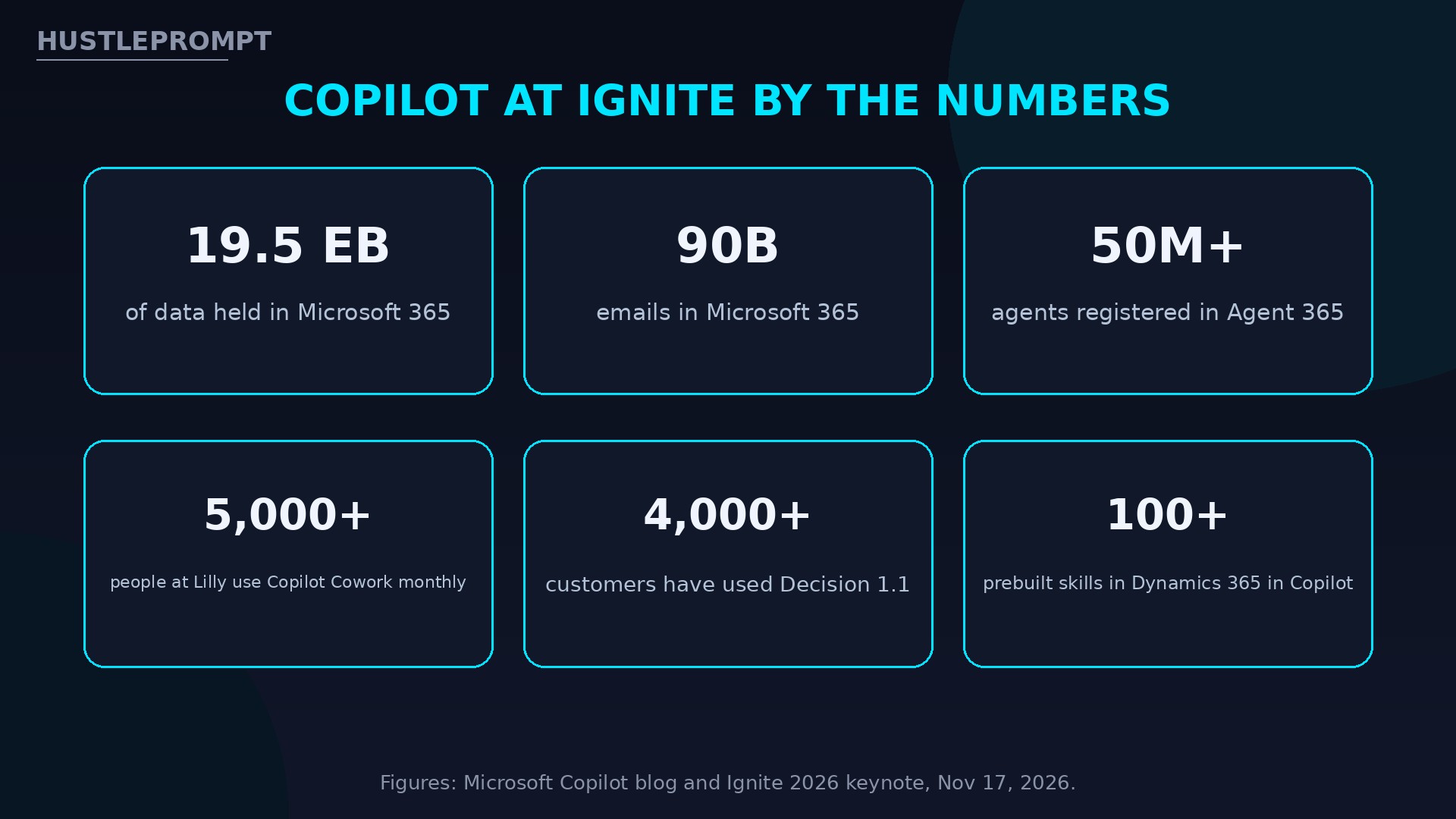
| Microsoft-Decision-1.1 | Generally available | Routing model used by 4,000+ customers already |
| Perception | Generally available | Red, blue and green security agent teams |
| Cobalt 200 VMs | Generally available | Highest-performing general-purpose Azure VMs |
Status facts from the Microsoft Copilot Blog and Satya Nadella’s Ignite keynote post (both November 17, 2026). Copilot Today, the proactive command center across mail, calendar and Teams, is in private preview in the Copilot app and Outlook.
Workspaces: the multiplayer moment
The centerpiece is Copilot Workspaces. Until now, AI at work has been single player: you and your agent, alone. Workspaces makes it multiplayer. As the evolution of Copilot Notebooks, it is a shared space where people and agents drive toward a common goal with shared context. An agent drafts a section of a document, and you review it. You leave a comment, and an agent picks it up. Your Autopilot takes a task and checks with you before anything is final. The collaboration continues in Microsoft Teams.
“Workspaces makes it a truly multiplayer experience, where people and agents drive towards a common goal, with shared context.”
— Microsoft Copilot Blog, November 17, 2026
Watch: Microsoft introduces Copilot Workspaces at Ignite 2026, on Microsoft’s official YouTube channel.
Workspaces lands alongside Autopilot, the always-on agent that is personal to you and keeps moving work forward 24 hours a day, 7 days a week, in the places where you and your team already collaborate. It lives in your tenant with its own identity, memory and tools, and you can @mention it like a colleague in Teams, Outlook, chats, channels and documents. It watches Teams channels, follows up on emails, runs recurring work and manages projects without waiting for a prompt. Microsoft’s own example: Autopilot can set up and manage a full supplier review process, building the schedule and workback plan, then handling prep, meetings and follow-ups on its own, right down to reaching out to stakeholders for updates.
The trust design is the part IT teams will actually read. Each Autopilot has its own Microsoft Entra Agent ID and a named manager. IT can scope its access and block it at any time. Its sign-ins and actions are logged under its own name, so security teams have a clear audit trail. And it checks with you before key actions. That is the difference between an agent you deploy and an agent you can defend in an audit.
The customer results Microsoft put on stage
Microsoft did not just announce features. It put customer numbers on the screen, and the numbers are the strongest evidence that Copilot has moved from pilot to production.
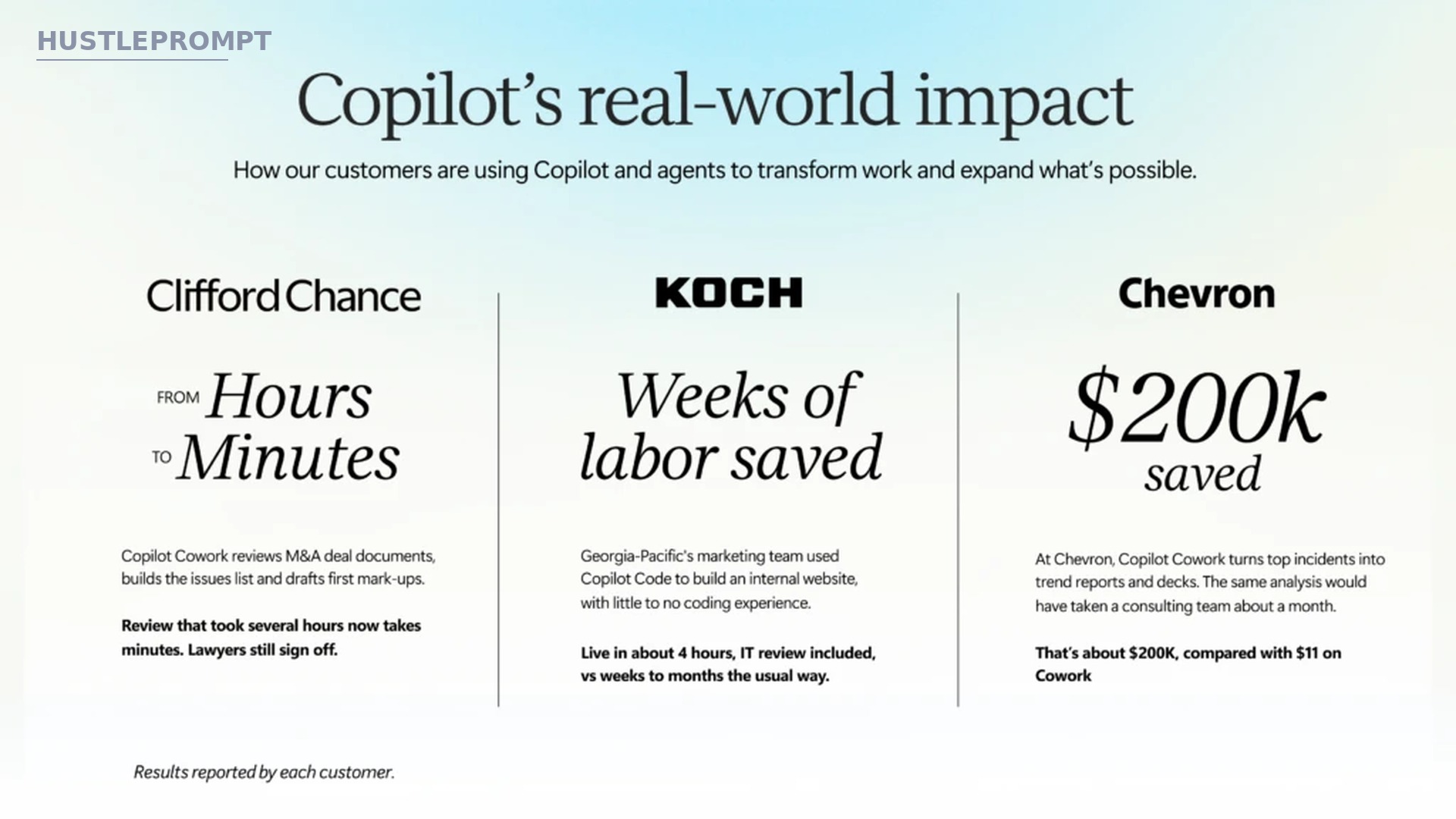
- Clifford Chance: Copilot Cowork reviews M&A deal documents, builds the issues list and drafts first mark-ups. A review that took several hours now takes minutes. Lawyers still sign off.
- Koch (Georgia-Pacific): the marketing team used Copilot Code to build an internal website with little to no coding experience. It went live in about 4 hours, IT review included, versus weeks to months the usual way.
- Chevron: Copilot Cowork turns top incidents into trend reports and decks. The same analysis would have taken a consulting team about a month. That is about $200,000 saved, compared with $11 on Cowork.
- Lilly: more than 5,000 people at the medicine company use Copilot Cowork every month, handing multistep research tasks to Copilot so scientists spend more time on science.
- The Fortune 500: nearly 80% of Fortune 500 companies now use Cowork, according to Microsoft.
Customer results from Microsoft’s Copilot at Ignite post, November 17, 2026. “Results reported by each customer,” as Microsoft notes on the graphic.
Copilot learns your business: role plugins
The second half of the Ignite story is Copilot growing up into specific jobs. Microsoft is extending Copilot for sales, legal, finance and service roles, with skills, connectors and plugins organized across the whole Copilot surface — including third-party systems. Two announcements matter most:
| Role or system | What you get | Status |
|---|---|---|
| Sales | 44 prebuilt skills — qualify leads, research prospects, manage outreach, prep meetings | In Copilot now |
| Customer service | 13 skills — triage cases, pull history, draft replies, build escalation summaries | In Copilot now |
| Finance | 30 prebuilt skills — workbooks, ERP data, month-end close, acquisition evaluation | In Copilot now |
| Legal | 20+ purpose-built skills — draft and negotiate agreements, manage obligations and deadlines | In Copilot now |
| Dynamics 365 in Copilot | 100+ prebuilt skills across Sales, Service and Finance and Operations | Announced at Ignite |
| Salesforce in Copilot | 38+ prebuilt sales skills, bringing Salesforce context into Copilot | Preview |
Skill counts from the Microsoft Copilot Blog, November 17, 2026. The Salesforce plugin is the telling one: Microsoft is now wiring Copilot into the CRM its customers already run, instead of asking them to move their data.
Agent 365: the ERP for AI spend
The announcement with the biggest money implications is not a feature. It is a measurement system. Agent 365, Microsoft’s control plane for enterprise agents, already holds more than 50 million agents. At Ignite, Microsoft added FinOps for AI: Agent 365 Business Analytics and Agent 365 Cost Management.
SPEND → MEASURE → CONNECT → OPTIMIZE
1. Spend: corporate AI spending doubled in a year, and more than 80% of it now sits outside the enterprise IT budget.
2. Measure: Business Analytics measures your investment in work completed, not simply tokens.
3. Connect: it links spend to outcomes — tasks, time saved, and the share Cowork performed.
4. Optimize: Cost Management sets spending policies, limits and alerts, so there is no runaway bill.
Business Analytics, rolling out today in Frontier Public, analyzes the tasks Copilot completes, how long that work typically takes a person, and the share Cowork performed, giving leaders a view of the hours their intelligence supports and what the work is worth. Nadella called it “your ERP system for AI usage.” Cost Management gives IT a central place to see what is driving spend across users, services, agents and models, and in Cowork your team sets a spending limit, so there are no surprises when the bill arrives.
That framing matters because the billing model is changing underneath it. Chat stays on a per-user license, while Cowork, Code and Autopilot run on usage-based billing in Copilot credits. When AI is priced by the work it does instead of the seat it occupies, the companies that can prove ROI win the budget. Agent 365 is Microsoft’s answer to that proof problem.
Work IQ: why Microsoft thinks it wins
Underneath Copilot sits Work IQ, and Ignite made the case that context, not models, is the moat. Microsoft 365 holds more than 19.5 exabytes of data, with 90 billion emails, 15 billion Teams messages and 10 billion new files added every week. Work IQ understands what you are looking for and identifies what you can ignore, so Copilot gives accurate, efficient answers that traditional APIs cannot match. Copilot’s Auto routing picks the right model and effort for each task, and employees can also manually select models from OpenAI or Anthropic, governed by organizational policy.
At Ignite, Microsoft externalized that system as a platform: Microsoft IQ, with hundreds of new connectors, so agents get full enterprise context where business gets done. On models, the keynote confirmed GPT-6.2 is coming to Foundry, Meta’s latest models are coming to Foundry too, and MAI Licensed Weights will let trusted customers access Microsoft AI model weights through Frontier Co. Our separate coverage of the seven new MAI models — including MAI Code 2, now generally available on GitHub Copilot — is in our Ignite models article. And on trust, Perception is now generally available, and the Microsoft AI Transparency Initiative launched with 40 organizations working on standards for independently verifiable AI.
“By surfacing account insights, service updates, and important client developments in real-time, our teams can stay aligned, make informed decisions, and take action without switching applications.”
— Christian Lewis, Managing Director, Commercial Hub Co-Lead, BNY, quoted by Microsoft, November 17, 2026
How to profit from the new Copilot
A work operating system is a services market. Every GA milestone at Ignite is a job somebody will pay for. Here are five concrete moves:
- Sell Copilot setup and governance. Home, Workspaces and Autopilot all need tenant configuration, Entra Agent IDs, named managers and access scoping. Small and mid-size businesses need someone to set that up safely. Charge a fixed setup fee plus a monthly governance retainer.
- Build role plugins and skills. Dynamics 365 and Salesforce plugins are the template. Build plain-English skills for a niche — real estate, dental practices, logistics — and sell them as reusable packages that plug into Copilot Chat and Cowork.
- Sell Copilot Code apps. Code lets non-developers build dashboards, trackers and internal tools in plain language. Offer a one-week build service: interview, build, deploy in the client’s tenant through Managed Runtime, hand over.
- Run AI ROI audits with Agent 365. Business Analytics measures work completed, not tokens. Offer a 30-day audit: baseline the hours Copilot saves, price the work, and report the ROI to the CFO. The Chevron example — $200,000 of work for $11 — is your sales slide.
- Train teams to delegate to Autopilot. Autopilot only pays off if people hand it real recurring work. Sell a workshop: pick five recurring processes, configure the Autopilots, set the approval guardrails, and leave a playbook behind.
What to watch next
Ignite runs through November 20, and the Copilot story is not finished. Watch for the Copilot Code general availability date, Autopilot expanding beyond Frontier customers, and the first Workspaces that bring Autopilots inside them — Microsoft says that is coming soon. Watch the Foundry and security sessions for the MAI model details and the Perception playbooks. And watch the first Agent 365 ROI reports: if Business Analytics shows Copilot paying for itself in hours of work completed, every CFO in the Fortune 500 will want the same dashboard. For now, the headline is the one Nadella put on the keynote: Copilot is the new OS for work, and as of today, it is generally available.
Frequently asked questions
What did Microsoft announce for Copilot at Ignite 2026?
Home and Office in Copilot are now generally available, Copilot Managed Runtime is generally available, Autopilot is starting to roll out to Frontier customers, Workspaces is now available in Frontier, and Copilot Code becomes generally available in the coming weeks. Microsoft also announced Agent 365 Business Analytics and Cost Management, Dynamics 365 in Copilot, and a Salesforce plugin in preview.
What is Copilot Workspaces?
Workspaces is the evolution of Copilot Notebooks: a shared space where people and agents work together as one team. An agent drafts a section of a document, you review it, you leave a comment and an agent picks it up. It is available in Frontier, and Microsoft says teams will soon be able to bring Autopilots into Workspaces.
What is Autopilot?
Autopilot is a trusted autonomous agent that is personal to you, always on, and working for you. It lives in your tenant with its own identity, memory and tools, has its own Microsoft Entra Agent ID and a named manager, and you can @mention it in Teams, Outlook, chats, channels and documents. It watches channels, follows up on emails, runs recurring work and manages projects without waiting for a prompt.
What is Agent 365 Business Analytics?
It is a new FinOps experience that connects AI spend to business outcomes. Instead of measuring tokens, it measures work completed: the tasks, how long that work typically takes a person, and the share Cowork performed. It rolls out today in Frontier Public, alongside Agent 365 Cost Management for spending policies, limits and alerts.
How much does Copilot cost?
Microsoft splits billing in two: Chat runs on a per-user license, while Cowork, Code and Autopilot run on usage-based billing in Copilot credits, with a billing policy set by the administrator. Office in Copilot is included in the Copilot subscription license, with no per-document meter.
What is Work IQ?
Work IQ is the context layer under Copilot. Microsoft 365 holds more than 19.5 exabytes of data, 90 billion emails, 15 billion Teams messages and 10 billion new files a week. Work IQ identifies what matters for the task at hand and what can be ignored, so Copilot gives accurate answers that traditional APIs cannot match.
Is Copilot Code available now?
Not yet. Copilot Code becomes generally available in the coming weeks. It lets anyone build apps, interactive dashboards and persistent desktop widgets by describing what they want in plain language, powered by the same technology as GitHub Copilot and hosted in the tenant through Copilot Managed Runtime, which is generally available today.
Keep Reading
Sources: Microsoft Copilot Blog, “Copilot at Microsoft Ignite” (November 17, 2026); The Official Microsoft Blog, Satya Nadella, “Ignite 2026: Building the frontier ecosystem” (November 17, 2026); Microsoft Tech Community, “Office at Ignite 2026” (November 17, 2026); Cloudwars keynote coverage (November 17, 2026). All figures are Microsoft’s own unless labeled otherwise.