
Your AI agents just got a memory upgrade. On October 14, 2026, Microsoft announced a SharePoint knowledge base for Copilot and agents — and early tests claim responses up to 4x faster with 30% fewer tokens.
Those numbers come from Microsoft’s own internal testing — a vendor claim, not an independent benchmark. Still, the direction is hard to ignore.
Here is what the announcement contains, what the fine print says, and how to turn it into a paid service.
What Microsoft actually announced
Microsoft is rolling it out now to Frontier preview tenants, on any SharePoint site — including sites behind Teams channels and Microsoft 365 Groups.
Creation and curation run through Copilot in SharePoint and the new Autopilot in the Copilot app. The team contributes emails, messages, meetings, and SharePoint content; Copilot organizes it into an up-to-date knowledge base.
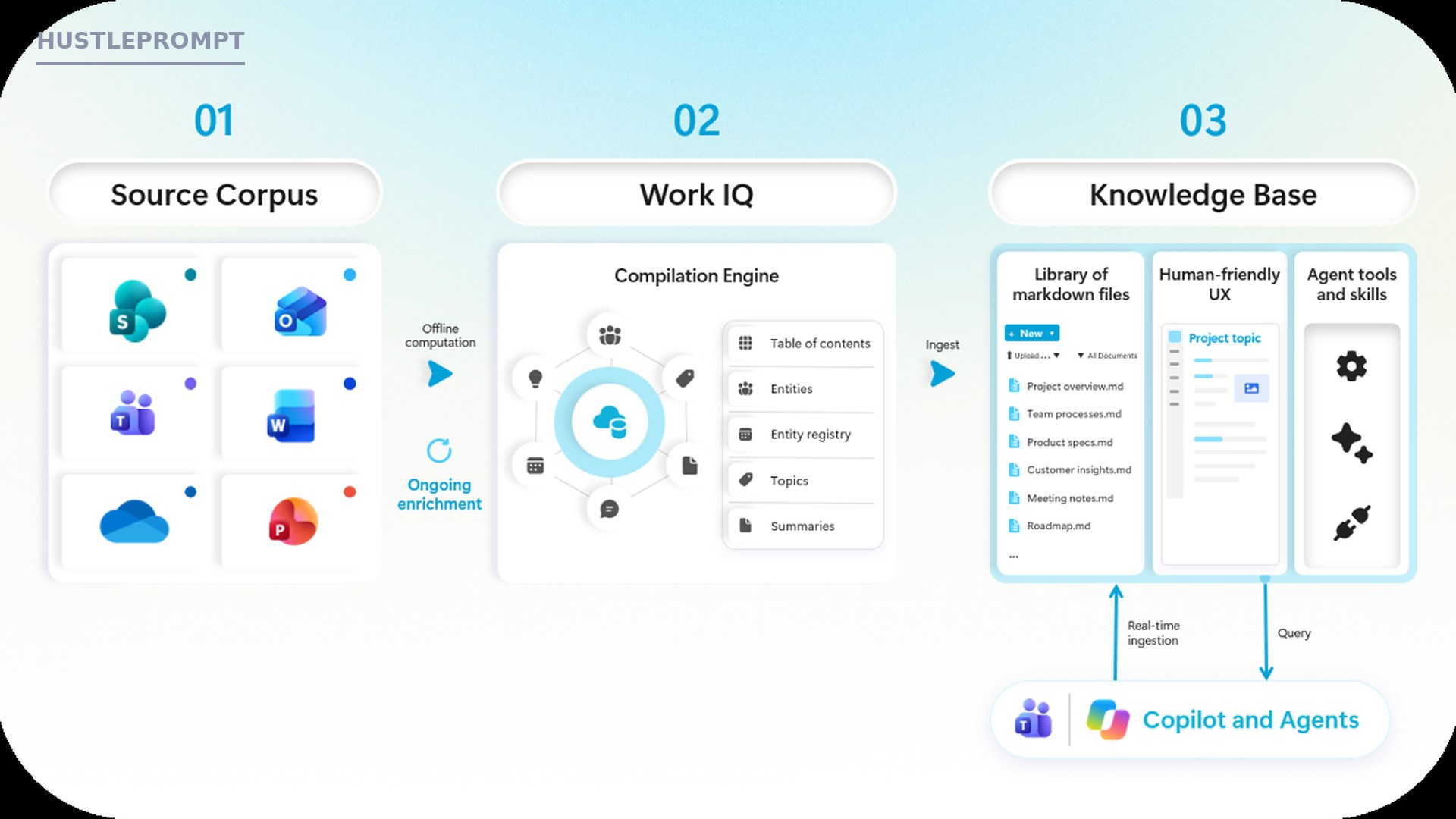
Under the hood, it is a specialized library of interlinked, agent-friendly Markdown files, created by Copilot with Work IQ’s knowledge compilation engine — the platform that turns scattered content into agent-ready knowledge.
The catch: it is currently available only to users enabled for usage-based billing (Copilot Credits). Admins manage access in the M365 admin center, and billing terms may change before general availability.
The numbers: 4x faster, 30% fewer tokens — with caveats
Microsoft’s headline claim comes from early internal testing in October 2026: with the knowledge base, agents answered up to 4x faster and used 30% fewer tokens when retrieving content and performing team tasks.
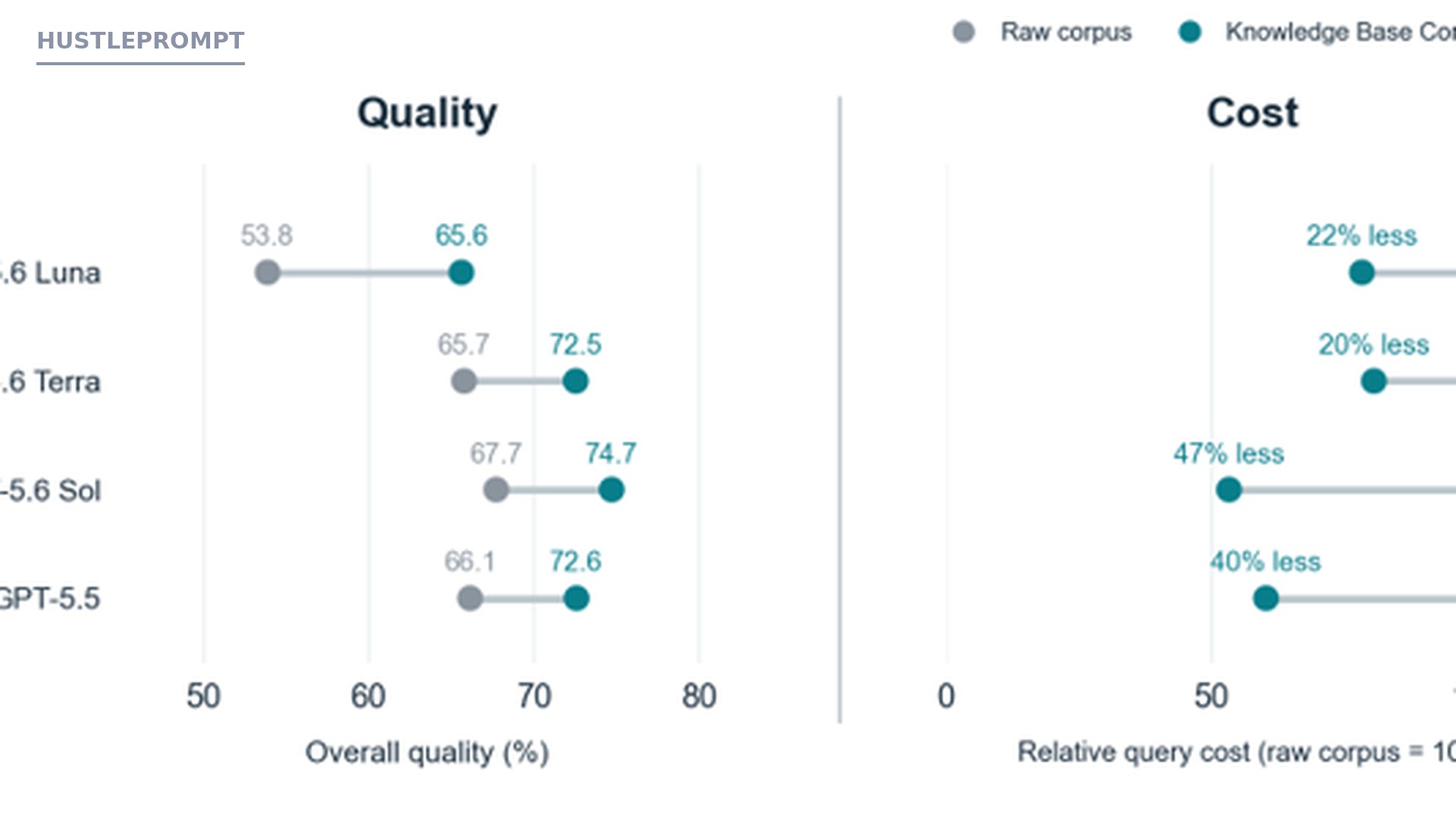
Microsoft also published a research paper on agents answering complex multi-document questions. The chart below — its own Figure 2 — compares quality and cost: Knowledge Base CorpusMap versus raw corpus.
| Model | Answer quality: raw corpus | Answer quality: with Knowledge Base CorpusMap | Relative query cost |
|---|---|---|---|
| GPT-5.6 Luna | 53.8% | 65.6% | 22% less |
| GPT-5.6 Terra | 65.7% | 72.5% | 20% less |
| GPT-5.6 Sol | 67.7% | 74.7% | 47% less |
| GPT-5.5 | 66.1% | 72.6% | 40% less |
Source: Microsoft’s published chart (synthetic test environment, per Microsoft).
Availability and access: the fine print
| Item | What Microsoft says |
|---|---|
| Announced | October 14, 2026 |
| Availability | Frontier Preview — rolling out to Frontier tenants now |
| Where it works | Any SharePoint site, including Teams channel sites and Microsoft 365 Group sites |
| Build and curate with | Copilot in SharePoint, plus Autopilot in the Copilot app (also usable from Teams and email) |
| Autopilot integration | Requires separate Autopilot access, rolling out on its own cadence |
| Billing | Usage-based billing (Copilot Credits) required; admins manage it in the M365 admin center; terms may change before GA |
| On the roadmap | Knowledge bases in Cowork and Teams, deeper M365 Groups bootstrapping, automated curation via Copilot Studio agent flows, CLI and coding-agent integration via Work IQ |
How it works
Microsoft’s pipeline has three stages — source corpus, Work IQ engine, knowledge base. In practice:
- Point Copilot at a SharePoint site — any site, including the one behind a Teams channel — and ask it to create a knowledge base.
- Feed it sources, or start empty. The team contributes emails, meeting notes, messages, and documents. Copilot confirms before reorganizing anything.
- Work IQ compiles the content into entities, topics, summaries, and a table of contents.
- Copilot writes interlinked Markdown pages — overviews, processes, specs, roadmaps — that people can read and edit.
- Copilot and agents query it in real time as new content keeps flowing in. Agents get grounded answers; humans get a living team wiki.
How to profit: sell the “AI-ready knowledge base” setup
Small businesses keep their knowledge in inboxes, chat threads, and forgotten folders — useless to agents without curated context. That gap is a service business waiting to happen.
- Pick one niche. Law firms, agencies, and consultancies drown in documents and bill for expertise. Specialize so your pitch writes itself.
- Sell a content-sprawl audit. Map where their knowledge lives — email, Teams, SharePoint, notes. The audit is a paid discovery product.
- Build their first knowledge base on their SharePoint site and connect key sources. Early-adopter positioning is a feature — clients pay for a guide through new tech.
- Wire it to recurring workflows — sales snapshots, onboarding, contract drafting.
- Productize it: a setup fee plus a monthly curation retainer. Usage-based billing lets you show efficiency gains in their own Copilot Credits reports.
The pitch practically writes itself: “Your agents are only as smart as the knowledge they can reach. I build the memory they run on.”
Keep Reading
Frequently asked questions
What exactly is the SharePoint knowledge base?
A SharePoint library of interlinked, agent-friendly Markdown files, created and maintained by Copilot — one current source of team context.
How is it different from a regular document library?
A document library stores files; the knowledge base compiles them into connected Markdown pages for precise agent retrieval.
Is the “4x faster, 30% fewer tokens” claim real?
It is Microsoft’s claim from early internal testing (October 2026) and a published paper using a synthetic test environment. Promising, but not an independent benchmark.
Who can use it right now?
Only Frontier preview tenants with usage-based billing (Copilot Credits) enabled. Works on any SharePoint site, including Teams channel and M365 Group sites.
How does billing work?
Usage-based billing (Copilot Credits), managed in the M365 admin center. Microsoft warns preview terms may change before GA — budget accordingly.
Can I build knowledge bases for clients as a freelancer?
Yes. Clients need a Frontier-enabled tenant and usage-based billing, plus someone who understands their content and the tooling. Sell setup plus a monthly curation retainer.